TL;DR
Learn how to build a robust CI/CD pipeline using GitHub Actions, AWS, and Docker
Building a Modern CI/CD Pipeline
Learn how to create a robust CI/CD pipeline that automates your software delivery process from code to production.
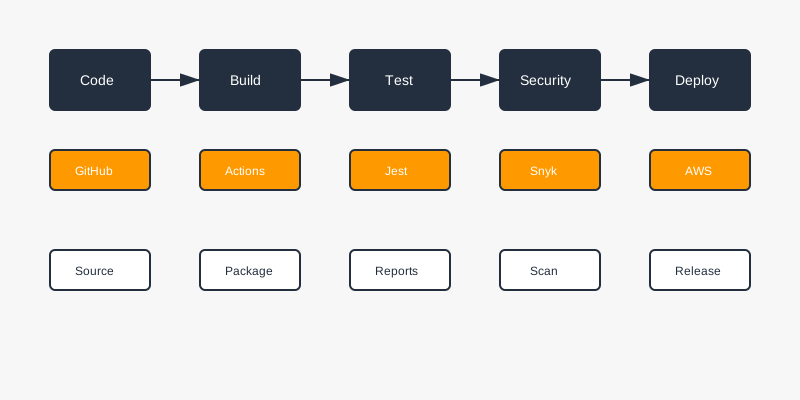
$1
A modern CI/CD pipeline consists of several key stages:
1. Code Commit & Review
2. Build & Test
3. Security Scanning
4. Artifact Creation
5. Deployment
6. Monitoring
$1
Here's a complete GitHub Actions workflow:
`` name: CI/CD Pipeline on:
push:
branches: [ main ]
pull_request:
branches: [ main ] jobs:
build:
runs-on: ubuntu-latest
steps:
- uses: actions/checkout@v3
- name: Set up Node.js
uses: actions/setup-node@v3
with:
node-version: '18'
- name: Install dependencies
run: npm ci
- name: Run tests
run: npm test
- name: Build application
run: npm run build
- name: Run security scan
uses: snyk/actions/node@master
env:
SNYK_TOKEN: ${{ secrets.SNYK_TOKEN }}
- name: Build Docker image
run: docker build -t myapp:${{ github.sha }} .
- name: Configure AWS credentials
uses: aws-actions/configure-aws-credentials@v1
with:
aws-access-key-id: ${{ secrets.AWS_ACCESS_KEY_ID }}
aws-secret-access-key: ${{ secrets.AWS_SECRET_ACCESS_KEY }}
aws-region: us-west-2
- name: Login to Amazon ECR
id: login-ecr
uses: aws-actions/amazon-ecr-login@v1
- name: Push to ECR
env:
ECR_REGISTRY: ${{ steps.login-ecr.outputs.registry }}
ECR_REPOSITORY: myapp
IMAGE_TAG: ${{ github.sha }}
run: |
docker tag myapp:$IMAGE_TAG $ECR_REGISTRY/$ECR_REPOSITORY:$IMAGE_TAG
docker push $ECR_REGISTRY/$ECR_REPOSITORY:$IMAGE_TAG
yaml
`
$1
Create an optimized Dockerfile:
` FROM node:18-alpine AS builder
WORKDIR /app
COPY package*.json ./
RUN npm ci
COPY . .
RUN npm run build FROM node:18-alpine
WORKDIR /app
COPY --from=builder /app/dist ./dist
COPY --from=builder /app/package*.json ./
RUN npm ci --only=production
EXPOSE 3000
CMD ["npm", "start"]
dockerfile
`Build stage
Production stage
$1
Set up your AWS infrastructure using Terraform:
` resource "aws_ecr_repository" "app" {
name = "myapp"
image_scanning_configuration {
scan_on_push = true
}
} resource "aws_ecs_cluster" "main" {
name = "myapp-cluster"
setting {
name = "containerInsights"
value = "enabled"
}
} resource "aws_ecs_task_definition" "app" {
family = "myapp"
requires_compatibilities = ["FARGATE"]
network_mode = "awsvpc"
cpu = 256
memory = 512
container_definitions = jsonencode([
{
name = "myapp"
image = "${aws_ecr_repository.app.repository_url}:latest"
portMappings = [
{
containerPort = 3000
protocol = "tcp"
}
]
}
])
}
hcl
`
$1
Set up CloudWatch monitoring:
` resource "aws_cloudwatch_metric_alarm" "service_health" {
alarm_name = "service-health"
comparison_operator = "LessThanThreshold"
evaluation_periods = "2"
metric_name = "HealthyHostCount"
namespace = "AWS/ApplicationELB"
period = "60"
statistic = "Average"
threshold = "1"
alarm_description = "This metric monitors service health"
alarm_actions = [aws_sns_topic.alerts.arn]
}
hcl
`
$1
1. Version Control
- Use feature branches
- Enforce code review
- Protect main branch
2. Testing
- Unit tests
- Integration tests
- End-to-end tests
- Performance tests
3. Security
- SAST (Static Application Security Testing)
- DAST (Dynamic Application Security Testing)
- Dependency scanning
- Container scanning
4. Deployment
- Blue-green deployment
- Canary releases
- Rollback capability
5. Monitoring
- Application metrics
- Infrastructure metrics
- Business metrics
- Alert thresholds
$1
Create helper scripts for common tasks:
` #!/bin/bash
bash
deploy.sh
Set variables
ENV=$1
VERSION=$2
Validate input
if [ -z "$ENV" ] || [ -z "$VERSION" ]; then
echo "Usage: ./deploy.sh exit 1
fi echo "Deploying version $VERSION to $ENV..."
aws ecs update-service \
--cluster myapp-cluster \
--service myapp-service-$ENV \
--force-new-deployment
``Deploy to environment
$1
A well-designed CI/CD pipeline is crucial for modern software development. It helps:
1. Reduce deployment time
2. Improve code quality
3. Increase team productivity
4. Ensure consistent deployments
5. Enable rapid feedback
Remember to continuously improve your pipeline based on team feedback and changing requirements.
Why This Matters
Understanding the business and technical context helps you make informed decisions rather than blindly following patterns.
Trade-offs to Consider
Every architectural decision involves trade-offs. Consider your specific requirements, team expertise, and scale when evaluating options.
When NOT to Use This
Knowing when a solution doesn't apply is as valuable as knowing when it does. Consider alternatives for your specific situation.
Decision Framework
Use this framework to evaluate whether this approach is right for your use case based on your specific constraints and requirements.