TL;DR
Master the fundamentals of Google Cloud Platform (GCP) with this comprehensive guide. Learn about core services, networking, security, and best practices for building scalable applications on GCP.
Introduction to Google Cloud Platform
Google Cloud Platform (GCP) is a suite of cloud computing services that runs on the same infrastructure that Google uses internally. This guide will help you understand the core concepts and get started with building on GCP.
$1
Let's start with the fundamental concepts that form the foundation of GCP:
| Concept | Description | Example |
|---|---|---|
| Projects | Base-level organizational unit that holds resources | my-web-app |
| Regions | Geographic locations where resources can be hosted | us-central1 |
| Zones | Isolated locations within regions | us-central1-a |
| Services | Individual GCP products | Compute Engine, Cloud Storage |
$1
Projects are the foundation of GCP resource management. Here's how to get started using the gcloud CLI:
`` brew install google-cloud-sdk gcloud init gcloud projects create my-project-id --name="My Project Name" gcloud config set project my-project-id
bash
`Install Google Cloud SDK (if not already installed)
For macOS:
Initialize gcloud and set project
Create a new project
Set the active project
$1
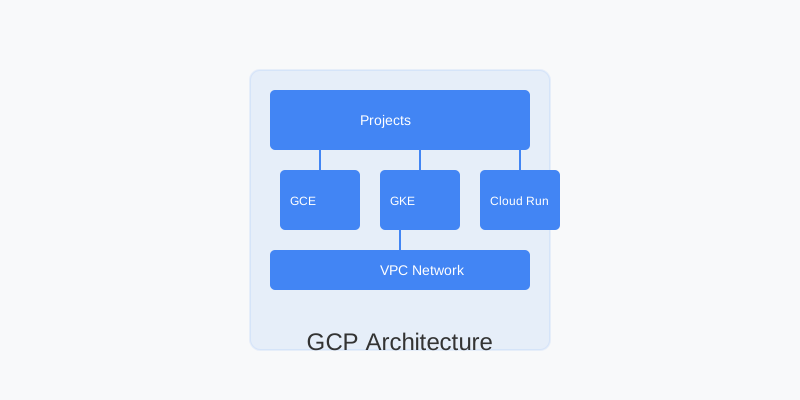
GCP's architecture is designed to provide scalable, secure, and reliable cloud services.
$1
The GCP resource hierarchy consists of:
1. Organization
2. Folders
3. Projects
4. Resources
Here's how to view your resource hierarchy:
` gcloud organizations list gcloud resource-manager folders list gcloud projects list
bash
`List organizations
List folders
List projects
$1
GCP offers various compute options to run your applications:
| Service | Use Case | Benefits |
|---|---|---|
| Compute Engine | Virtual machines for maximum control | Flexible, full control over infrastructure |
| Google Kubernetes Engine | Container orchestration | Managed Kubernetes service |
| Cloud Run | Serverless containers | Auto-scaling, pay-per-use |
| Cloud Functions | Event-driven functions | Serverless, minimal management |
$1
Here's how to create a basic VM instance:
` gcloud compute instances create my-vm \
--zone=us-central1-a \
--machine-type=e2-medium \
--image-family=debian-11 \
--image-project=debian-cloud gcloud compute ssh my-vm --zone=us-central1-a
bash
`Create a VM instance
SSH into the instance
$1
GCP's networking services provide the foundation for connecting your resources:
$1
Create and manage your VPC network:
` gcloud compute networks create my-vpc \
--subnet-mode=custom gcloud compute networks subnets create my-subnet \
--network=my-vpc \
--region=us-central1 \
--range=10.0.0.0/24 gcloud compute firewall-rules create allow-http \
--network=my-vpc \
--allow=tcp:80 \
--source-ranges=0.0.0.0/0
bash
`Create a VPC network
Create a subnet
Create a firewall rule
$1
GCP provides various storage options for different use cases:
1. Cloud Storage: Object storage for any amount of data
2. Cloud SQL: Managed relational databases
3. Cloud Firestore: NoSQL document database
4. Cloud Bigtable: NoSQL wide-column database
$1
` gsutil mb gs://my-unique-bucket-name gsutil cp myfile.txt gs://my-unique-bucket-name/ gsutil iam ch allUsers:objectViewer gs://my-unique-bucket-name
bash
`Create a bucket
Upload a file
Set bucket permissions
$1
GCP provides comprehensive security features through Cloud Identity and Access Management (IAM):
| Component | Purpose | Example |
|---|---|---|
| IAM Roles | Define permissions | roles/compute.admin |
| Service Accounts | Machine-to-machine auth | app-engine-service@project.iam |
| Cloud KMS | Key management | Encryption keys for data |
$1
` gcloud iam service-accounts create my-service-account \
--display-name="My Service Account" gcloud iam service-accounts keys create key.json \
--iam-account=my-service-account@my-project-id.iam.gserviceaccount.com
bash
`Create a service account
Generate key for service account
$1
GCP provides comprehensive monitoring through Cloud Monitoring and Cloud Logging:
1. Cloud Monitoring: Metrics, dashboards, and alerts
2. Cloud Logging: Log management and analysis
3. Error Reporting: Tracks and groups errors
4. Cloud Trace: Latency analysis and debugging
$1
` gcloud services enable monitoring.googleapis.com gcloud monitoring uptime-check-configs create http-check \
--display-name="HTTP Check" \
--http-check-path="/" \
--hostname="example.com"
bash
`Enable monitoring API
Create an uptime check
$1
Managing costs effectively in GCP involves several strategies:
| Strategy | Implementation | Benefit |
|---|---|---|
| Budgets | Set spending limits | Cost control |
| Committed Use | 1-3 year commitments | Significant discounts |
| Preemptible VMs | Use for interruptible workloads | Up to 80% savings |
$1
` gcloud billing budgets create \
--billing-account=BILLING_ACCOUNT_ID \
--display-name="Monthly Budget" \
--budget-amount=1000USD \
--threshold-rules=percent=90
bash
``Create a budget
$1
After mastering these basics, consider exploring:
1. Infrastructure as Code: Using Terraform or Deployment Manager
2. CI/CD: Setting up Cloud Build pipelines
3. Serverless: Implementing Cloud Run and Cloud Functions
4. Machine Learning: Exploring AI Platform and AutoML
Remember to:
Why This Matters
Understanding the business and technical context helps you make informed decisions rather than blindly following patterns.
Trade-offs to Consider
Every architectural decision involves trade-offs. Consider your specific requirements, team expertise, and scale when evaluating options.
When NOT to Use This
Knowing when a solution doesn't apply is as valuable as knowing when it does. Consider alternatives for your specific situation.
Decision Framework
Use this framework to evaluate whether this approach is right for your use case based on your specific constraints and requirements.