TL;DR
Learn about the essential components of GitLab, from repositories and CI/CD to issues and security features, with practical examples for daily use.
Introduction 🚀
GitLab is more than just a version control system - it's a complete DevOps platform. In this guide, we'll explore the essential components of GitLab and how they work together to streamline your development workflow.
$1
$1
Before we begin, ensure you have:
Core Components Overview 🎯
$1
The foundation of GitLab, handling your code and version control.
$1
`` git clone https://gitlab.com/username/project.git git checkout -b feature/new-feature git push origin feature/new-feature
bash
`Clone a repository
Create a new branch
Push changes
$1
` node_modules/
*.log
.env
dist/
yaml
`.gitignore example
$1
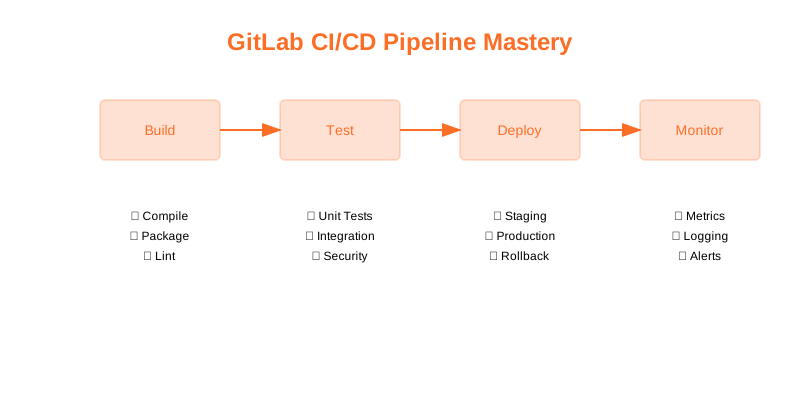
Automate your build, test, and deployment processes.
$1
` stages:
- build
- test
- deploy build_job:
stage: build
script:
- npm install
- npm run build test_job:
stage: test
script:
- npm run test deploy_job:
stage: deploy
script:
- echo "Deploying application..."
yaml
`.gitlab-ci.yml
$1
Manage tasks, bugs, and feature requests.
$1
` [Describe the bug] 1. Go to '...'
2. Click on '....'
3. See error [What should happen]
markdown
`Bug Report Template
$1
$1
$1
$1
Create and maintain project documentation.
$1
`markdown
Project Wiki
$1
$1
`
$1
Store and manage Docker images.
$1
` docker tag myapp:latest registry.gitlab.com/group/project/myapp:latest docker push registry.gitlab.com/group/project/myapp:latest
bash
`Tag an image
Push to registry
$1
Built-in security scanning and vulnerability management.
$1
` include:
- template: Security/SAST.gitlab-ci.yml
- template: Security/Dependency-Scanning.gitlab-ci.yml
yaml
`.gitlab-ci.yml
Component Integration 🔗
$1
` graph TD
A[Code Push] --> B[CI Pipeline]
B --> C{Tests Pass?}
C -->|Yes| D[Deploy]
C -->|No| E[Create Issue]
D --> F[Update Wiki]
E --> G[Notify Team]
mermaid
`
$1
` Related to merge request !456
See documentation in [[Setup Guide]]
Security scan results in pipeline #789
markdown
`Issue #123
$1
` rules:
- if: $CI_PIPELINE_SOURCE == "merge_request_event"
when: always
allow_failure: false
yaml
`.gitlab/automation.yml
Best Practices for Each Component 💡
$1
` git commit -m "feat: add user authentication systembash
`Good commit message
$1
` cache:
key: ${CI_COMMIT_REF_SLUG}
paths:
- node_modules/
- .npm/
yaml
`Optimized pipeline
$1
` /label ~bug ~needs-investigation
/assign @qa-team
/milestone %"Next Release"
markdown
`
$1
`
markdown
`Feature Documentation
$1
$1
$1
$1
$1
` FROM node:alpine AS builder
WORKDIR /app
COPY package*.json ./
RUN npm ci
COPY . .
RUN npm run build FROM nginx:alpine
COPY --from=builder /app/dist /usr/share/nginx/html
dockerfile
`Optimized Dockerfile
$1
` security_scan:
script:
- security-tool scan
artifacts:
reports:
security: gl-security-report.json
yaml
`Security scanning
Common Workflows 🔄
$1
1. Create issue
2. Branch from main
3. Develop and test
4. Create merge request
5. Review and merge
6. Update documentation
$1
1. Report bug with template
2. Reproduce and document
3. Create fix branch
4. Test thoroughly
5. Update test cases
6. Merge and deploy
$1
1. Create milestone
2. Gather requirements
3. Develop features
4. Run security scans
5. Update documentation
6. Deploy and monitor
Troubleshooting Guide 🔧
$1
` git checkout main
git pull origin main
git checkout feature-branch
git rebase main
bash
`Fix merge conflicts
$1
` gitlab-runner exec docker job-name
bash
`Debug pipeline
$1
` debug_job:
script:
- echo $CI_PROJECT_PATH
- echo $CI_REGISTRY
- echo $CI_ENVIRONMENT_NAME
yaml
`Debug integration
Advanced Tips 🌟
$1
` curl --header "PRIVATE-TOKEN: "https://gitlab.com/api/v4/projects/1/issues"
bash
`Use GitLab API
$1
` webhook:
url: https://your-webhook.com
push_events: true
issues_events: true
yaml
`Custom webhook
$1
` variables:
DOCKER_BUILDKIT: 1
COMPOSE_DOCKER_CLI_BUILD: 1
yaml
``Cache configuration
Conclusion 🎉
You've learned about:
Remember to:
Need help? Check out:
Happy coding! 🚀
Why This Matters
Understanding the business and technical context helps you make informed decisions rather than blindly following patterns.
Trade-offs to Consider
Every architectural decision involves trade-offs. Consider your specific requirements, team expertise, and scale when evaluating options.
When NOT to Use This
Knowing when a solution doesn't apply is as valuable as knowing when it does. Consider alternatives for your specific situation.
Decision Framework
Use this framework to evaluate whether this approach is right for your use case based on your specific constraints and requirements.