AWS CloudFormation Patterns: Infrastructure as Code Best Practices
Learn essential patterns and best practices for managing infrastructure using AWS CloudFormation, including template design, nested stacks, and deployment strategies
Mastering AWS CloudFormation: Patterns for Robust Infrastructure as Code
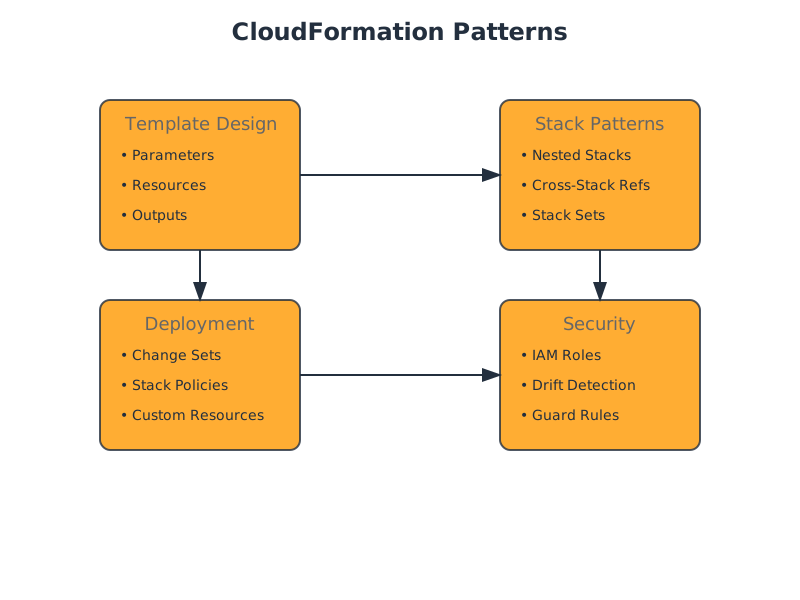
TL;DR: This guide provides experienced engineers with advanced strategies for leveraging AWS CloudFormation. It covers essential template design principles, common stack patterns (Nested, Cross-Stack, StackSets), and robust deployment and validation techniques, emphasizing practical examples, trade-offs, and when to avoid certain approaches.
AWS CloudFormation empowers infrastructure as code (IaC) by enabling the declaration, provisioning, and management of AWS resources in a consistent, automated, and repeatable manner. This document delves into advanced patterns and best practices, assuming a foundational understanding of CloudFormation concepts.
Advanced Template Design
Effective CloudFormation templates are built on a solid understanding of their core components and how to structure them for clarity, reusability, and maintainability.
Modularity and Reusability
- Parameters: Parameterize common values (e.g., CIDR blocks, instance types, environment identifiers) to promote reusability and reduce redundancy across templates. Use ,
AllowedValues, andConstraintDescriptionto enforce valid inputs.Min/MaxLength - Mappings: Use mappings to define conditional values based on region, environment, or other criteria. This is particularly useful for selecting AMIs or instance types that vary by region.
- Conditions: Employ conditions to control the creation of resources or the configuration of properties, enabling templates to adapt to different deployment scenarios without modifying the template file itself.
- Intrinsic Functions: Leverage intrinsic functions like ,
!Ref,!GetAtt,!Sub, and!Jointo dynamically construct resource properties and values.!FindInMap
Example: Parameterized VPC with Mappings for AMI Selection
AWSTemplateFormatVersion: '2010-09-09'
Description: Production VPC with parameterized CIDR and automated AMI lookup.

Parameters:
  VPCCIDR:
    Type: String
    Description: CIDR block for the VPC (e.g., 10.0.0.0/16).
    Default: 10.0.0.0/16
    AllowedPattern: ^([0-9]{1,3}\.){3}[0-9]{1,3}(\/([0-9]|[1-2][0-9]|3[0-2]))$
    ConstraintDescription: Must be a valid IP CIDR range.

  Environment:
    Type: String
    Description: Deployment environment (e.g., prod, staging).
    Default: prod
    AllowedValues: [dev, staging, prod]

Resources:
  VPC:
    Type: AWS::EC2::VPC
    Properties:
      CidrBlock: !Ref VPCCIDR
      EnableDnsSupport: true
      EnableDnsHostnames: true
      Tags:
        - Key: Name
          Value: !Sub ${Environment}-vpc
        - Key: Environment
          Value: !Ref Environment

  # Example of using a Mapping to select an AMI based on Region and Environment
  MyEC2Instance:
    Type: AWS::EC2::Instance
    Properties:
      ImageId: !FindInMap [AWSRegionArch2AMI, !Ref "AWS::Region", !Ref Environment]
      InstanceType: t3.micro
      Tags:
        - Key: Name
          Value: !Sub ${Environment}-webserver
        - Key: Environment
          Value: !Ref Environment

Mappings:
  AWSRegionArch2AMI:
    us-east-1:
      dev: ami-0abcdef1234567890 # Dummy AMI ID for development in us-east-1
      prod: ami-0fedcba9876543210 # Dummy AMI ID for production in us-east-1
    us-west-2:
      dev: ami-0123456789abcdef0 # Dummy AMI ID for development in us-west-2
      prod: ami-0fedcba9876543211 # Dummy AMI ID for production in us-west-2

Outputs:
  VpcId:
    Description: The ID of the created VPC.
    Value: !Ref VPC
    Export:
      Name: !Sub ${AWS::StackName}-VpcId
Stack Composition Patterns
For larger or more complex infrastructures, breaking down a single large template into manageable, reusable units is crucial.
1. Nested Stacks
Nested stacks allow you to decompose a CloudFormation template into smaller, self-contained templates. A parent stack can then instantiate these child templates as nested stacks. This promotes modularity, reusability, and team collaboration.
- Use Cases: Building reusable network modules, security group configurations, or common service deployments.
- Trade-offs:
- Pros: Improved organization, reusability, isolation of components, easier troubleshooting of individual modules.
- Cons: Increased complexity in managing multiple template files, potential for circular dependencies (though CloudFormation prevents this), debugging can sometimes span multiple stacks.
- Example: A can be referenced by multiple parent application stacks.
network-template.yaml
# parent-stack.yaml
AWSTemplateFormatVersion: '2010-09-09'
Description: Parent stack deploying network and application components.

Parameters:
  VPCCIDR:
    Type: String
    Default: 10.0.0.0/16

Resources:
  # Deploy the network module as a nested stack
  NetworkStack:
    Type: AWS::CloudFormation::Stack
    Properties:
      TemplateURL: "https://my-s3-bucket.s3.amazonaws.com/templates/network-template.yaml"
      Parameters:
        VPCCIDR: !Ref VPCCIDR

  # Deploy an application module as a nested stack
  AppStack:
    Type: AWS::CloudFormation::Stack
    Properties:
      TemplateURL: "https://my-s3-bucket.s3.amazonaws.com/templates/app-template.yaml"
      Parameters:
        VpcId: !GetAtt NetworkStack.Outputs.VpcId # Cross-stack reference to a nested stack output

Outputs:
  AppLoadBalancerDNS:
    Description: DNS name of the application's load balancer.
    Value: !GetAtt AppStack.Outputs.LoadBalancerDNS
2. Cross-Stack References
Cross-stack references allow a stack to consume outputs from another stack. This is essential for building loosely coupled infrastructure where one stack's resources are dependencies for another.
- Mechanism: Achieved using in the consuming stack and
!ImportValuein the producing stack's outputs.Export - Trade-offs:
- Pros: Enables independent management and deployment of stacks, promotes decoupling, allows resource sharing across different CloudFormation stacks.
- Cons: Requires careful planning of dependencies, changes to the exporting stack can impact consuming stacks, stack export names must be unique within an AWS region.
- Example: A dedicated network stack can export its VPC ID, and multiple application stacks can import it.
# network-stack.yaml (Producer)
...
Outputs:
  VpcId:
    Description: VPC ID for the network.
    Value: !Ref VPC
    Export:
      Name: MySharedVPC-VPCId # Unique export name

# application-stack.yaml (Consumer)
...
Parameters:
  VpcId:
    Type: AWS::EC2::VPC::Id
    Description: The VPC ID to deploy into.

Resources:
  AppInstance:
    Type: AWS::EC2::Instance
    Properties:
      # ... other properties
      SubnetId: !Select [0, !Split [",", !ImportValue MySharedVPC-SubnetIds]] # Example of importing and splitting
      Tags:
        - Key: Name
          Value: !Sub ${AWS::StackName}-app-instance

Outputs:
  AppInstanceId:
    Description: ID of the application instance.
    Value: !Ref AppInstance
Note: When using cross-stack references, ensure the exporting stack is created and available before attempting to create or update the consuming stack.
3. AWS CloudFormation StackSets
StackSets allow you to provision and manage stacks across multiple AWS accounts and regions simultaneously from a single template.
- Use Cases: Deploying standardized security controls, logging configurations, or common application components across an organization.
- Trade-offs:
- Pros: Automates multi-account/multi-region deployments, centralizes management, ensures consistency.
- Cons: Higher operational overhead for setup and management, debugging can be more complex across multiple accounts and regions, requires appropriate IAM permissions.
Deployment and Validation Best Practices
Ensuring the integrity and correctness of your infrastructure deployments is paramount.
Change Management
- Change Sets: Strongly recommended. Change sets allow you to preview the changes CloudFormation will make to your stack before executing them. This provides a critical safety net against unintended modifications.
- Trade-offs: Adds an extra step to the deployment process, but significantly reduces risk.
- Stack Policies: Protect your stack from accidental updates by defining which resources are protected and how they can be modified. This is especially useful for critical resources like RDS instances or EC2 instances that host stateful applications.
- Trade-offs: Can limit agility if not managed carefully; requires explicit updates to the stack policy to allow modifications to protected resources.
- Custom Resources: Integrate AWS Lambda functions or SNS topics into your CloudFormation templates to perform actions not natively supported by CloudFormation. This includes custom validation, pre-configuration tasks, or integration with third-party services.
- Trade-offs: Adds complexity and external dependencies (Lambda function management), requires careful error handling within the custom resource.
State Validation
- Drift Detection: Periodically run drift detection to identify any manual changes made to your infrastructure outside of CloudFormation. This helps maintain the desired state defined in your templates.
- Trade-offs: Detects drift but does not automatically remediate it; requires a process for addressing detected drift.
- AWS CloudFormation Guard (CFN-Guard): A policy-as-code tool that allows you to define custom compliance rules for your CloudFormation templates. You can enforce security best practices, cost controls, or architectural standards before deployment.
- Trade-offs: Requires learning CFN-Guard's declarative language; needs to be integrated into your CI/CD pipeline.
- Hooks (Pre/Post-Deploy): CloudFormation Hooks allow you to register Lambda functions that execute before or after specific CloudFormation resource operations. This enables automated validation, testing, or configuration steps at specific points in the deployment lifecycle.
- Trade-offs: Adds Lambda dependency and execution time to deployments; requires careful design of hook logic.
Example: Using Change Sets and Stack Policies
- Create a Change Set:
aws cloudformation create-change-set \ --stack-name my-application-stack \ --template-body file://app-template.yaml \ --change-set-name my-app-changeset \ --parameters ParameterKey=InstanceType,ParameterValue=t3.medium \ --capabilities CAPABILITY_IAM \ --region us-east-1 - Review the Change Set:
aws cloudformation describe-change-set \ --stack-name my-application-stack \ --change-set-name my-app-changeset \ --region us-east-1 - Execute the Change Set:
aws cloudformation execute-change-set \
    --stack-name my-application-stack \
    --change-set-name my-app-changeset \
    --region us-east-1
Example: Stack Policy to Protect an RDS Instance
{
  "Statement": [
    {
      "Effect": "Allow",
      "Action": "Update:Replace",
      "Principal": "*",
      "Resource": "LogicalResourceId/MyProductionDB"
    },
    {
      "Effect": "Deny",
      "Action": "Update:Delete",
      "Principal": "*",
      "Resource": "LogicalResourceId/MyProductionDB"
    }
  ]
}
This policy allows replacement of
MyProductionDBWhen Not to Use CloudFormation
While powerful, CloudFormation might not be the optimal tool in all scenarios:
- Highly Dynamic or Ephemeral Resources: For workloads that require extremely rapid provisioning and deprovisioning of thousands of ephemeral resources (e.g., some high-performance computing or data processing jobs), lower-level SDKs or custom scripting might offer better performance and control.
- Simple, Static Infrastructure: For very basic, unchanging infrastructure (e.g., a single S3 bucket), the overhead of a CloudFormation template might be unnecessary.
- Infrastructure Not Supported by CloudFormation: If you need to manage resources that are not yet supported by CloudFormation (rare, but possible), you might need to resort to other tools or custom solutions.
- Fine-grained Control over Every Aspect of a Resource Lifecycle: While Custom Resources and Hooks offer extensibility, CloudFormation is fundamentally an declarative orchestration service. For scenarios demanding imperative, step-by-step control over resource lifecycles at a very granular level, imperative tools or SDKs might be more suitable.
Decision Checklist
| Feature | Consideration | Recommendation | | :---------------------- | :-------------------------------------------------------------------------------- | :---------------------------------------------------------------------------------------------------------------------- | | Template Size/Complexity | Is the template becoming unmanageable? Are there reusable components? | Use Nested Stacks for modularity. | | Resource Sharing | Do multiple stacks need to use resources (e.g., VPC, subnets) from a central stack? | Use Cross-Stack References (
!ImportValueExport