TL;DR
Learn the fundamentals of Kubernetes, including core concepts, architecture, and basic operations. Perfect for beginners starting with container orchestration.
$1
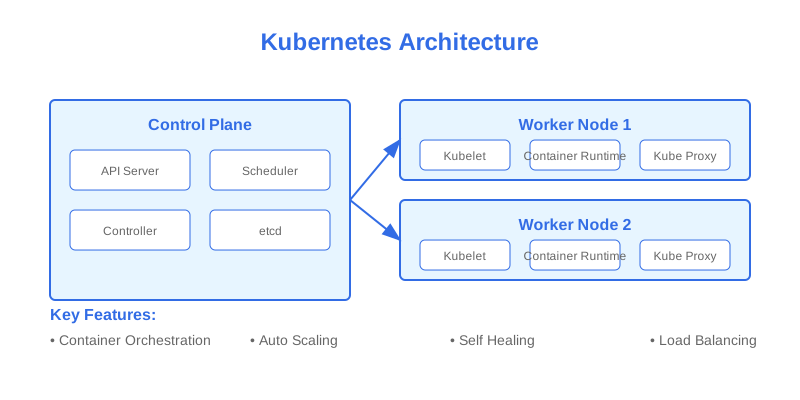
Kubernetes (K8s) is an open-source container orchestration platform that automates the deployment, scaling, and management of containerized applications. This guide will walk you through the fundamental concepts and components.
$1
$1
#### Control Plane Components
#### Node Components
$1
#### Pods
The smallest deployable unit in Kubernetes:
`` apiVersion: v1
kind: Pod
metadata:
name: nginx-pod
labels:
app: nginx
spec:
containers:
- name: nginx
image: nginx:1.14.2
ports:
- containerPort: 80
yaml
`basic-pod.yaml
#### Deployments
Manages Pod lifecycle and updates:
` apiVersion: apps/v1
kind: Deployment
metadata:
name: nginx-deployment
labels:
app: nginx
spec:
replicas: 3
selector:
matchLabels:
app: nginx
template:
metadata:
labels:
app: nginx
spec:
containers:
- name: nginx
image: nginx:1.14.2
ports:
- containerPort: 80
yaml
`deployment.yaml
#### Services
Exposes Pods to the network:
` apiVersion: v1
kind: Service
metadata:
name: nginx-service
spec:
selector:
app: nginx
ports:
- port: 80
targetPort: 80
type: LoadBalancer
yaml
`service.yaml
$1
$1
` kubectl cluster-info kubectl get nodes kubectl get pods -n kube-system
bash
`View cluster information
Get nodes status
View system components
$1
` kubectl apply -f deployment.yaml kubectl get deployments kubectl scale deployment nginx-deployment --replicas=5 kubectl set image deployment/nginx-deployment nginx=nginx:1.16.1
bash
`Create resources
View deployments
Scale deployment
Update image
$1
` kubectl logs nginx-pod kubectl exec -it nginx-pod -- /bin/bash kubectl describe pod nginx-pod
bash
`Get pod logs
Execute command in pod
Describe resource
$1
$1
Store configuration data:
` apiVersion: v1
kind: ConfigMap
metadata:
name: app-config
data:
database_url: "mongodb://localhost:27017"
api_endpoint: "https://api.example.com"
yaml
`configmap.yaml
Using ConfigMap in Pod:
` apiVersion: v1
kind: Pod
metadata:
name: app-pod
spec:
containers:
- name: app
image: my-app:1.0
envFrom:
- configMapRef:
name: app-config
yaml
`
$1
Store sensitive information:
` apiVersion: v1
kind: Secret
metadata:
name: app-secrets
type: Opaque
data:
username: dXNlcm5hbWU= # base64 encoded
password: cGFzc3dvcmQ= # base64 encoded
yaml
`secret.yaml
Using Secret in Pod:
` apiVersion: v1
kind: Pod
metadata:
name: app-pod
spec:
containers:
- name: app
image: my-app:1.0
env:
- name: DB_USERNAME
valueFrom:
secretKeyRef:
name: app-secrets
key: username
yaml
`
$1
$1
Define storage resource:
` apiVersion: v1
kind: PersistentVolume
metadata:
name: app-pv
spec:
capacity:
storage: 10Gi
accessModes:
- ReadWriteOnce
hostPath:
path: "/mnt/data"
yaml
`pv.yaml
$1
Request storage:
` apiVersion: v1
kind: PersistentVolumeClaim
metadata:
name: app-pvc
spec:
accessModes:
- ReadWriteOnce
resources:
requests:
storage: 5Gi
yaml
`pvc.yaml
Using PVC in Pod:
` apiVersion: v1
kind: Pod
metadata:
name: app-pod
spec:
containers:
- name: app
image: my-app:1.0
volumeMounts:
- name: data-volume
mountPath: /app/data
volumes:
- name: data-volume
persistentVolumeClaim:
claimName: app-pvc
yaml
`
$1
$1
1. ClusterIP (default):
` apiVersion: v1
kind: Service
metadata:
name: backend-service
spec:
type: ClusterIP
selector:
app: backend
ports:
- port: 80
targetPort: 8080
yaml
`
2. NodePort:
` apiVersion: v1
kind: Service
metadata:
name: frontend-service
spec:
type: NodePort
selector:
app: frontend
ports:
- port: 80
targetPort: 80
nodePort: 30080
yaml
`
3. LoadBalancer:
` apiVersion: v1
kind: Service
metadata:
name: web-service
spec:
type: LoadBalancer
selector:
app: web
ports:
- port: 80
targetPort: 80
yaml
`
$1
Control traffic flow:
` apiVersion: networking.k8s.io/v1
kind: NetworkPolicy
metadata:
name: api-allow
spec:
podSelector:
matchLabels:
app: api
policyTypes:
- Ingress
ingress:
- from:
- podSelector:
matchLabels:
role: frontend
ports:
- protocol: TCP
port: 8080
yaml
`
$1
$1
` apiVersion: v1
kind: Pod
metadata:
name: resource-pod
spec:
containers:
- name: app
image: my-app:1.0
resources:
requests:
memory: "64Mi"
cpu: "250m"
limits:
memory: "128Mi"
cpu: "500m"
yaml
`
$1
` apiVersion: autoscaling/v2
kind: HorizontalPodAutoscaler
metadata:
name: app-hpa
spec:
scaleTargetRef:
apiVersion: apps/v1
kind: Deployment
name: app-deployment
minReplicas: 2
maxReplicas: 10
metrics:
- type: Resource
resource:
name: cpu
target:
type: Utilization
averageUtilization: 80
yaml
`
$1
$1
` apiVersion: v1
kind: Pod
metadata:
name: app-pod
spec:
containers:
- name: app
image: my-app:1.0
livenessProbe:
httpGet:
path: /health
port: 8080
initialDelaySeconds: 3
periodSeconds: 3
readinessProbe:
httpGet:
path: /ready
port: 8080
initialDelaySeconds: 5
periodSeconds: 5
yaml
`
$1
` apiVersion: v1
kind: Pod
metadata:
name: secure-pod
spec:
securityContext:
runAsNonRoot: true
runAsUser: 1000
containers:
- name: app
image: my-app:1.0
securityContext:
allowPrivilegeEscalation: false
readOnlyRootFilesystem: true
yaml
``
$1
Key takeaways for Kubernetes:
$1
1. Set up a local Kubernetes cluster
2. Practice with sample applications
3. Learn advanced concepts
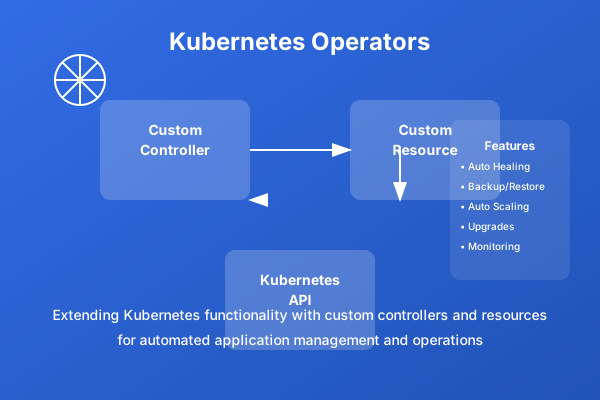
4. Explore Kubernetes operators
5. Study service mesh implementations
$1
Why This Matters
Understanding the business and technical context helps you make informed decisions rather than blindly following patterns.
Trade-offs to Consider
Every architectural decision involves trade-offs. Consider your specific requirements, team expertise, and scale when evaluating options.
When NOT to Use This
Knowing when a solution doesn't apply is as valuable as knowing when it does. Consider alternatives for your specific situation.
Decision Framework
Use this framework to evaluate whether this approach is right for your use case based on your specific constraints and requirements.