TL;DR
Learn the fundamentals of Terraform for infrastructure automation. This guide covers core concepts, basic commands, and best practices for managing cloud infrastructure as code.
$1
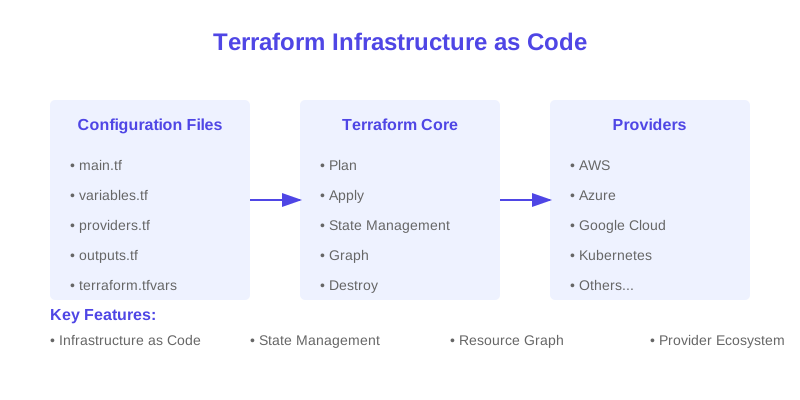
Terraform is HashiCorp's Infrastructure as Code (IaC) tool that enables you to safely and predictably create, change, and improve infrastructure. This guide will walk you through the fundamental concepts and practical implementation of Terraform.
$1
$1
Infrastructure as Code is the practice of managing infrastructure through machine-readable definition files rather than manual processes. Benefits include:
$1
#### Provider Configuration
`` terraform {
required_providers {
aws = {
source = "hashicorp/aws"
version = "~> 5.0"
}
}
} provider "aws" {
region = "us-west-2"
}
hcl
`
#### Resource Blocks
` resource "aws_instance" "example" {
ami = "ami-0c55b159cbfafe1f0"
instance_type = "t2.micro"
tags = {
Name = "example-instance"
}
}
hcl
`
#### Variables and Outputs
` variable "instance_type" {
description = "EC2 instance type"
type = string
default = "t2.micro"
} output "instance_ip" {
description = "Public IP of the instance"
value = aws_instance.example.public_ip
}
hcl
`variables.tf
outputs.tf
$1
$1
` terraform init
This command initializes a Terraform working directory by:
bash
`
$1
` terraform plan
The plan command:
bash
`
$1
` terraform apply
Apply command:
bash
`
$1
` terraform destroy
Safely removes all resources managed by Terraform.bash
`
$1
$1
The state file (terraform.tfstate) is crucial for:
` terraform {
backend "s3" {
bucket = "terraform-state-bucket"
key = "terraform.tfstate"
region = "us-west-2"
}
}
hcl
`Backend configuration for state management
$1
$1
` project/
├── main.tf # Main configuration
├── variables.tf # Variable declarations
├── outputs.tf # Output declarations
├── terraform.tfvars # Variable values
└── providers.tf # Provider configuration
`
$1
` resource "aws_instance" "web_server" {
# Use descriptive names
tags = {
Name = "${var.environment}-web-server"
Environment = var.environment
Project = var.project_name
}
}
hcl
`
$1
` terraform {
required_providers {
aws = {
source = "hashicorp/aws"
version = "~> 5.0.0" # Use version constraints
}
}
required_version = ">= 1.0.0"
}
hcl
`
$1
Data sources allow Terraform to use information defined outside of Terraform:
` data "aws_ami" "ubuntu" {
most_recent = true
filter {
name = "name"
values = ["ubuntu/images/hvm-ssd/ubuntu-focal-20.04-amd64-server-*"]
}
filter {
name = "virtualization-type"
values = ["hvm"]
}
owners = ["099720109477"] # Canonical
}
hcl
`
$1
$1
1. Provider Authentication
` provider "aws" {
region = "us-west-2"
access_key = var.aws_access_key # Use variables
secret_key = var.aws_secret_key # Use variables
}
hcl
`
2. Dependency Management
` resource "aws_instance" "web" {
# ... instance configuration ... depends_on = [
aws_vpc.main,
aws_subnet.web
]
}
hcl
`
$1
This guide covered the essential concepts and practices for getting started with Terraform. Remember to:
$1
To continue learning Terraform:
1. Explore more complex resource types
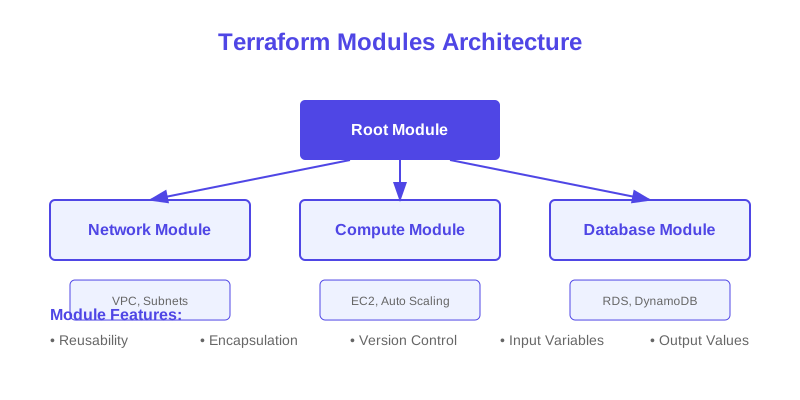
2. Learn about Terraform modules
3. Practice with different cloud providers
4. Implement CI/CD for Terraform
5. Study advanced state management techniques
$1
Why This Matters
Understanding the business and technical context helps you make informed decisions rather than blindly following patterns.
Trade-offs to Consider
Every architectural decision involves trade-offs. Consider your specific requirements, team expertise, and scale when evaluating options.
When NOT to Use This
Knowing when a solution doesn't apply is as valuable as knowing when it does. Consider alternatives for your specific situation.
Decision Framework
Use this framework to evaluate whether this approach is right for your use case based on your specific constraints and requirements.