TL;DR
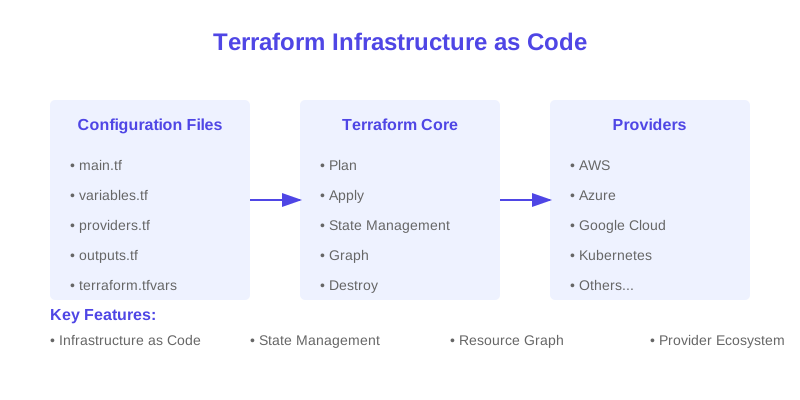
A step-by-step guide to getting started with Infrastructure as Code using Terraform to manage AWS resources.
How to Write Your First Terraform Script for AWS Infrastructure
{ graph LR
Init[terraform init] --> Plan[terraform plan]
Plan --> Apply[terraform apply]
Apply --> State[State Management]
subgraph Infrastructure
State --> AWS[AWS Resources]
State --> Updates[Infrastructure Updates]
State --> Destroy[Resource Cleanup]
end
}
$1
$1
$1
| Concept | Description | Purpose |
|---|---|---|
| Provider | Cloud platform interface | Resource management |
| Resource | Infrastructure component | Service definition |
| State | Infrastructure tracking | Change management |
$1
$1
| Requirement | Purpose | Installation |
|---|---|---|
| Terraform CLI | Command execution | Package manager |
| AWS CLI | AWS authentication | AWS website |
| AWS Account | Resource creation | AWS Console |
$1
$1
`` provider "aws" {
region = "us-west-2"
} resource "aws_vpc" "main" {
cidr_block = "10.0.0.0/16"
tags = {
Name = "main"
Environment = "production"
}
} resource "aws_subnet" "public" {
vpc_id = aws_vpc.main.id
cidr_block = "10.0.1.0/24"
tags = {
Name = "public"
}
}
hcl
``Configure AWS Provider
Create VPC
Create Subnet
$1
$1
| Resource | Purpose | Example |
|---|---|---|
| VPC | Network isolation | aws_vpc |
| EC2 | Compute instances | aws_instance |
| S3 | Storage | aws_s3_bucket |
$1
$1
| Type | Usage | Example |
|---|---|---|
| Input Variables | Configuration input | variable "region" |
| Local Values | Reusable values | locals {} |
| Output Values | Return values | output "vpc_id" |
$1
$1
| Operation | Purpose | Command |
|---|---|---|
| State List | View resources | terraform state list |
| State Show | Resource details | terraform state show |
| State Move | Resource relocation | terraform state mv |
$1
$1
| Practice | Description | Benefit |
|---|---|---|
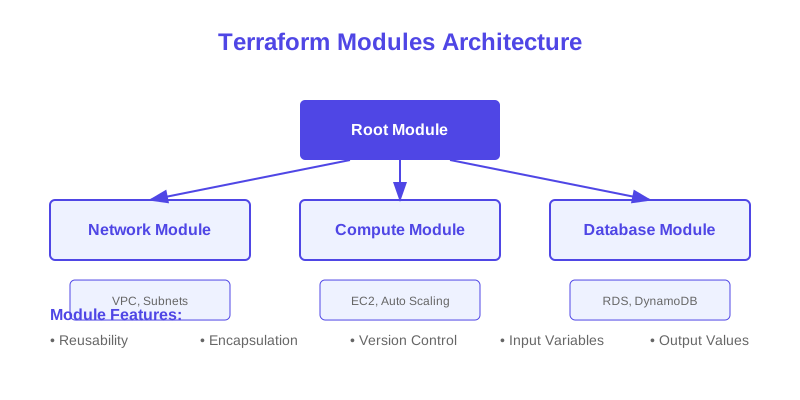
| Modules | Reusable components | Code reuse |
| Workspaces | Environment isolation | State separation |
| Remote State | State storage | Collaboration |
$1
$1
| Command | Purpose | Usage |
|---|---|---|
| init | Initialize directory | terraform init |
| plan | Preview changes | terraform plan |
| apply | Apply changes | terraform apply |
$1
$1
| Practice | Implementation | Benefit |
|---|---|---|
| State Encryption | S3 encryption | Data protection |
| Access Control | IAM policies | Limited access |
| Secret Management | AWS Secrets Manager | Secure variables |
$1
$1
| Issue | Cause | Solution |
|---|---|---|
| Provider Error | Authentication | Check credentials |
| State Lock | Concurrent access | Release lock |
| Resource Failure | Configuration | Check syntax |
$1
$1
| Topic | Description | Use Case |
|---|---|---|
| Modules | Code organization | Reusability |
| Workspaces | Environment management | Multiple environments |
| Data Sources | External data | Resource lookup |
$1
Terraform provides a powerful way to manage infrastructure as code. By following this guide and implementing the best practices, you can start building and managing your AWS infrastructure efficiently and reliably.
$1
1. [Terraform Documentation](https://www.terraform.io/docs)
2. [AWS Provider Documentation](https://registry.terraform.io/providers/hashicorp/aws/latest/docs)
3. [Terraform Best Practices](https://www.terraform-best-practices.com/)
Why This Matters
Understanding the business and technical context helps you make informed decisions rather than blindly following patterns.
Trade-offs to Consider
Every architectural decision involves trade-offs. Consider your specific requirements, team expertise, and scale when evaluating options.
When NOT to Use This
Knowing when a solution doesn't apply is as valuable as knowing when it does. Consider alternatives for your specific situation.
Decision Framework
Use this framework to evaluate whether this approach is right for your use case based on your specific constraints and requirements.