TL;DR
Master GitLab issue tracking, boards, labels, and milestones to effectively manage projects and streamline team collaboration.
GitLab Issue Management: A Complete Guide to Organizing Work
Executive Summary
GitLab issues are the unit of planned work: every feature, bug, and task should be findable, owned, and connected to the merge request that resolves it. The surrounding machinery, templates, labels, boards, milestones, weights, epics, and quick actions, exists to keep a large backlog legible without a separate project-management tool. This guide explains how to structure issues so they can be acted on without a meeting, how scoped labels model workflow state honestly, how boards work as views over label data rather than a second source of truth, and how milestones and iterations turn a backlog into a plan. You will finish able to design an issue system a new team member can use correctly on their first day.
Why This Matters
Work that is tracked badly is not tracked at all. Vague issues produce clarification meetings, unowned issues produce duplicated effort and quiet abandonment, and a board that disagrees with the underlying issues produces status reports nobody trusts. The costs are concrete: a bug report without reproduction steps bounces between people for days; a feature issue without acceptance criteria is reviewed against expectations invented at review time; a backlog with no triage discipline grows until planning means scrolling. GitLab gives you the mechanics to prevent all of this inside the same system as the code, but the mechanics only work if the team agrees on structure: what a complete issue contains, what each label means, and when an issue is allowed to move.
Core Concepts
Anatomy of an Actionable Issue
A complete issue answers five questions without follow-up: what is wrong or wanted, why it matters, how you will know it is done, what it affects, and who owns it. Templates enforce that structure per work type, stored as Markdown files in the repository so they are versioned and reviewable.
# .gitlab/issue_templates/Feature.md
### Feature Request

**Description**
[Detailed description of the feature]

**Acceptance Criteria**
- [ ] Criterion 1
- [ ] Criterion 2

**Technical Details**
- Required changes:
- Affected components:

**Additional Context**
[Any additional information]
Bug reports need environment, steps to reproduce, expected behaviour, and actual behaviour. Feature requests need the user problem before the proposed solution. A default template for the project catches the issues that match no specific type. Keep templates short enough that people complete them; a template with twenty fields will be bypassed, and the bypass becomes the culture.
References and Closing Keywords
Issues do not live alone. Mentioning an issue number in a commit, branch name, or merge request links them in both directions, and closing keywords in a merge request description or commit message close the issue automatically when the change lands on the default branch.
This issue is related to #123
Fixes #456
Closes #789
See merge request !234
This linkage is the main reason to track work in GitLab rather than beside it: the answer to why is this code here and the answer to where is the fix for that bug are the same query. Use related and blocking relationships deliberately for dependencies instead of burying them in comments.
Labels: Taxonomy and Scoped Workflow State
Labels classify issues across several independent dimensions: type, priority, component, and status. Scoped labels, written with a double colon, are mutually exclusive within their scope, which makes them the correct mechanism for workflow state and priority: an issue can hold exactly one status and one priority, and applying a new one replaces the old.
# .gitlab/labels.yml
- name: "Priority::High"
  color: "#FF0000"
  description: "Urgent issues requiring immediate attention"

- name: "Type::Bug"
  color: "#D9534F"
  description: "Something isn't working"

- name: "Status::In Progress"
  color: "#FFA500"
  description: "Currently being worked on"
Define labels at the group level where several projects share a workflow, so the taxonomy is consistent and board configurations port between projects. Give every label a description; an undocumented label set diverges within a quarter as each person invents their own interpretation. Prune labels on a cadence, because every additional label reduces the chance the right one gets applied.
Boards Are Views, Not Data
An issue board presents issues as cards in lists. In GitLab, list membership is label-driven: a list corresponds to a label, and dragging a card applies or removes labels on the issue. This has a consequence teams must internalise: the board cannot be fixed directly. If a card is in the wrong list, the issue's labels are wrong, and correcting labels corrects every view at once.
Boards earn their keep when they are scoped: a board filtered to one milestone shows the current release, a board filtered to one label shows the bug queue, and an assignee board shows one team's load. Assignee and milestone lists exist alongside label lists for exactly these views. Limit work in progress by agreement and review, since the board makes overload visible but cannot prevent it. Multiple boards per project are normal; one board trying to serve planning, triage, and executive reporting serves none of them.
Milestones, Iterations, and Releases
A milestone groups issues and merge requests toward a date or a version, with burndown and burnup views of progress and a list of what remains. Use milestones for outcomes with a real boundary, a release, a contractual delivery, a migration, not as a permanent bucket for everything. Iterations are the time-boxed cadence for teams working in sprints, and can be managed at group level so several projects share the same cadence. Releases attach to Git tags and cite their milestone, giving stakeholders one page that lists what shipped. Planning discipline is simple: an issue in the current milestone should be small enough to finish within it, owned, and labelled; anything else is backlog wearing a costume.
Weight, Time Tracking, and Health
Weight is the estimate field, conventionally story points on a scale the team calibrates itself.
weights:
  enabled: true
  scale: [1, 2, 3, 5, 8, 13]
Estimates are for capacity planning, not for evaluating individuals; the moment weight becomes a performance metric, estimates inflate and the data dies. Time tracking with quick actions records estimates and actuals inside the issue where the work is discussed.
/estimate 2h
/spend 1h 30m
Issue health status, on track, needs attention, at risk, available on epics and where tiers support it, exists so risk is declared in the tool rather than discovered in a status meeting.
Quick Actions and Automation
Quick actions are slash commands in comments that change an issue as part of a conversation: assigning, labelling, setting milestones and due dates, and marking duplicates.
/label ~bug ~needs-investigation
/assign @qa-team
/milestone %"Next Release"
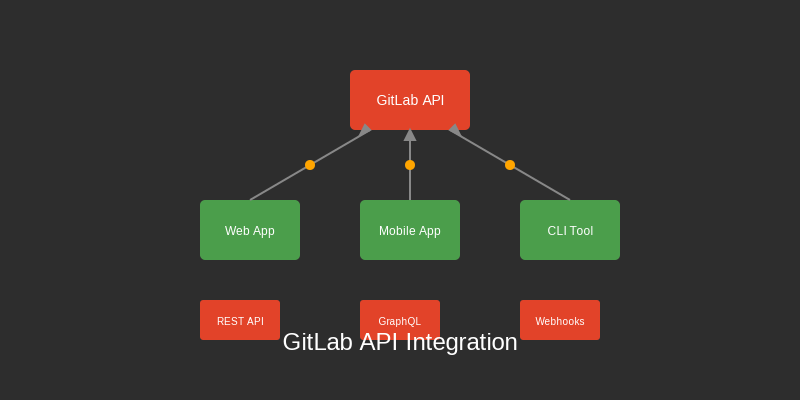
Beyond that, automation should be modest and explicit: service desk for emailed requests, webhooks and the API for integration with systems that genuinely live elsewhere, and project automation rules where your tier provides them. Creating an issue from another system is a standard API call.
# Create issue via API
curl --request POST \
  --header "PRIVATE-TOKEN: <your_token>" \
  "https://gitlab.com/api/v4/projects/1/issues" \
  --data "title=New Issue&description=Description"
Resist elaborate auto-labelling and auto-assignment schemes built from pipeline jobs; they are hard to discover, easy to break, and usually encode a triage decision a human should make once, in the open.
Triage as a Recurring Practice
The system stays healthy through triage: a regular pass over new issues to confirm they are complete, labelled, prioritised, and either scheduled or explicitly parked. Untriaged issues should be a visible, small number. Stale issues need a policy too: ask for information, wait a defined period, then close as incomplete rather than letting the backlog fill with zombies that make every search worse.
Decision Framework
| Situation | Recommendation |
|---|---|
| New bug report lacks reproduction detail | Apply a needs-information label and ask specific questions; do not assign it onward |
| Planning a release | One milestone for the release, scoped board filtered to it, issues weighted and owned |
| Team works in sprints across several projects | Group-level iterations and group labels so cadence and taxonomy are shared |
| Board and issue list disagree | Fix the issue's labels; the board is a view and cannot be corrected directly |
| Backlog is too large to scan | Triage on a cadence, close stale items under a stated policy, and keep untriaged count visible |
| Work depends on another issue | Record the blocking relationship on the issue instead of noting it in a comment |
| External users need to raise requests | Use service desk or a form feeding the API, not project membership for outsiders |
Implementation Checklist
Trade-offs
Structure costs effort up front: templates, label design, and triage time are real work that competes with shipping. Too little structure produces chaos; too much produces compliance theatre, where fields are filled to satisfy the form and say nothing. Boards simplify status and hide nuance, so complex dependencies still need the issue text. Keeping planning inside GitLab maximises traceability to code and gives up the richer portfolio features of dedicated planning tools, which larger organisations may genuinely need. The balance point is team-specific, but it is always better to run a small system consistently than a complete system nobody maintains.
When Not to Use
Do not use GitLab issues as a customer support helpdesk; requesters should not need project access, and support needs SLAs, queues, and customer communication tooling, for which service desk is only a bridge. Do not track organisation-wide programmes spanning many teams and quarters solely in one project's issues; that is what group epics or a dedicated portfolio tool are for. Do not use issues for secrets, credentials, or sensitive personal data in reports; redact first, because issue history is widely visible and hard to purge. And do not mirror the same work in GitLab and a second tracker: two sources of truth guarantee that both are wrong.
Conclusion
Issue management works when the issue is complete, the labels mean one thing, the board is understood as a view, and triage keeps the backlog honest. Build those four habits and GitLab gives you planning and traceability in the same place as the code. Skip them, and no tool configuration will rescue the backlog.
References
Why This Matters
Understanding the business and technical context helps you make informed decisions rather than blindly following patterns.
Trade-offs to Consider
Every architectural decision involves trade-offs. Consider your specific requirements, team expertise, and scale when evaluating options.
When NOT to Use This
Knowing when a solution doesn't apply is as valuable as knowing when it does. Consider alternatives for your specific situation.
Decision Framework
Use this framework to evaluate whether this approach is right for your use case based on your specific constraints and requirements.