terraform
How to Write Your First Terraform Script for AWS Infrastructure
A step-by-step guide to getting started with Infrastructure as Code using Terraform to manage AWS resources.
March 20, 2024
Admin
3 min read
How to Write Your First Terraform Script for AWS Infrastructure
What You'll Learn
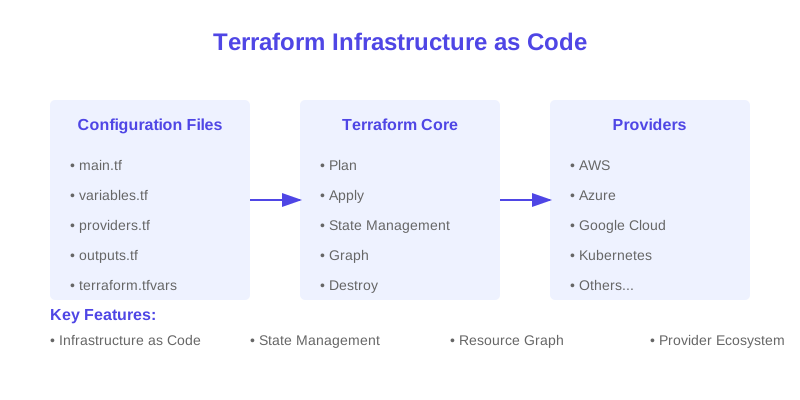
- Understanding Infrastructure as Code
- Terraform basics and concepts
- Writing your first configuration
- Managing AWS resources
- Best practices and tips
Understanding Terraform
Core Concepts
| Concept | Description | Purpose |
|---|---|---|
| Provider | Cloud platform interface | Resource management |
| Resource | Infrastructure component | Service definition |
| State | Infrastructure tracking | Change management |
Getting Started
Prerequisites
| Requirement | Purpose | Installation |
|---|---|---|
| Terraform CLI | Command execution | Package manager |
| AWS CLI | AWS authentication | AWS website |
| AWS Account | Resource creation | AWS Console |
Your First Configuration
Basic Structure
# Configure AWS Provider
provider "aws" {
  region = "us-west-2"
}

# Create VPC
resource "aws_vpc" "main" {
  cidr_block = "10.0.0.0/16"

  tags = {
    Name = "main"
    Environment = "production"
  }
}

# Create Subnet
resource "aws_subnet" "public" {
  vpc_id     = aws_vpc.main.id
  cidr_block = "10.0.1.0/24"

  tags = {
    Name = "public"
  }
}
Resource Management
Common Resources
| Resource | Purpose | Example |
|---|---|---|
| VPC | Network isolation | aws_vpc |
| EC2 | Compute instances | aws_instance |
| S3 | Storage | aws_s3_bucket |
Variables and Outputs
Variable Types
| Type | Usage | Example |
|---|---|---|
| Input Variables | Configuration input | variable "region" |
| Local Values | Reusable values | locals |
| Output Values | Return values | output "vpc_id" |
State Management
State Operations
| Operation | Purpose | Command |
|---|---|---|
| State List | View resources | terraform state list |
| State Show | Resource details | terraform state show |
| State Move | Resource relocation | terraform state mv |
Best Practices
Code Organization
| Practice | Description | Benefit |
|---|---|---|
| Modules | Reusable components | Code reuse |
| Workspaces | Environment isolation | State separation |
| Remote State | State storage | Collaboration |
Common Commands
Basic Operations
| Command | Purpose | Usage |
|---|---|---|
| init | Initialize directory | terraform init |
| plan | Preview changes | terraform plan |
| apply | Apply changes | terraform apply |
Security Considerations
Security Best Practices
| Practice | Implementation | Benefit |
|---|---|---|
| State Encryption | S3 encryption | Data protection |
| Access Control | IAM policies | Limited access |
| Secret Management | AWS Secrets Manager | Secure variables |
Troubleshooting
Common Issues
| Issue | Cause | Solution |
|---|---|---|
| Provider Error | Authentication | Check credentials |
| State Lock | Concurrent access | Release lock |
| Resource Failure | Configuration | Check syntax |
Advanced Topics
Next Steps
| Topic | Description | Use Case |
|---|---|---|
| Modules | Code organization | Reusability |
| Workspaces | Environment management | Multiple environments |
| Data Sources | External data | Resource lookup |
Conclusion
Terraform provides a powerful way to manage infrastructure as code. By following this guide and implementing the best practices, you can start building and managing your AWS infrastructure efficiently and reliably.
Additional Resources
Terraform
AWS
IaC
DevOps
Cloud Infrastructure