TL;DR
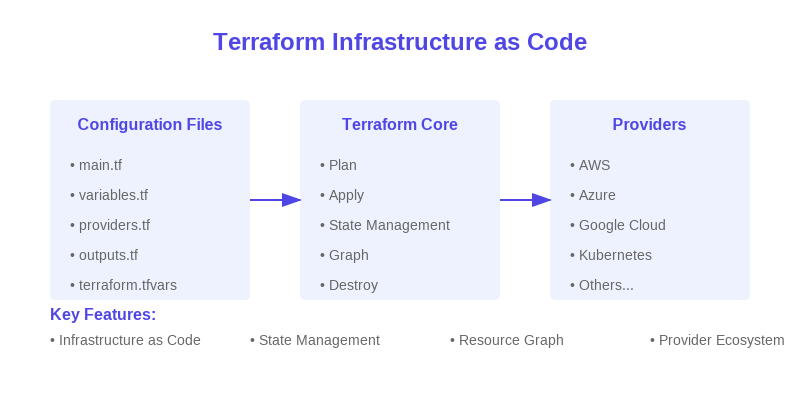
Learn essential best practices for managing your infrastructure as code with Terraform, including project structure, module design, and workflow optimization
import { MermaidDiagram } from '@/components/mermaid-diagram'
Discover how to effectively manage your infrastructure as code using Terraform. This guide covers best practices, patterns, and workflows for maintaining scalable and maintainable infrastructure.
Env
Root --> Mod
Env --> Dev
Env --> Stage
Env --> Prod
Mod --> Core
Mod --> App
Mod --> Data
Dev -->|"Promotes to"| Stage
Stage -->|"Promotes to"| Prod
style Root fill:#3b82f6,stroke:#2563eb,color:white
style Env fill:#3b82f6,stroke:#2563eb,color:white
style Mod fill:#3b82f6,stroke:#2563eb,color:white
style Dev fill:#f1f5f9,stroke:#64748b
style Stage fill:#f1f5f9,stroke:#64748b
style Prod fill:#f1f5f9,stroke:#64748b
style Core fill:#f1f5f9,stroke:#64748b
style App fill:#f1f5f9,stroke:#64748b
style Data fill:#f1f5f9,stroke:#64748b
/> >Git: Commit Changes
Git->>CI: Trigger Pipeline
CI->>State: Initialize Backend
State-->>CI: Load Current State
CI->>CI: Terraform Plan
alt Plan Has Changes
CI->>Dev: Request Approval
Dev->>CI: Approve Changes
CI->>Cloud: Apply Changes
Cloud-->>State: Update State
else No Changes
CI->>Dev: No Changes Required
end
State-->>Dev: State Updated
}
}
/>
Project Structure
A well-organized Terraform project structure is crucial for maintainability. Here's a detailed breakdown of a recommended project structure:
project/
├── environments/           # Environment-specific configurations
│   ├── dev/               # Development environment
│   │   ├── main.tf        # Main configuration file
│   │   ├── variables.tf   # Variable declarations
│   │   ├── outputs.tf     # Output definitions
│   │   └── terraform.tfvars # Environment-specific values
│   ├── staging/           # Staging environment
│   └── prod/              # Production environment
├── modules/               # Reusable module definitions
│   ├── vpc/              # Network infrastructure
│   │   ├── main.tf       # Module logic
│   │   ├── variables.tf  # Input variables
│   │   └── outputs.tf    # Output values
│   ├── ec2/              # Compute resources
│   └── rds/              # Database resources
├── scripts/              # Helper scripts
│   ├── init.sh          # Initialization script
│   └── cleanup.sh       # Cleanup script
├── .gitignore           # Git ignore patterns
├── README.md            # Project documentation
└── versions.tf          # Version constraints
Each directory serves a specific purpose:
environments/: Contains environment-specific configurationsmodules/: Houses reusable infrastructure componentsscripts/: Stores automation and helper scriptsModule Design
1. Keep Modules Focused
Each module should have a single responsibility. Here's an example of a well-structured VPC module:
# modules/vpc/main.tf
# Purpose: Creates a VPC with public and private subnets across multiple AZs

module "vpc" {
  source = "terraform-aws-modules/vpc/aws"
  version = "5.0.0"  # Always pin module versions

  name = var.vpc_name
  cidr = var.vpc_cidr

  # Availability Zones configuration
  azs             = var.availability_zones
  private_subnets = var.private_subnet_cidrs
  public_subnets  = var.public_subnet_cidrs

  # NAT Gateway configuration
  enable_nat_gateway = true
  single_nat_gateway = var.environment != "production"  # Use single NAT for non-prod

  # VPC DNS Settings
  enable_dns_hostnames = true
  enable_dns_support   = true

  # VPC Flow Logs
  enable_flow_log                      = true
  create_flow_log_cloudwatch_log_group = true
  create_flow_log_cloudwatch_iam_role  = true

  # Resource tags
  tags = merge(var.tags, {
    Environment = var.environment
    ManagedBy   = "terraform"
    Name        = var.vpc_name
  })
}

# Output essential information
output "vpc_id" {
  description = "The ID of the VPC"
  value       = module.vpc.vpc_id
}

output "private_subnet_ids" {
  description = "List of private subnet IDs"
  value       = module.vpc.private_subnets
}
2. Use Data Sources Effectively
Data sources help you reference existing resources and maintain infrastructure relationships:
# Example: Reference existing resources and create dependencies

# Find existing VPC by tags
data "aws_vpc" "existing" {
  tags = {
    Environment = var.environment
    Project     = var.project_name
  }
}

# Get all private subnets
data "aws_subnet_ids" "private" {
  vpc_id = data.aws_vpc.existing.id

  tags = {
    Tier = "Private"
    Environment = var.environment
  }
}

# Use the data in a resource
resource "aws_security_group" "app" {
  name        = "${var.environment}-app-sg"
  description = "Security group for application servers"
  vpc_id      = data.aws_vpc.existing.id

  # Ingress rules
  ingress {
    from_port   = 443
    to_port     = 443
    protocol    = "tcp"
    cidr_blocks = data.aws_vpc.existing.cidr_block_associations[*].cidr_block
    description = "HTTPS from VPC"
  }

  # Egress rules
  egress {
    from_port   = 0
    to_port     = 0
    protocol    = "-1"
    cidr_blocks = ["0.0.0.0/0"]
    description = "Allow all outbound traffic"
  }

  tags = merge(var.tags, {
    Name = "${var.environment}-app-sg"
  })
}
State Management
1. Remote State Configuration
Implement robust remote state management with proper backend configuration:
# backend.tf
# Purpose: Configure remote state storage with encryption and locking

terraform {
  backend "s3" {
    bucket         = "terraform-state-bucket"
    key            = "env/dev/terraform.tfstate"
    region         = "us-west-2"
    encrypt        = true
    dynamodb_table = "terraform-locks"

    # Additional security measures
    kms_key_id     = "arn:aws:kms:us-west-2:ACCOUNT_ID:key/KEY_ID"

    # Versioning and logging
    versioning {
      enabled = true
    }

    # Access logging
    logging {
      target_bucket = "access-logs-bucket"
      target_prefix = "terraform-state/"
    }
  }
}

# Create the state bucket with proper configuration
resource "aws_s3_bucket" "terraform_state" {
  bucket = "terraform-state-bucket"

  # Enable versioning
  versioning {
    enabled = true
  }

  # Enable server-side encryption
  server_side_encryption_configuration {
    rule {
      apply_server_side_encryption_by_default {
        kms_master_key_id = aws_kms_key.terraform_state.id
        sse_algorithm     = "aws:kms"
      }
    }
  }

  # Enable access logging
  logging {
    target_bucket = aws_s3_bucket.access_logs.id
    target_prefix = "terraform-state/"
  }

  # Block public access
  block_public_acls       = true
  block_public_policy     = true
  ignore_public_acls      = true
  restrict_public_buckets = true
}
2. State Locking Implementation
Ensure safe concurrent operations with state locking:
# state-locking.tf
# Purpose: Implement state locking using DynamoDB

resource "aws_dynamodb_table" "terraform_locks" {
  name         = "terraform-locks"
  billing_mode = "PAY_PER_REQUEST"
  hash_key     = "LockID"

  attribute {
    name = "LockID"
    type = "S"
  }

  # Enable point-in-time recovery
  point_in_time_recovery {
    enabled = true
  }

  # Enable server-side encryption
  server_side_encryption {
    enabled     = true
    kms_key_arn = aws_kms_key.terraform_locks.arn
  }

  tags = merge(var.tags, {
    Name        = "terraform-locks"
    Description = "DynamoDB table for Terraform state locking"
  })
}

# KMS key for encryption
resource "aws_kms_key" "terraform_locks" {
  description             = "KMS key for Terraform state locking"
  deletion_window_in_days = 7
  enable_key_rotation     = true

  tags = merge(var.tags, {
    Name = "terraform-locks-key"
  })
}
Variable Management
1. Advanced Variable Validation
Implement comprehensive validation rules:
# variables.tf
# Purpose: Define and validate input variables

variable "environment" {
  type        = string
  description = "Environment name (dev, staging, prod)"

  validation {
    condition     = contains(["dev", "staging", "prod"], var.environment)
    error_message = "Environment must be dev, staging, or prod."
  }
}

variable "instance_type" {
  type        = string
  description = "EC2 instance type"

  validation {
    condition     = can(regex("^t[23]|m[45]|c[56]", var.instance_type))
    error_message = "Instance type must be a valid AWS instance type."
  }
}

variable "vpc_cidr" {
  type        = string
  description = "CIDR block for VPC"

  validation {
    condition     = can(cidrhost(var.vpc_cidr, 0))
    error_message = "VPC CIDR must be a valid IPv4 CIDR block."
  }

  validation {
    condition     = tonumber(split("/", var.vpc_cidr)[1]) <= 16
    error_message = "VPC CIDR block must be /16 or larger."
  }
}

variable "tags" {
  type = map(string)
  description = "Resource tags"

  validation {
    condition     = contains(keys(var.tags), "Project")
    error_message = "Tags must include a 'Project' key."
  }
}
2. Environment-Specific Variables
Organize variables by environment with detailed documentation:
# environments/dev/terraform.tfvars
# Purpose: Development environment configuration

# Network Configuration
environment = "dev"
vpc_cidr    = "10.0.0.0/16"
region      = "us-west-2"
availability_zones = ["us-west-2a", "us-west-2b"]

# Compute Resources
instance_type = "t3.micro"
asg_min_size  = 1
asg_max_size  = 3

# Database Configuration
db_instance_class    = "db.t3.small"
db_allocated_storage = 20
db_engine_version    = "13.7"

# Monitoring
enable_detailed_monitoring = true
retention_in_days         = 7

# Tags
tags = {
  Project     = "MyApp"
  Environment = "dev"
  Owner       = "DevOps"
  CostCenter  = "12345"
}

# Backup Configuration
backup_retention_period = 7
enable_cross_region_backup = false
Advanced Features
1. Custom Provider Configuration
# providers.tf
# Purpose: Configure providers with advanced settings

provider "aws" {
  region = var.region

  # Default tags applied to all resources
  default_tags {
    tags = {
      Environment = var.environment
      ManagedBy   = "terraform"
      Project     = var.project_name
    }
  }

  # Assume role for cross-account management
  assume_role {
    role_arn     = "arn:aws:iam::${var.target_account_id}:role/TerraformExecutionRole"
    session_name = "TerraformSession"
  }

  # S3 endpoint configuration
  endpoints {
    s3 = "s3.${var.region}.amazonaws.com"
  }
}

# Additional region for disaster recovery
provider "aws" {
  alias  = "dr"
  region = var.dr_region

  assume_role {
    role_arn     = "arn:aws:iam::${var.dr_account_id}:role/TerraformExecutionRole"
    session_name = "TerraformDRSession"
  }
}
2. Advanced Monitoring Setup
# monitoring.tf
# Purpose: Configure comprehensive monitoring

# CloudWatch Dashboard
resource "aws_cloudwatch_dashboard" "main" {
  dashboard_name = "${var.environment}-infrastructure-dashboard"

  dashboard_body = jsonencode({
    widgets = [
      {
        type   = "metric"
        x      = 0
        y      = 0
        width  = 12
        height = 6

        properties = {
          metrics = [
            ["AWS/EC2", "CPUUtilization", "AutoScalingGroupName", aws_autoscaling_group.app.name],
            [".", "NetworkIn", ".", "."],
            [".", "NetworkOut", ".", "."]
          ]
          period = 300
          stat   = "Average"
          region = var.region
          title  = "EC2 Metrics"
        }
      },
      {
        type   = "metric"
        x      = 12
        y      = 0
        width  = 12
        height = 6

        properties = {
          metrics = [
            ["AWS/RDS", "CPUUtilization", "DBInstanceIdentifier", aws_db_instance.main.id],
            [".", "FreeStorageSpace", ".", "."],
            [".", "DatabaseConnections", ".", "."]
          ]
          period = 300
          stat   = "Average"
          region = var.region
          title  = "RDS Metrics"
        }
      }
    ]
  })
}

# CloudWatch Alarms
resource "aws_cloudwatch_metric_alarm" "high_cpu" {
  alarm_name          = "${var.environment}-high-cpu-utilization"
  comparison_operator = "GreaterThanThreshold"
  evaluation_periods  = "2"
  metric_name        = "CPUUtilization"
  namespace          = "AWS/EC2"
  period             = "300"
  statistic          = "Average"
  threshold          = "80"
  alarm_description  = "This metric monitors EC2 CPU utilization"
  alarm_actions      = [aws_sns_topic.alerts.arn]

  dimensions = {
    AutoScalingGroupName = aws_autoscaling_group.app.name
  }
}
Security Best Practices
1. IAM Role Configuration
# iam.tf
# Purpose: Define IAM roles with least privilege

# Application Role
resource "aws_iam_role" "app_role" {
  name = "${var.environment}-app-role"

  assume_role_policy = jsonencode({
    Version = "2012-10-17"
    Statement = [
      {
        Action = "sts:AssumeRole"
        Effect = "Allow"
        Principal = {
          Service = "ec2.amazonaws.com"
        }
      }
    ]
  })

  # Inline policy for specific permissions
  inline_policy {
    name = "app-permissions"
    policy = jsonencode({
      Version = "2012-10-17"
      Statement = [
        {
          Effect = "Allow"
          Action = [
            "s3:GetObject",
            "s3:ListBucket"
          ]
          Resource = [
            aws_s3_bucket.app_data.arn,
            "${aws_s3_bucket.app_data.arn}/*"
          ]
        },
        {
          Effect = "Allow"
          Action = [
            "secretsmanager:GetSecretValue"
          ]
          Resource = [
            aws_secretsmanager_secret.app_secrets.arn
          ]
        }
      ]
    })
  }

  tags = merge(var.tags, {
    Name = "${var.environment}-app-role"
  })
}
2. Security Group Management
# security.tf
# Purpose: Define security groups with detailed rules

resource "aws_security_group" "app_sg" {
  name        = "${var.environment}-app-sg"
  description = "Security group for application servers"
  vpc_id      = aws_vpc.main.id

  # Web traffic
  ingress {
    description = "HTTPS from ALB"
    from_port   = 443
    to_port     = 443
    protocol    = "tcp"
    security_groups = [aws_security_group.alb.id]
  }

  # Application port
  ingress {
    description = "Application port"
    from_port   = var.app_port
    to_port     = var.app_port
    protocol    = "tcp"
    security_groups = [aws_security_group.alb.id]
  }

  # Monitoring
  ingress {
    description = "Prometheus metrics"
    from_port   = 9090
    to_port     = 9090
    protocol    = "tcp"
    security_groups = [aws_security_group.monitoring.id]
  }

  # Outbound rules
  egress {
    description = "Allow all outbound traffic"
    from_port   = 0
    to_port     = 0
    protocol    = "-1"
    cidr_blocks = ["0.0.0.0/0"]
  }

  tags = merge(var.tags, {
    Name = "${var.environment}-app-sg"
  })

  lifecycle {
    create_before_destroy = true
  }
}
Conclusion
Following these enhanced best practices will help you build and maintain a robust infrastructure codebase. Key takeaways:
Remember to regularly review and update your infrastructure code to incorporate new best practices and security improvements.
Additional Resources
Why This Matters
Understanding the business and technical context helps you make informed decisions rather than blindly following patterns.
Trade-offs to Consider
Every architectural decision involves trade-offs. Consider your specific requirements, team expertise, and scale when evaluating options.
When NOT to Use This
Knowing when a solution doesn't apply is as valuable as knowing when it does. Consider alternatives for your specific situation.
Decision Framework
Use this framework to evaluate whether this approach is right for your use case based on your specific constraints and requirements.