TL;DR
A deep dive into Kubernetes architecture, exploring its core components, control plane, and how they work together to manage containerized applications.
Kubernetes Architecture Explained: Components and Workflow
Kubernetes has become the de facto standard for container orchestration, powering modern cloud-native applications across organizations of all sizes. This comprehensive guide explores the architecture of Kubernetes, breaking down its components and explaining how they work together to provide a robust container orchestration platform.
$1
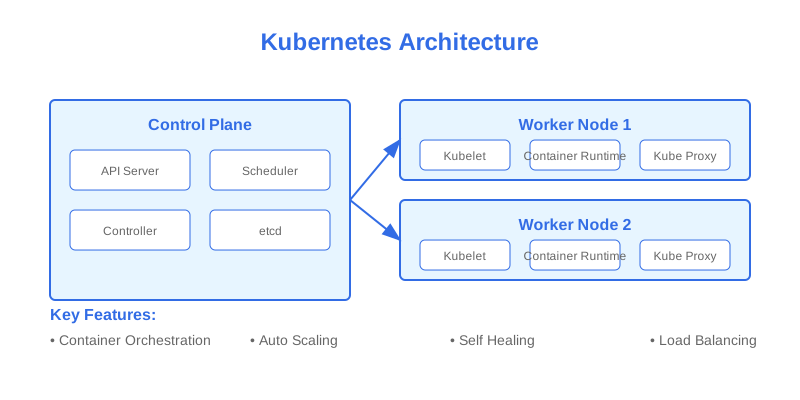
The Kubernetes architecture follows a master-worker (control plane and data plane) pattern, designed for high availability and scalability. This distributed system architecture enables Kubernetes to manage containerized applications across multiple hosts while maintaining desired state and handling failures gracefully.
`` graph TB
subgraph "Control Plane"
A[API Server] --> B[etcd]
A --> C[Controller Manager]
A --> D[Scheduler]
end
subgraph "Worker Node 1"
E[Kubelet] --> A
F[Container Runtime] --> E
G[Kube Proxy] --> A
end
subgraph "Worker Node 2"
H[Kubelet] --> A
I[Container Runtime] --> H
J[Kube Proxy] --> A
end
style A fill:#f96,stroke:#333
style B fill:#9cf,stroke:#333
style E,H fill:#9f9,stroke:#333
mermaid
`
$1
The control plane is the brain of Kubernetes, responsible for making global decisions about the cluster. It consists of several critical components that work together to maintain the desired state of your applications.
| Component | Description | Primary Responsibility |
|-----------|-------------|------------------------|
| API Server | Central hub for communication | Validates and processes REST operations |
| etcd | Distributed key-value store | Stores cluster state and configuration |
| Controller Manager | Manages controllers | Maintains desired state |
| Scheduler | Assigns workloads to nodes | Places pods based on constraints |
$1
The API server serves as the front-end interface for the Kubernetes control plane. It processes REST operations, validates them, and updates the corresponding objects in etcd. Understanding its role is crucial for both operators and developers working with Kubernetes.
` apiVersion: v1
kind: Pod
metadata:
name: example-pod
namespace: default
spec:
containers:
- name: nginx
image: nginx:1.14.2
ports:
- containerPort: 80
yaml
`
$1
Worker nodes are the workhorses of a Kubernetes cluster, running your containerized applications. Each node contains essential components that enable it to communicate with the control plane and manage containers effectively.
` flowchart TB
subgraph "Node Components"
A[Kubelet] --> B[Container Runtime]
A --> C[Pod]
B --> C
D[Kube Proxy] --> E[Network Rules]
end
style A fill:#f96,stroke:#333
style B fill:#9cf,stroke:#333
style C fill:#9f9,stroke:#333
mermaid
`
$1
The Container Runtime Interface (CRI) provides a standardized way for Kubernetes to interact with different container runtimes. This abstraction allows Kubernetes to support multiple container runtimes without tightly coupling to any specific implementation.
$1
Kubernetes networking follows specific principles that enable seamless communication between pods, services, and external clients. Understanding these networking concepts is essential for building scalable and reliable applications.
` graph LR
A[Pod] -->|Container Network Interface| B[Node Network]
B -->|Overlay Network| C[Cluster Network]
C -->|Service Mesh| D[Service Discovery]
D -->|Load Balancer| E[External Traffic]
style A fill:#f96,stroke:#333
style C fill:#9cf,stroke:#333
style E fill:#9f9,stroke:#333
mermaid
`
$1
Security in Kubernetes is implemented through multiple layers, from authentication and authorization to network policies and pod security contexts. This comprehensive approach ensures your applications and data remain secure.
Example RBAC configuration:
` apiVersion: rbac.authorization.k8s.io/v1
kind: Role
metadata:
namespace: default
name: pod-reader
rules:
resources: ["pods"]
verbs: ["get", "watch", "list"]
yaml
``
Why This Matters
Understanding the business and technical context helps you make informed decisions rather than blindly following patterns.
Trade-offs to Consider
Every architectural decision involves trade-offs. Consider your specific requirements, team expertise, and scale when evaluating options.
When NOT to Use This
Knowing when a solution doesn't apply is as valuable as knowing when it does. Consider alternatives for your specific situation.
Decision Framework
Use this framework to evaluate whether this approach is right for your use case based on your specific constraints and requirements.