TL;DR
A comprehensive guide to managing infrastructure across multiple cloud providers using Terraform
Managing Multi-Cloud Environments with Terraform
Learn how to effectively manage infrastructure across multiple cloud providers using Terraform. This guide covers best practices, patterns, and real-world examples.
$1
1. Avoid vendor lock-in
2. Leverage best-of-breed services
3. Improve reliability and redundancy
4. Optimize costs
5. Meet compliance requirements
$1
`` provider "aws" {
region = "us-west-2"
alias = "west"
} provider "aws" {
region = "us-east-1"
alias = "east"
} provider "azurerm" {
features {}
subscription_id = var.azure_subscription_id
tenant_id = var.azure_tenant_id
} provider "google" {
project = var.gcp_project_id
region = "us-central1"
}
hcl
`AWS Provider Configuration
Azure Provider Configuration
Google Cloud Provider Configuration
$1
` multi-cloud/
├── providers/
│ ├── aws.tf
│ ├── azure.tf
│ └── gcp.tf
├── modules/
│ ├── networking/
│ │ ├── aws/
│ │ ├── azure/
│ │ └── gcp/
│ └── compute/
│ ├── aws/
│ ├── azure/
│ └── gcp/
├── environments/
│ ├── dev/
│ └── prod/
└── variables.tf
`
$1
$1
` resource "aws_vpc" "main" {
provider = aws.west
cidr_block = "10.0.0.0/16"
tags = {
Name = "aws-vpc"
}
} resource "azurerm_virtual_network" "main" {
name = "azure-vnet"
resource_group_name = azurerm_resource_group.main.name
location = azurerm_resource_group.main.location
address_space = ["172.16.0.0/16"]
} resource "google_compute_network" "main" {
name = "gcp-vpc"
auto_create_subnetworks = false
} resource "aws_vpc_peering_connection" "aws_azure" {
provider = aws.west
vpc_id = aws_vpc.main.id
peer_vpc_id = azurerm_virtual_network.main.id
}
hcl
`AWS VPC
Azure Virtual Network
GCP VPC
VPC Peering
$1
` resource "aws_lb" "main" {
provider = aws.west
name = "aws-lb"
internal = false
load_balancer_type = "application"
subnets = aws_subnet.public[*].id
} resource "azurerm_lb" "main" {
name = "azure-lb"
location = azurerm_resource_group.main.location
resource_group_name = azurerm_resource_group.main.name
sku = "Standard"
} resource "google_compute_global_forwarding_rule" "main" {
name = "gcp-lb"
target = google_compute_target_http_proxy.main.self_link
port_range = "80"
}
hcl
`AWS Load Balancer
Azure Load Balancer
GCP Load Balancer
$1
$1
` resource "aws_s3_bucket" "main" {
provider = aws.west
bucket = "multi-cloud-storage"
} resource "azurerm_storage_account" "main" {
name = "multicloudstorage"
resource_group_name = azurerm_resource_group.main.name
location = azurerm_resource_group.main.location
account_tier = "Standard"
account_replication_type = "GRS"
} resource "google_storage_bucket" "main" {
name = "multi-cloud-storage"
location = "US"
}
hcl
`AWS S3
Azure Blob Storage
Google Cloud Storage
$1
` resource "aws_db_instance" "main" {
provider = aws.west
identifier = "multi-cloud-db"
engine = "postgres"
instance_class = "db.t3.medium"
allocated_storage = 20
} resource "azurerm_postgresql_server" "main" {
name = "multi-cloud-db"
location = azurerm_resource_group.main.location
resource_group_name = azurerm_resource_group.main.name
sku_name = "GP_Gen5_2"
version = "11"
} resource "google_sql_database_instance" "main" {
name = "multi-cloud-db"
database_version = "POSTGRES_11"
region = "us-central1"
}
hcl
`AWS RDS
Azure Database
Google Cloud SQL
$1
$1
` resource "aws_iam_role" "multi_cloud" {
provider = aws.west
name = "multi-cloud-role"
assume_role_policy = jsonencode({
Version = "2012-10-17"
Statement = [
{
Action = "sts:AssumeRole"
Effect = "Allow"
Principal = {
Service = "ec2.amazonaws.com"
}
}
]
})
} resource "azurerm_role_assignment" "multi_cloud" {
scope = azurerm_resource_group.main.id
role_definition_name = "Contributor"
principal_id = data.azurerm_client_config.current.object_id
} resource "google_project_iam_member" "multi_cloud" {
project = var.gcp_project_id
role = "roles/editor"
member = "user:${var.gcp_user_email}"
}
hcl
`AWS IAM
Azure Role Assignment
GCP IAM
$1
` resource "aws_security_group" "main" {
provider = aws.west
vpc_id = aws_vpc.main.id
ingress {
from_port = 443
to_port = 443
protocol = "tcp"
cidr_blocks = ["0.0.0.0/0"]
}
} resource "azurerm_network_security_group" "main" {
name = "multi-cloud-nsg"
location = azurerm_resource_group.main.location
resource_group_name = azurerm_resource_group.main.name
} resource "google_compute_firewall" "main" {
name = "multi-cloud-firewall"
network = google_compute_network.main.name
allow {
protocol = "tcp"
ports = ["443"]
}
}
hcl
`AWS Security Group
Azure Network Security Group
GCP Firewall Rule
$1
$1
` resource "aws_cloudwatch_dashboard" "multi_cloud" {
provider = aws.west
dashboard_name = "multi-cloud-dashboard"
dashboard_body = jsonencode({
widgets = [
{
type = "metric"
properties = {
metrics = [
["AWS/EC2", "CPUUtilization"]
]
}
}
]
})
} resource "azurerm_monitor_action_group" "main" {
name = "multi-cloud-alerts"
resource_group_name = azurerm_resource_group.main.name
short_name = "multicloud"
} resource "google_monitoring_dashboard" "main" {
dashboard_json = jsonencode({
displayName = "Multi-Cloud Dashboard"
gridLayout = {
widgets = []
}
})
}
hcl
`AWS CloudWatch
Azure Monitor
GCP Monitoring
$1
` resource "aws_budgets_budget" "multi_cloud" {
provider = aws.west
name = "multi-cloud-budget"
budget_type = "COST"
limit_amount = "1000"
limit_unit = "USD"
time_unit = "MONTHLY"
} resource "azurerm_consumption_budget_resource_group" "main" {
name = "multi-cloud-budget"
resource_group_id = azurerm_resource_group.main.id
amount = 1000
time_grain = "Monthly"
}
hcl
`AWS Budgets
Azure Cost Management
$1
1. Use Workspaces
` terraform {
backend "s3" {
bucket = "terraform-state"
key = "multi-cloud/${terraform.workspace}/terraform.tfstate"
region = "us-west-2"
}
}
hcl
`
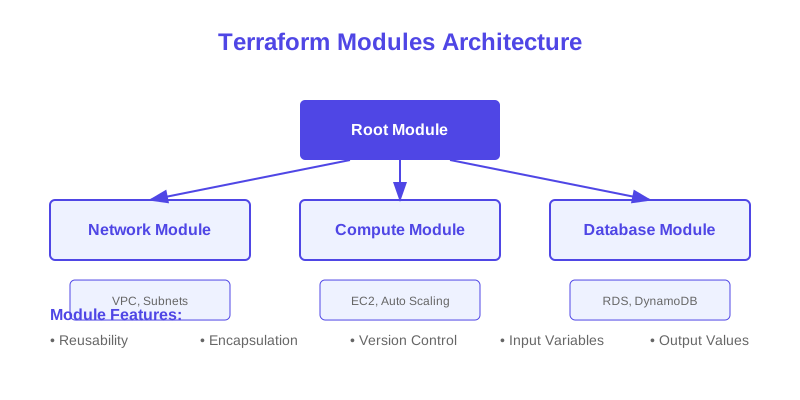
2. Modular Design
` module "aws_infrastructure" {
source = "./modules/aws"
providers = {
aws = aws.west
}
} module "azure_infrastructure" {
source = "./modules/azure"
} module "gcp_infrastructure" {
source = "./modules/gcp"
}
hcl
`
3. Variable Management
` variable "cloud_regions" {
type = map(object({
aws = string
azure = string
gcp = string
}))
default = {
us = {
aws = "us-west-2"
azure = "westus2"
gcp = "us-central1"
}
}
}
hcl
``
$1
Managing multi-cloud infrastructure requires:
1. Proper planning and architecture
2. Consistent naming and tagging
3. Centralized state management
4. Robust security practices
5. Comprehensive monitoring
Remember to:
$1
Here are essential resources for managing multi-cloud environments with Terraform:
1. [Terraform Multi-Cloud Documentation](https://www.terraform.io/docs/language/providers/configuration.html) - Official guide to multiple providers
2. [AWS Provider Documentation](https://registry.terraform.io/providers/hashicorp/aws/latest/docs) - AWS provider reference
3. [Azure Provider Documentation](https://registry.terraform.io/providers/hashicorp/azurerm/latest/docs) - Azure provider reference
4. [Google Cloud Provider Documentation](https://registry.terraform.io/providers/hashicorp/google/latest/docs) - GCP provider reference
5. [Multi-Cloud Architecture](https://www.hashicorp.com/resources/multi-cloud-infrastructure-automation-terraform) - HashiCorp's guide to multi-cloud
6. [Cloud Migration Strategies](https://www.hashicorp.com/resources/cloud-migration-strategies-terraform) - Guide to cloud migration
7. [Terraform Workspaces](https://www.terraform.io/docs/language/state/workspaces.html) - Managing multiple environments
8. [Remote State Management](https://www.terraform.io/docs/language/state/remote.html) - Managing state across clouds
9. [Multi-Cloud Security](https://www.hashicorp.com/resources/securing-multi-cloud-infrastructure) - Security best practices
These resources provide comprehensive information about managing infrastructure across multiple cloud providers.
Why This Matters
Understanding the business and technical context helps you make informed decisions rather than blindly following patterns.
Trade-offs to Consider
Every architectural decision involves trade-offs. Consider your specific requirements, team expertise, and scale when evaluating options.
When NOT to Use This
Knowing when a solution doesn't apply is as valuable as knowing when it does. Consider alternatives for your specific situation.
Decision Framework
Use this framework to evaluate whether this approach is right for your use case based on your specific constraints and requirements.