TL;DR
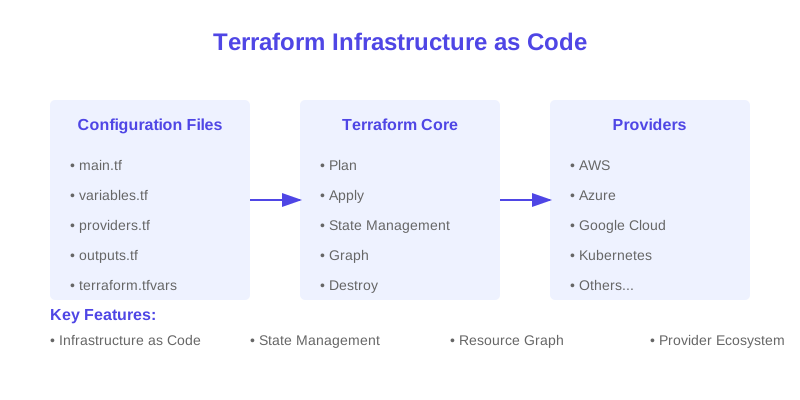
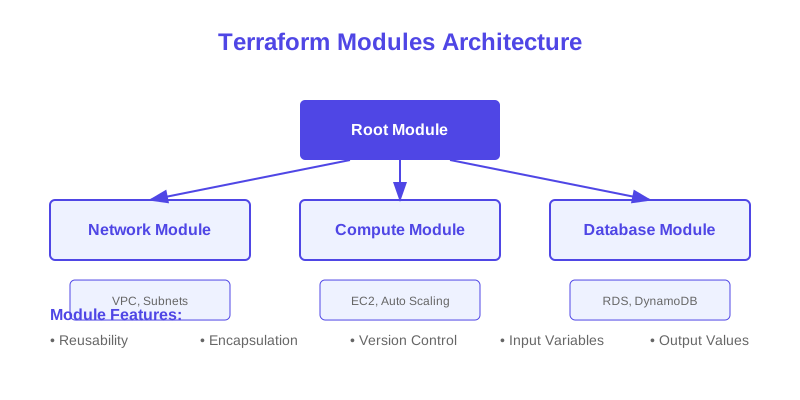
Learn essential best practices for managing your infrastructure as code with Terraform, including project structure, module design, and workflow optimization
import { MermaidDiagram } from '@/components/mermaid-diagram'
Discover how to effectively manage your infrastructure as code using Terraform. This guide covers best practices, patterns, and workflows for maintaining scalable and maintainable infrastructure.
    graph TB
      subgraph "Project Structure"
        Root["Project Root"]
        Env["Environments"]
        Mod["Modules"]

        subgraph "Environment Types"
          Dev["Development"]
          Stage["Staging"]
          Prod["Production"]
        end

        subgraph "Module Types"
          Core["Core Infrastructure"]
          App["Application"]
          Data["Data Layer"]
        end
      end

      Root --> Env
      Root --> Mod

      Env --> Dev
      Env --> Stage
      Env --> Prod

      Mod --> Core
      Mod --> App
      Mod --> Data

      Dev -->|"Promotes to"| Stage
      Stage -->|"Promotes to"| Prod

      style Root fill:#3b82f6,stroke:#2563eb,color:white
      style Env fill:#3b82f6,stroke:#2563eb,color:white
      style Mod fill:#3b82f6,stroke:#2563eb,color:white
      style Dev fill:#f1f5f9,stroke:#64748b
      style Stage fill:#f1f5f9,stroke:#64748b
      style Prod fill:#f1f5f9,stroke:#64748b
      style Core fill:#f1f5f9,stroke:#64748b
      style App fill:#f1f5f9,stroke:#64748b
      style Data fill:#f1f5f9,stroke:#64748b
/>
}
    sequenceDiagram
      participant Dev as Developer
      participant Git as Version Control
      participant CI as CI/CD Pipeline
      participant State as State Backend
      participant Cloud as Cloud Provider

      Dev->>Git: Commit Changes
      Git->>CI: Trigger Pipeline

      CI->>State: Initialize Backend
      State-->>CI: Load Current State

      CI->>CI: Terraform Plan

      alt Plan Has Changes
        CI->>Dev: Request Approval
        Dev->>CI: Approve Changes
        CI->>Cloud: Apply Changes
        Cloud-->>State: Update State
      else No Changes
        CI->>Dev: No Changes Required
      end

      State-->>Dev: State Updated
/>
}
$1
A well-organized Terraform project structure is crucial for maintainability. Here's a detailed breakdown of a recommended project structure:
`` project/
├── environments/ # Environment-specific configurations
│ ├── dev/ # Development environment
│ │ ├── main.tf # Main configuration file
│ │ ├── variables.tf # Variable declarations
│ │ ├── outputs.tf # Output definitions
│ │ └── terraform.tfvars # Environment-specific values
│ ├── staging/ # Staging environment
│ └── prod/ # Production environment
├── modules/ # Reusable module definitions
│ ├── vpc/ # Network infrastructure
│ │ ├── main.tf # Module logic
│ │ ├── variables.tf # Input variables
│ │ └── outputs.tf # Output values
│ ├── ec2/ # Compute resources
│ └── rds/ # Database resources
├── scripts/ # Helper scripts
│ ├── init.sh # Initialization script
│ └── cleanup.sh # Cleanup script
├── .gitignore # Git ignore patterns
├── README.md # Project documentation
└── versions.tf # Version constraints
plaintext
`
Each directory serves a specific purpose:
: Contains environment-specific configurations: Houses reusable infrastructure components: Stores automation and helper scripts$1
$1
Each module should have a single responsibility. Here's an example of a well-structured VPC module:
`hcl
modules/vpc/main.tf
Purpose: Creates a VPC with public and private subnets across multiple AZs
module "vpc" {
source = "terraform-aws-modules/vpc/aws"
version = "5.0.0" # Always pin module versions
name = var.vpc_name
cidr = var.vpc_cidr
# Availability Zones configuration
azs = var.availability_zones
private_subnets = var.private_subnet_cidrs
public_subnets = var.public_subnet_cidrs
# NAT Gateway configuration
enable_nat_gateway = true
single_nat_gateway = var.environment != "production" # Use single NAT for non-prod
# VPC DNS Settings
enable_dns_hostnames = true
enable_dns_support = true
# VPC Flow Logs
enable_flow_log = true
create_flow_log_cloudwatch_log_group = true
create_flow_log_cloudwatch_iam_role = true
# Resource tags
tags = merge(var.tags, {
Environment = var.environment
ManagedBy = "terraform"
Name = var.vpc_name
})
}
Output essential information
output "vpc_id" {
description = "The ID of the VPC"
value = module.vpc.vpc_id
}
output "private_subnet_ids" {
description = "List of private subnet IDs"
value = module.vpc.private_subnets
}
`
$1
Data sources help you reference existing resources and maintain infrastructure relationships:
`hcl
Example: Reference existing resources and create dependencies
Find existing VPC by tags
data "aws_vpc" "existing" {
tags = {
Environment = var.environment
Project = var.project_name
}
}
Get all private subnets
data "aws_subnet_ids" "private" {
vpc_id = data.aws_vpc.existing.id
tags = {
Tier = "Private"
Environment = var.environment
}
}
Use the data in a resource
resource "aws_security_group" "app" {
name = "${var.environment}-app-sg"
description = "Security group for application servers"
vpc_id = data.aws_vpc.existing.id
# Ingress rules
ingress {
from_port = 443
to_port = 443
protocol = "tcp"
cidr_blocks = data.aws_vpc.existing.cidr_block_associations[*].cidr_block
description = "HTTPS from VPC"
}
# Egress rules
egress {
from_port = 0
to_port = 0
protocol = "-1"
cidr_blocks = ["0.0.0.0/0"]
description = "Allow all outbound traffic"
}
tags = merge(var.tags, {
Name = "${var.environment}-app-sg"
})
}
`
$1
$1
Implement robust remote state management with proper backend configuration:
`hcl
backend.tf
Purpose: Configure remote state storage with encryption and locking
terraform {
backend "s3" {
bucket = "terraform-state-bucket"
key = "env/dev/terraform.tfstate"
region = "us-west-2"
encrypt = true
dynamodb_table = "terraform-locks"
# Additional security measures
kms_key_id = "arn:aws:kms:us-west-2:ACCOUNT_ID:key/KEY_ID"
# Versioning and logging
versioning {
enabled = true
}
# Access logging
logging {
target_bucket = "access-logs-bucket"
target_prefix = "terraform-state/"
}
}
}
Create the state bucket with proper configuration
resource "aws_s3_bucket" "terraform_state" {
bucket = "terraform-state-bucket"
# Enable versioning
versioning {
enabled = true
}
# Enable server-side encryption
server_side_encryption_configuration {
rule {
apply_server_side_encryption_by_default {
kms_master_key_id = aws_kms_key.terraform_state.id
sse_algorithm = "aws:kms"
}
}
}
# Enable access logging
logging {
target_bucket = aws_s3_bucket.access_logs.id
target_prefix = "terraform-state/"
}
# Block public access
block_public_acls = true
block_public_policy = true
ignore_public_acls = true
restrict_public_buckets = true
}
`
$1
Ensure safe concurrent operations with state locking:
`hcl
state-locking.tf
Purpose: Implement state locking using DynamoDB
resource "aws_dynamodb_table" "terraform_locks" {
name = "terraform-locks"
billing_mode = "PAY_PER_REQUEST"
hash_key = "LockID"
attribute {
name = "LockID"
type = "S"
}
# Enable point-in-time recovery
point_in_time_recovery {
enabled = true
}
# Enable server-side encryption
server_side_encryption {
enabled = true
kms_key_arn = aws_kms_key.terraform_locks.arn
}
tags = merge(var.tags, {
Name = "terraform-locks"
Description = "DynamoDB table for Terraform state locking"
})
}
KMS key for encryption
resource "aws_kms_key" "terraform_locks" {
description = "KMS key for Terraform state locking"
deletion_window_in_days = 7
enable_key_rotation = true
tags = merge(var.tags, {
Name = "terraform-locks-key"
})
}
`
$1
$1
Implement comprehensive validation rules:
`hcl
variables.tf
Purpose: Define and validate input variables
variable "environment" {
type = string
description = "Environment name (dev, staging, prod)"
validation {
condition = contains(["dev", "staging", "prod"], var.environment)
error_message = "Environment must be dev, staging, or prod."
}
}
variable "instance_type" {
type = string
description = "EC2 instance type"
validation {
condition = can(regex("^t[23]|m[45]|c[56]", var.instance_type))
error_message = "Instance type must be a valid AWS instance type."
}
}
variable "vpc_cidr" {
type = string
description = "CIDR block for VPC"
validation {
condition = can(cidrhost(var.vpc_cidr, 0))
error_message = "VPC CIDR must be a valid IPv4 CIDR block."
}
validation {
condition = tonumber(split("/", var.vpc_cidr)[1]) <= 16
error_message = "VPC CIDR block must be /16 or larger."
}
}
variable "tags" {
type = map(string)
description = "Resource tags"
validation {
condition = contains(keys(var.tags), "Project")
error_message = "Tags must include a 'Project' key."
}
}
`
$1
Organize variables by environment with detailed documentation:
`hcl
environments/dev/terraform.tfvars
Purpose: Development environment configuration
Network Configuration
environment = "dev"
vpc_cidr = "10.0.0.0/16"
region = "us-west-2"
availability_zones = ["us-west-2a", "us-west-2b"]
Compute Resources
instance_type = "t3.micro"
asg_min_size = 1
asg_max_size = 3
Database Configuration
db_instance_class = "db.t3.small"
db_allocated_storage = 20
db_engine_version = "13.7"
Monitoring
enable_detailed_monitoring = true
retention_in_days = 7
Tags
tags = {
Project = "MyApp"
Environment = "dev"
Owner = "DevOps"
CostCenter = "12345"
}
Backup Configuration
backup_retention_period = 7
enable_cross_region_backup = false
`
$1
$1
`hcl
providers.tf
Purpose: Configure providers with advanced settings
provider "aws" {
region = var.region
# Default tags applied to all resources
default_tags {
tags = {
Environment = var.environment
ManagedBy = "terraform"
Project = var.project_name
}
}
# Assume role for cross-account management
assume_role {
role_arn = "arn:aws:iam::${var.target_account_id}:role/TerraformExecutionRole"
session_name = "TerraformSession"
}
# S3 endpoint configuration
endpoints {
s3 = "s3.${var.region}.amazonaws.com"
}
}
Additional region for disaster recovery
provider "aws" {
alias = "dr"
region = var.dr_region
assume_role {
role_arn = "arn:aws:iam::${var.dr_account_id}:role/TerraformExecutionRole"
session_name = "TerraformDRSession"
}
}
`
$1
`hcl
monitoring.tf
Purpose: Configure comprehensive monitoring
CloudWatch Dashboard
resource "aws_cloudwatch_dashboard" "main" {
dashboard_name = "${var.environment}-infrastructure-dashboard"
dashboard_body = jsonencode({
widgets = [
{
type = "metric"
x = 0
y = 0
width = 12
height = 6
properties = {
metrics = [
["AWS/EC2", "CPUUtilization", "AutoScalingGroupName", aws_autoscaling_group.app.name],
[".", "NetworkIn", ".", "."],
[".", "NetworkOut", ".", "."]
]
period = 300
stat = "Average"
region = var.region
title = "EC2 Metrics"
}
},
{
type = "metric"
x = 12
y = 0
width = 12
height = 6
properties = {
metrics = [
["AWS/RDS", "CPUUtilization", "DBInstanceIdentifier", aws_db_instance.main.id],
[".", "FreeStorageSpace", ".", "."],
[".", "DatabaseConnections", ".", "."]
]
period = 300
stat = "Average"
region = var.region
title = "RDS Metrics"
}
}
]
})
}
CloudWatch Alarms
resource "aws_cloudwatch_metric_alarm" "high_cpu" {
alarm_name = "${var.environment}-high-cpu-utilization"
comparison_operator = "GreaterThanThreshold"
evaluation_periods = "2"
metric_name = "CPUUtilization"
namespace = "AWS/EC2"
period = "300"
statistic = "Average"
threshold = "80"
alarm_description = "This metric monitors EC2 CPU utilization"
alarm_actions = [aws_sns_topic.alerts.arn]
dimensions = {
AutoScalingGroupName = aws_autoscaling_group.app.name
}
}
`
$1
$1
`hcl
iam.tf
Purpose: Define IAM roles with least privilege
Application Role
resource "aws_iam_role" "app_role" {
name = "${var.environment}-app-role"
assume_role_policy = jsonencode({
Version = "2012-10-17"
Statement = [
{
Action = "sts:AssumeRole"
Effect = "Allow"
Principal = {
Service = "ec2.amazonaws.com"
}
}
]
})
# Inline policy for specific permissions
inline_policy {
name = "app-permissions"
policy = jsonencode({
Version = "2012-10-17"
Statement = [
{
Effect = "Allow"
Action = [
"s3:GetObject",
"s3:ListBucket"
]
Resource = [
aws_s3_bucket.app_data.arn,
"${aws_s3_bucket.app_data.arn}/*"
]
},
{
Effect = "Allow"
Action = [
"secretsmanager:GetSecretValue"
]
Resource = [
aws_secretsmanager_secret.app_secrets.arn
]
}
]
})
}
tags = merge(var.tags, {
Name = "${var.environment}-app-role"
})
}
`
$1
`hcl
security.tf
Purpose: Define security groups with detailed rules
resource "aws_security_group" "app_sg" {
name = "${var.environment}-app-sg"
description = "Security group for application servers"
vpc_id = aws_vpc.main.id
# Web traffic
ingress {
description = "HTTPS from ALB"
from_port = 443
to_port = 443
protocol = "tcp"
security_groups = [aws_security_group.alb.id]
}
# Application port
ingress {
description = "Application port"
from_port = var.app_port
to_port = var.app_port
protocol = "tcp"
security_groups = [aws_security_group.alb.id]
}
# Monitoring
ingress {
description = "Prometheus metrics"
from_port = 9090
to_port = 9090
protocol = "tcp"
security_groups = [aws_security_group.monitoring.id]
}
# Outbound rules
egress {
description = "Allow all outbound traffic"
from_port = 0
to_port = 0
protocol = "-1"
cidr_blocks = ["0.0.0.0/0"]
}
tags = merge(var.tags, {
Name = "${var.environment}-app-sg"
})
lifecycle {
create_before_destroy = true
}
}
``
$1
Following these enhanced best practices will help you build and maintain a robust infrastructure codebase. Key takeaways:
1. Implement comprehensive project structure
2. Use focused, well-documented modules
3. Configure secure and scalable state management
4. Implement thorough variable validation
5. Set up detailed monitoring and alerting
6. Follow security best practices
7. Maintain clear documentation
Remember to regularly review and update your infrastructure code to incorporate new best practices and security improvements.
$1
1. [Terraform Best Practices Guide](https://www.terraform.io/docs/cloud/guides/recommended-practices/index.html)
2. [AWS Architecture Center](https://aws.amazon.com/architecture/)
3. [HashiCorp Learn](https://learn.hashicorp.com/terraform)
4. [Terraform Module Registry](https://registry.terraform.io/)
Why This Matters
Understanding the business and technical context helps you make informed decisions rather than blindly following patterns.
Trade-offs to Consider
Every architectural decision involves trade-offs. Consider your specific requirements, team expertise, and scale when evaluating options.
When NOT to Use This
Knowing when a solution doesn't apply is as valuable as knowing when it does. Consider alternatives for your specific situation.
Decision Framework
Use this framework to evaluate whether this approach is right for your use case based on your specific constraints and requirements.