Implementing RAG (Retrieval Augmented Generation): Best Practices and Patterns
Deep dive into implementing Retrieval Augmented Generation (RAG) systems. Learn about vector databases, embedding strategies, and optimization techniques for production deployments.
Production-Ready Retrieval Augmented Generation (RAG): Best Practices and Patterns
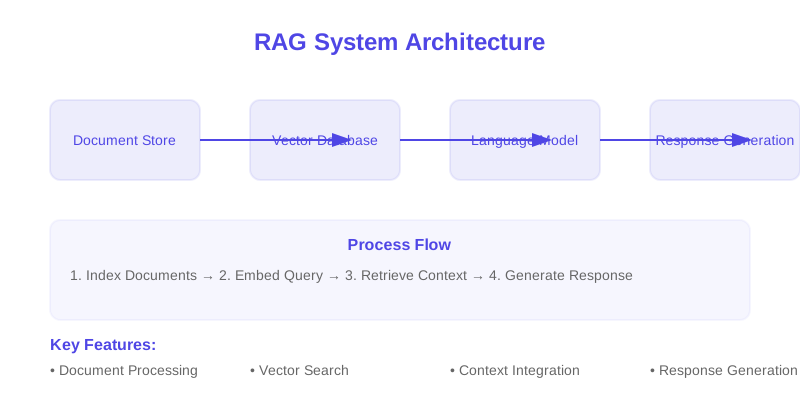
Retrieval Augmented Generation (RAG) is a critical technique for grounding Large Language Models (LLMs) in factual, up-to-date external knowledge. This guide details best practices and common patterns for building robust, scalable, and performant RAG systems suitable for production environments.
TL;DR: Effective RAG implementation involves a well-defined pipeline for document processing, embedding generation, vector storage, and LLM integration. Key considerations include chunking strategies, embedding model selection, vector database tuning, sophisticated prompt engineering, and robust monitoring for performance and quality.
Core RAG Architecture and Components
A production RAG system is comprised of several interconnected components, each requiring careful design and optimization.
1. Document Ingestion and Processing
This phase transforms raw documents into a queryable format.
- Text Extraction: Reliable extraction of text from diverse formats (PDF, HTML, DOCX, etc.) is foundational. Libraries like ,
PyMuPDF, orBeautifulSoupare commonly used.python-docx - Chunking Strategies: The process of splitting documents into smaller, semantically coherent pieces.
- Fixed-size: Simple but can break sentences or logical units.
- Recursive Character Splitting: Splits on a list of separators (e.g., ,
\n\n,\n) and recursively applies until chunks meet size criteria. This is a common and effective approach. - Semantic Chunking: Uses sentence embeddings to identify semantic boundaries, creating more meaningful chunks. This is more complex but can yield better retrieval quality.
- Metadata Management: Associating source, page numbers, document IDs, and other relevant metadata with each chunk is crucial for provenance, filtering, and debugging.
- Document Storage: While not strictly part of the RAG pipeline, an artifact store (e.g., S3, GCS) for original and processed documents is essential for re-processing and auditing.
Example (Chunking):
from typing import List, Dict
from langchain.text_splitter import RecursiveCharacterTextSplitter

class DocumentProcessor:
    def __init__(self, chunk_size: int = 1000, chunk_overlap: int = 200):
        self.text_splitter = RecursiveCharacterTextSplitter(
            chunk_size=chunk_size,
            chunk_overlap=chunk_overlap,
            length_function=len, # Assumes character count, can be token count
            separators=["\n\n", "\n", " ", ""]
        )

    def process_document(self, content: str, metadata: Dict) -> List[Dict]:
        """
        Splits document content into chunks with associated metadata.

        Args:
            content: The raw text content of the document.
            metadata: A dictionary of metadata for the document.

        Returns:
            A list of dictionaries, where each dictionary represents a chunk
            with its text and enriched metadata.
        """
        chunks = self.text_splitter.split_text(content)
        processed_chunks = []
        for i, chunk_text in enumerate(chunks):
            processed_chunks.append({
                "text": chunk_text,
                "metadata": {
                    **metadata,
                    "chunk_index": i, # Order within the document
                    "document_id": metadata.get("document_id", generate_uuid(chunk_text)) # Unique ID for chunk
                }
            })
        return processed_chunks

# Helper for unique IDs if not provided
import hashlib
def generate_uuid(text: str) -> str:
    return hashlib.md5(text.encode()).hexdigest()
2. Embedding Generation
Converting text chunks into dense vector representations (embeddings).
- Model Selection: The choice of embedding model significantly impacts retrieval quality.
- Sentence-BERT variants (,
all-MiniLM-L6-v2): Good balance of performance and speed.all-mpnet-base-v2 - OpenAI Embeddings (): High performance, but introduces external dependency and cost.
text-embedding-ada-002 - Specialized Models: Models fine-tuned for specific domains (e.g., scientific literature, legal documents) can outperform general-purpose models.
- Sentence-BERT variants (
- Embedding Optimization:
- Batch Processing: Encode texts in batches to leverage hardware acceleration (GPU).
- Dimension Reduction: Techniques like PCA can reduce vector dimensionality, saving storage and potentially improving query speed, but may impact accuracy.
- Quality Assurance: Periodically evaluate embedding quality using benchmark datasets or human evaluation to detect drift or performance degradation.
Example (Embedding Pipeline):
from sentence_transformers import SentenceTransformer
import numpy as np
from typing import List

class EmbeddingPipeline:
    def __init__(self, model_name: str = "all-MiniLM-L6-v2"):
        """
        Initializes the embedding pipeline with a Sentence Transformer model.

        Args:
            model_name: The name of the Sentence Transformer model to use.
        """
        self.model = SentenceTransformer(model_name)

    def generate_embeddings(self, texts: List[str], batch_size: int = 64) -> np.ndarray:
        """
        Generates embeddings for a list of texts using batch processing.

        Args:
            texts: A list of text strings to embed.
            batch_size: The number of texts to process in each batch.

        Returns:
            A NumPy array of embeddings.
        """
        if not texts:
            return np.array([])
        # The model can handle batching internally, but explicit batching
        # can provide more control and logging.
        embeddings = self.model.encode(texts, convert_to_numpy=True, batch_size=batch_size)
        return embeddings
3. Vector Storage and Indexing
Storing embeddings and enabling efficient similarity search.
- Database Selection:
- Managed Services: Pinecone, Weaviate Cloud, Zilliz Cloud offer scalability and ease of use.
- Self-Hosted: Weaviate, Milvus, Qdrant, ChromaDB provide more control but require operational overhead.
- Hybrid/Relational: PostgreSQL with pgvector extension offers a familiar environment for existing relational databases.
- Index Optimization: The choice of index (e.g., HNSW, IVF) and its parameters (e.g., ,
ef_constructionfor HNSW) critically impacts search speed and recall.M - Query Performance: Tune (number of neighbors) and distance metrics (cosine similarity, dot product, Euclidean).
k - Scaling Strategies: Plan for read replicas, sharding, and efficient data loading.
Example (Weaviate Integration):
import weaviate
from weaviate.util import generate_uuid5 # Useful for deterministic UUIDs
import numpy as np
from typing import List, Dict, Any

class VectorStore:
    def __init__(self, url: str, api_key: str = None, model_name: str = "text-embedding-ada-002"):
        """
        Initializes a connection to a Weaviate vector database and sets up schema.

        Args:
            url: The Weaviate instance URL.
            api_key: Optional API key for authentication.
            model_name: The name of the embedding model configured in Weaviate, if using Weaviate's vectorization.
        """
        auth_config = weaviate.AuthApiKey(api_key) if api_key else None
        self.client = weaviate.Client(url=url, auth_client_auth_protocol=auth_config)
        self.model_name = model_name
        self._setup_schema() # Ensure schema is created on initialization

    def _setup_schema(self):
        """Defines the Weaviate schema for document storage."""
        # Example: Using Weaviate's built-in vectorizer.
        # If providing vectors manually, set 'vectorizer': 'none' and pass vectors during data import.
        class_name = "DocumentChunk"
        if not self.client.schema.exists(class_name):
            schema_obj = {
                "class": class_name,
                "description": "Stores chunks of documents for RAG.",
                # If using Weaviate's text2vec-openai or similar:
                "vectorizer": "text2vec-openai", # Or your chosen vectorizer module
                "moduleConfig": {
                    "text2vec-openai": {
                        "model": self.model_name,
                        "type": "text",
                        "vectorizeClassName": False # Typically false for better control
                    }
                },
                "properties": [
                    {"name": "text", "dataType": ["text"], "description": "The content of the document chunk."},
                    {"name": "metadata", "dataType": ["object"], "description": "Original metadata associated with the chunk."}
                    # Add more properties as needed, e.g., document_id, page_number
                ]
            }
            self.client.schema.create_class(schema_obj)
            print(f"Class '{class_name}' created successfully.")
        else:
            print(f"Class '{class_name}' already exists.")

    def add_documents_with_vectors(self, documents_with_embeddings: List[Dict[str, Any]]):
        """
        Adds document chunks and their pre-computed embeddings to Weaviate.

        Args:
            documents_with_embeddings: A list of dictionaries. Each dict should contain
                                       'text', 'metadata', and 'embedding'.
        """
        class_name = "DocumentChunk"
        with self.client.batch(
            batch_size=100, # Tune for performance
            batch_type='object' # 'object' for data objects, 'vector' for vector data
        ) as batch:
            for item in documents_with_embeddings:
                uuid = generate_uuid5(item.get("metadata", {}).get("document_id", "") + str(item.get("metadata", {}).get("chunk_index", "")))
                properties = {
                    "text": item["text"],
                    "metadata": item["metadata"]
                }
                batch.add_data_object(
                    data_object=properties,
                    class_name=class_name,
                    uuid=uuid,
                    vector=item["embedding"] # Provide pre-computed embedding
                )
        print(f"Added {len(documents_with_embeddings)} documents to Weaviate.")

    def search_by_vector(self, query_embedding: np.ndarray, k: int = 5, certainty_threshold: float = 0.7) -> List[Dict]:
        """
        Performs a similarity search in Weaviate using a query embedding.

        Args:
            query_embedding: The embedding vector for the query.
            k: The number of nearest neighbors to retrieve.
            certainty_threshold: Minimum certainty score to consider a result relevant.

        Returns:
            A list of retrieved document chunks.
        """
        class_name = "DocumentChunk"
        try:
            result = (
                self.client.query
                .get(class_name, ["text", "metadata"])
                .with_near_vector({
                    "vector": query_embedding.tolist(), # Weaviate expects list
                    "certainty": certainty_threshold # Use certainty for similarity search
                })
                .with_limit(k)
                .do()
            )
            # Weaviate returns results under "data" -> "Get" -> [ClassName]
            return result.get("data", {}).get("Get", {}).get(class_name, [])
        except Exception as e:
            print(f"Error during Weaviate search: {e}")
            return []
4. LLM Integration
Orchestrating retrieval and generation.
- Context Injection: Carefully format retrieved chunks into a context string for the LLM. Avoid overwhelming the LLM's context window.
- Prompt Engineering: Crafting effective prompts is paramount. This includes:
- Instructions: Clearly state the LLM's role and task.
- Context Formatting: Present retrieved information clearly, potentially with source attributions.
- Question: The user's original query.
- Output Constraints: Specify desired output format (e.g., JSON, bullet points).
- Response Generation: Use the LLM to synthesize an answer based on the injected context and the original query.
- Output Validation: Implement checks for hallucinations, factual inconsistencies, or compliance with output format requirements.
Example (RAG System Orchestration):
from langchain.chat_models import ChatOpenAI
from langchain.prompts import ChatPromptTemplate
from langchain_core.runnables import RunnablePassthrough
from langchain_core.output_parsers import StrOutputParser
from typing import Dict, Any

class RAGSystem:
    def __init__(self, vector_store: VectorStore, embedding_pipeline: EmbeddingPipeline, llm_model_name: str = "gpt-4o"):
        """
        Initializes the RAG system orchestrating retrieval and generation.

        Args:
            vector_store: An instance of the VectorStore.
            embedding_pipeline: An instance of the EmbeddingPipeline.
            llm_model_name: The name of the LLM to use (e.g., "gpt-4o", "gpt-3.5-turbo").
        """
        self.vector_store = vector_store
        self.embedding_pipeline = embedding_pipeline
        self.llm = ChatOpenAI(model_name=llm_model_name, temperature=0.2) # Lower temperature for factual answers

        # Define the retrieval chain
        def retrieve_context(query: str) -> Dict[str, Any]:
            query_embedding = self.embedding_pipeline.generate_embeddings([query])[0]
            # Weaviate expects a list of embeddings, but we only have one here.
            # The search_by_vector method handles this conversion.
            retrieved_docs = self.vector_store.search_by_vector(query_embedding, k=5)
            # Extract only the text content for the prompt
            return {"context": "\n\n".join([doc.get("text", "") for doc in retrieved_docs])}

        # Define the prompt template
        self.prompt_template = ChatPromptTemplate.from_messages([
            ("system", "You are an AI assistant that answers questions based on the provided context. If you cannot find the answer in the context, state that you don't know."),
            ("human", "Context:\n{context}\n\nQuestion: {question}")
        ])

        # Define the RAG chain using LCEL (LangChain Expression Language)
        self.rag_chain = (
            {"context": RunnablePassthrough() | retrieve_context, "question": RunnablePassthrough()}
            | self.prompt_template
            | self.llm
            | StrOutputParser()
        )

    def generate_response(self, query: str) -> str:
        """
        Generates a response to a user query using the RAG system.

        Args:
            query: The user's question.

        Returns:
            The synthesized answer from the LLM.
        """
        try:
            # The RunnablePassthrough() will pass the query to both
            # retrieve_context (via the | operator) and the prompt template.
            response = self.rag_chain.invoke({"context": query, "question": query})
            return response
        except Exception as e:
            print(f"Error generating response: {e}")
            return "An error occurred while generating the response."
Advanced Optimization Techniques
1. Enhancing Retrieval Quality
- Re-ranking: After initial retrieval, use a cross-encoder model to re-rank the top-N results for improved relevance.
- Hybrid Search: Combine keyword search (e.g., BM25) with vector search to capture both exact matches and semantic similarity.
- Query Expansion: Augthen the user query with synonyms or related terms before embedding and searching.
- Multi-Vector Embeddings: For documents with complex structure or mixed content types, consider generating multiple embeddings per chunk (e.g., one for text, one for metadata).
- Context Compression: Techniques to reduce the amount of context passed to the LLM, focusing on the most salient information.
2. Improving Generation Accuracy
- Prompt Tuning/Few-Shot Learning: Experiment with different prompt structures and provide few-shot examples to guide the LLM's output.
- Knowledge Graph Integration: Augment RAG with structured knowledge from knowledge graphs for more precise fact retrieval.
- Fact-Checking Layer: Post-process the LLM's output to verify factual claims against a trusted source or knowledge base.
- Iterative Refinement: If the initial answer is unsatisfactory, use it as feedback to refine the query or context and re-generate.
3. Performance Optimization
- Caching: Cache embeddings and LLM responses for frequent queries.
- Asynchronous Operations: Utilize asynchronous I/O for document processing, embedding generation, and LLM calls.
- Optimized Vector Indexes: Tune HNSW parameters, consider specialized indexes for particular data distributions.
- GPU Acceleration: Ensure embedding generation and LLM inference leverage available GPUs.
Monitoring and Maintenance
Continuous monitoring is essential for production systems.
1. Performance Metrics
- Latency: End-to-end query latency, and latency of individual components (retrieval, embedding, generation).
- Throughput: Queries per second.
- Resource Utilization: CPU, memory, GPU, network I/O.
- Cost: API calls, compute resources, storage.
Example (Basic Metrics Logging):
import time
from typing import List, Dict, Any

class RAGMonitor:
    def __init__(self):
        self.metrics_log: List[Dict[str, Any]] = []

    def log_query_performance(
        self,
        query: str,
        retrieval_time: float,
        embedding_time: float,
        generation_time: float,
        response: str,
        retrieved_docs: List[Dict],
        error: Exception = None
    ):
        """Logs performance metrics for a single query."""
        total_latency = retrieval_time + embedding_time + generation_time
        log_entry = {
            "timestamp": time.time(),
            "query": query,
            "retrieval_time_ms": retrieval_time * 1000,
            "embedding_time_ms": embedding_time * 1000,
            "generation_time_ms": generation_time * 1000,
            "total_latency_ms": total_latency * 1000,
            "num_retrieved_docs": len(retrieved_docs),
            "response_length": len(response),
            "error": str(error) if error else None,
            # Add more metrics like token counts from LLM, certainty scores etc.
        }
        self.metrics_log.append(log_entry)
        print(f"Logged query performance: {log_entry}")

    def get_summary(self):
        """Provides a basic summary of logged metrics."""
        if not self.metrics_log:
            return {"message": "No metrics logged yet."}

        latencies = [m["total_latency_ms"] for m in self.metrics_log if m["error"] is None]
        retrieval_times = [m["retrieval_time_ms"] for m in self.metrics_log if m["error"] is None]
        generation_times = [m["generation_time_ms"] for m in self.metrics_log if m["error"] is None]
        errors = [m for m in self.metrics_log if m["error"] is not None]

        summary = {
            "total_queries": len(self.metrics_log),
            "successful_queries": len(latencies),
            "error_queries": len(errors),
            "average_total_latency_ms": np.mean(latencies) if latencies else 0,
            "median_total_latency_ms": np.median(latencies) if latencies else 0,
            "average_retrieval_time_ms": np.mean(retrieval_times) if retrieval_times else 0,
            "average_generation_time_ms": np.mean(generation_times) if generation_times else 0,
            "errors": errors[:5] # Show first 5 errors
        }
        return summary
2. Quality Assurance
- Relevance Scoring: Automated or human evaluation of retrieved document relevance.
- Answer Accuracy: Metrics like ROUGE, BLEU, or factual consistency checks.
- User Feedback Loop: Collect explicit feedback (thumbs up/down, comments) from users to identify areas for improvement.
- Drift Detection: Monitor changes in data distribution or embedding quality over time.
Production Deployment Considerations
1. Scaling and Reliability
- Containerization: Dockerize all components for consistent deployment.
- Orchestration: Use Kubernetes or similar for managing containerized services, auto-scaling, and rolling updates.
- Load Balancing: Distribute incoming requests across multiple instances of your RAG service.
- Redundancy: Ensure high availability for critical components like the vector database.
- Graceful Degradation: Implement fallback mechanisms (e.g., use a simpler LLM, return cached results) when components fail.
2. Error Handling and Resilience
- Circuit Breakers: Prevent cascading failures by stopping requests to services that are experiencing issues.
- Retries with Backoff: Implement exponential backoff for transient errors when calling external APIs (LLMs, vector databases).
- Dead Letter Queues: Capture messages or requests that repeatedly fail processing for later inspection.
Example (Error Handling Strategy):
from typing import Any, Dict, List

class RAGErrorHandler:
    def __init__(self, max_retries: int = 3, retry_delay_sec: float = 1.0):
        self.max_retries = max_retries
        self.retry_delay_sec = retry_delay_sec

    def _retry_logic(self, operation: callable, *args, **kwargs) -> Any:
        """Applies a retry strategy to a given operation."""
        for attempt in range(self.max_retries):
            try:
                return operation(*args, **kwargs)
            except Exception as e:
                print(f"Attempt {attempt + 1}/{self.max_retries} failed: {e}")
                if attempt < self.max_retries - 1:
                    time.sleep(self.retry_delay_sec * (2 ** attempt)) # Exponential backoff
                else:
                    raise e # Re-raise the last exception

    def handle_retrieval(self, vector_store_search_func: callable, query_embedding: np.ndarray, k: int) -> List[Dict]:
        """Handles potential errors during the vector retrieval process."""
        try:
            return self._retry_logic(
                vector_store_search_func,
                query_embedding=query_embedding,
                k=k
            )
        except Exception as e:
            print(f"Critical retrieval error after multiple retries: {e}")
            # Implement fallback strategy: e.g., return empty list, log, alert
            return []

    def handle_generation(self, llm_call_func: callable, prompt_content: str) -> str:
        """Handles potential errors during the LLM generation process."""
        try:
            return self._retry_logic(
                llm_call_func,
                prompt_content=prompt_content
            )
        except Exception as e:
            print(f"Critical generation error after multiple retries: {e}")
            # Implement fallback strategy: e.g., return a generic error message, alert
            return "An internal error occurred. Please try again later."

    def handle_embedding(self, embedding_pipeline_func: callable, texts: List[str]) -> np.ndarray:
        """Handles potential errors during embedding generation."""
        try:
            return self._retry_logic(
                embedding_pipeline_func,
                texts=texts
            )
        except Exception as e:
            print(f"Critical embedding error after multiple retries: {e}")
            # Implement fallback strategy: e.g., use a default low-quality embedding, log, alert
            return np.zeros((len(texts), 384)) # Example: return zero vectors
Trade-offs and Considerations
- Complexity vs. Performance: Advanced techniques like re-ranking or hybrid search add complexity but can significantly improve results. Choose based on your specific requirements.
- Cost vs. Quality: More powerful embedding models and LLMs often come with higher costs. Benchmark to find the optimal balance.
- Latency vs. Completeness: Longer context windows and more complex processing increase latency. Techniques like context compression are crucial for real-time applications.
- Data Freshness: RAG systems are only as current as their underlying knowledge base. Implement robust data ingestion pipelines to keep the knowledge base updated.
- Hallucinations: Despite RAG, LLMs can still hallucinate. Rigorous prompt engineering and output validation are necessary.
When Not to Use RAG
- Simple Q&A on Limited, Static Data: If your knowledge base is small, static, and can be easily fit into an LLM's context window, fine-tuning might be simpler and more performant.
- Tasks Requiring Deep Reasoning or Creativity: RAG is primarily for grounding in facts. For tasks heavily reliant on abstract reasoning or novel creative generation without specific factual constraints, standard LLMs or different architectures might be better.
- Real-time Conversational Agents with Very Low Latency Requirements: The retrieval step adds latency. For ultra-low latency chatbots where speed