Cloud-Native Architecture Patterns: A Comprehensive Guide
Master cloud-native architecture patterns with this in-depth guide covering microservices, event-driven architectures, scalability patterns, and deployment strategies.
Cloud-Native Architecture Patterns: A Pragmatic Engineering Guide
This guide provides an in-depth look at core cloud-native architectural patterns, focusing on practical implementation, trade-offs, and operational considerations for experienced engineers.
TL;DR
Cloud-native architectures leverage patterns like microservices and event-driven systems for modularity and scalability. Essential implementation patterns include API Gateways for request routing and management, and Event Sourcing for immutable state management. To enhance resilience, patterns like CQRS, Circuit Breakers, Retries, and Bulkheads are crucial. Deployment patterns such as Sidecar and Ambassador simplify external service interaction and management. Robust observability is achieved through Health Checks and Metrics Collection. Adhering to design principles, implementation guidelines, and operational best practices is key to successful cloud-native adoption.
Core Architecture Patterns
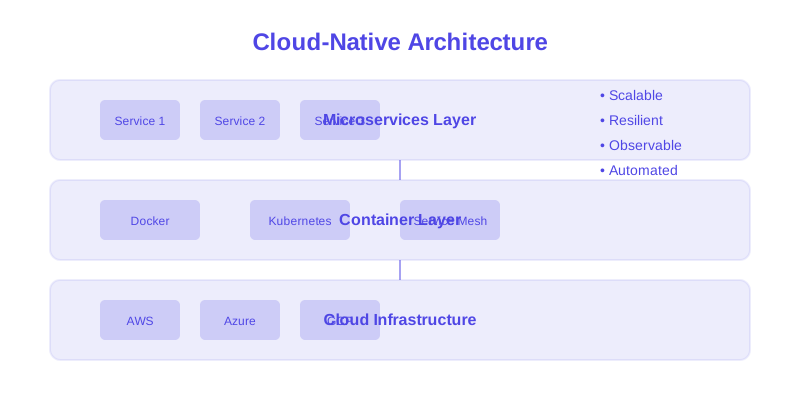
These patterns form the foundational structure of cloud-native applications, emphasizing modularity and decoupled services.
1. Microservices Pattern
Decomposes an application into small, independent services, each responsible for a specific business capability. Services communicate over a network, typically via HTTP APIs or asynchronous messaging.
Diagram:
Key Considerations:
- Communication: Services communicate via well-defined APIs (REST, gRPC) or message queues.
- Data Management: Each service typically manages its own database, promoting autonomy but introducing eventual consistency challenges.
- Deployment: Services can be deployed, scaled, and updated independently.
2. Event-Driven Architecture (EDA)
Systems communicate through events, which are significant changes in state. Producers publish events to an event bus, and consumers subscribe to events they are interested in, reacting asynchronously.
Diagram:
Key Considerations:
- Decoupling: Producers and consumers are highly decoupled, as they only need to agree on event schemas.
- Scalability: Consumers can be scaled independently to handle event volume.
- Complexity: Managing event ordering, deduplication, and idempotency can be challenging.
Implementation Patterns
These patterns address how to effectively build and manage the interactions within and between your cloud-native services.
1. API Gateway Pattern
A single entry point for all client requests. It handles request routing, composition, authentication, authorization, rate limiting, and protocol translation.
Code Example (Node.js with Express and http-proxy-middleware
// api-gateway.ts
import express from 'express';
import { createProxyMiddleware } from 'http-proxy-middleware';

const app = express();
const PORT = 3000;

// Service registry - In production, this would be dynamic (e.g., Consul, Kubernetes Service Discovery)
const services = {
  auth: 'http://auth-service:3001',
  users: 'http://user-service:3002',
  products: 'http://product-service:3003',
  orders: 'http://order-service:3004'
};

// Example Authentication middleware - In a real system, this would call an auth service
const authenticateRequest = async (req: express.Request, res: express.Response, next: express.NextFunction) => {
  const authHeader = req.headers.authorization;
  if (!authHeader) {
    return res.status(401).json({ error: 'Authorization header missing' });
  }
  // In a real scenario, validate the token with the auth service
  // const isValid = await validateToken(authHeader);
  // if (!isValid) return res.status(401).json({ error: 'Invalid token' });

  // For demonstration purposes, assume valid if header is present
  console.log('Request authenticated.');
  next();
};

// Define routes and their corresponding services and middleware
const routes = [
  { path: '/auth', target: services.auth, requiresAuth: false },
  { path: '/users', target: services.users, requiresAuth: true },
  { path: '/products', target: services.products, requiresAuth: true },
  { path: '/orders', target: services.orders, requiresAuth: true }
];

routes.forEach(({ path, target, requiresAuth }) => {
  const middleware = requiresAuth ? [authenticateRequest] : [];
  app.use(path, ...middleware, createProxyMiddleware({
    target: target,
    changeOrigin: true,
    pathRewrite: {
      // Remove the base path from the request before forwarding
      [`^${path}`]: ''
    },
    onError: (err, req, res) => {
      console.error(`Proxy error for ${path}: ${err.message}`);
      res.status(502).json({ error: 'Bad Gateway' });
    }
  }));
});

app.listen(PORT, () => {
  console.log(`API Gateway running on port ${PORT}`);
});
Trade-offs:
- Pros: Centralized cross-cutting concerns (auth, logging, rate limiting), simplifies client interaction, can aggregate/transform responses.
- Cons: Single point of failure if not highly available, can become a bottleneck, adds latency, complexity in managing routing rules.
2. Event Sourcing Pattern
Records all changes to application state as a sequence of immutable events. The current state is derived by replaying these events.
Code Example (Conceptual Event Store):
// event-store.ts
interface Event {
  id: string; // Unique ID for the event
  type: string; // Type of event (e.g., 'OrderCreated', 'ProductUpdated')
  data: any;    // Payload of the event
  timestamp: Date; // When the event occurred
  aggregateId: string; // ID of the entity this event relates to
  version: number; // Version of the aggregate this event applies to
}

// Abstract base class for command handlers
abstract class CommandHandler<TCommand, TAggregate> {
    abstract handle(command: TCommand, aggregate: TAggregate): Promise<Event[]>;
}

// Abstract base class for aggregate roots
abstract class AggregateRoot {
    abstract getAggregateId(): string;
    abstract applyEvent(event: Event): void;
    abstract getUncommittedEvents(): Event[];
    abstract clearUncommittedEvents(): void;
    abstract getVersion(): number;
}

class EventStore {
  // In-memory store for demonstration. A real implementation would use a persistent database.
  private eventsByAggregate: Map<string, Event[]> = new Map();
  private eventHandlers: Map<string, Array<(event: Event) => Promise<void>>> = new Map();

  async appendEvents(aggregateId: string, events: Event[]): Promise<void> {
    if (!this.eventsByAggregate.has(aggregateId)) {
      this.eventsByAggregate.set(aggregateId, []);
    }
    const aggregateEvents = this.eventsByAggregate.get(aggregateId)!;
    for (const event of events) {
      // Ensure events are ordered and versions are sequential
      event.version = aggregateEvents.length + 1;
      aggregateEvents.push(event);
      await this.publishEvent(event);
    }
  }

  async getEventsForAggregate(aggregateId: string): Promise<Event[]> {
    return this.eventsByAggregate.get(aggregateId) || [];
  }

  subscribe(eventType: string, handler: (event: Event) => Promise<void>): void {
    const handlers = this.eventHandlers.get(eventType) || [];
    handlers.push(handler);
    this.eventHandlers.set(eventType, handlers);
  }

  private async publishEvent(event: Event): Promise<void> {
    const handlers = this.eventHandlers.get(event.type) || [];
    await Promise.all(handlers.map(handler => handler(event)));
  }

  // Method to replay events to reconstruct state
  async replayEvents<TAggregate extends AggregateRoot>(aggregate: TAggregate): Promise<void> {
    const events = await this.getEventsForAggregate(aggregate.getAggregateId());
    events.forEach(event => aggregate.applyEvent(event));
  }
}

// Example Usage (Conceptual)
/*
class OrderAggregate extends AggregateRoot {
    private id: string;
    private orderLines: any[] = [];
    private currentVersion: number = 0;
    private uncommittedEvents: Event[] = [];

    constructor(id: string) {
        super();
        this.id = id;
    }

    getAggregateId(): string { return this.id; }
    getVersion(): number { return this.currentVersion; }

    getUncommittedEvents(): Event[] { return this.uncommittedEvents; }
    clearUncommittedEvents(): void { this.uncommittedEvents = []; }

    applyEvent(event: Event): void {
        this.currentVersion = event.version;
        switch (event.type) {
            case 'OrderCreated':
                this.orderLines = event.data.items;
                break;
            case 'ItemAddedToOrder':
                this.orderLines.push(event.data.item);
                break;
            // ... other event types
        }
    }

    createOrder(items: any[]): void {
        const event: Event = {
            id: uuidv4(),
            type: 'OrderCreated',
            data: { items },
            timestamp: new Date(),
            aggregateId: this.id,
            version: 0 // Version will be set by EventStore
        };
        this.uncommittedEvents.push(event);
        this.applyEvent(event);
    }
}

// In a service:
const eventStore = new EventStore();
// Subscribe handlers for side effects (e.g., updating read models)
eventStore.subscribe('OrderCreated', async (event) => {
    // Update read model for order list
});

const orderId = 'order-123';
const order = new OrderAggregate(orderId);
await eventStore.replayEvents(order); // Load existing state

order.createOrder([{ productId: 'p1', quantity: 2 }]);
const newEvents = order.getUncommittedEvents();
await eventStore.appendEvents(orderId, newEvents);
order.clearUncommittedEvents();
*/
Trade-offs:
- Pros: Complete audit trail, enables temporal queries, simplifies event-driven integrations, can reconstruct any state.
- Cons: Increased complexity (eventual consistency, query models), potential for large event streams, requires careful schema evolution.
Scalability Patterns
These patterns are designed to improve the ability of your system to handle increasing loads and demands.
1. CQRS (Command Query Responsibility Segregation)
Separates the models for updating data (commands) from the models for reading data (queries). This allows for optimizing each path independently.
Code Example (Conceptual Handlers):
// cqrs-example.ts
// --- Common Interfaces ---
interface Command {
  id: string;
  type: string;
  payload: any;
  timestamp: Date;
}

interface Query {
  id: string;
  type: string;
  parameters: any;
  timestamp: Date;
}

// --- Command Side ---
class OrderService {
  constructor(private eventStore: EventStore) {} // Assuming EventStore from previous example

  async executeCommand(command: Command): Promise<void> {
    let order: OrderAggregate; // Assuming OrderAggregate from Event Sourcing example
    const orderId = command.payload.orderId; // Or derive from command payload

    if (command.type === 'CreateOrderCommand') {
      order = new OrderAggregate(orderId); // New aggregate
    } else {
      order = new OrderAggregate(orderId);
      await this.eventStore.replayEvents(order); // Load existing state
    }

    // Apply command logic to aggregate to produce events
    // e.g., if (command.type === 'AddItemToOrderCommand') { order.addItem(command.payload.item); }
    const newEvents = order.getUncommittedEvents();
    await this.eventStore.appendEvents(orderId, newEvents);
    order.clearUncommittedEvents();
  }
}

// --- Query Side ---
class OrderReadService {
  constructor(private dataStore: any) {} // e.g., a dedicated read database

  async executeQuery(query: Query): Promise<any> {
    switch (query.type) {
      case 'GetOrderByIdQuery':
        return this.dataStore.findById(query.parameters.orderId);
      case 'ListOrdersQuery':
        return this.dataStore.findMany(query.parameters);
      default:
        throw new Error(`Unknown query type: ${query.type}`);
    }
  }
}

// --- Event Handlers for updating read models ---
// This would be part of the EventStore's subscription mechanism
async function handleOrderEventForReadModel(event: Event): Promise<void> {
  const readService = new OrderReadService(myReadDatabase); // Assume myReadDatabase is globally accessible
  switch (event.type) {
    case 'OrderCreated':
      await readService.dataStore.insert({
        id: event.aggregateId,
        ...event.data,
        version: event.version
      });
      break;
    case 'ItemAddedToOrder':
      const order = await readService.dataStore.findById(event.aggregateId);
      if (order) {
        order.items.push(event.data.item);
        order.version = event.version;
        await readService.dataStore.update(order);
      }
      break;
    // ... other event types
  }
}
Trade-offs:
- Pros: Optimizes read and write performance independently, can use different data stores for read/write, simplifies complex queries.
- Cons: Increased complexity (managing two models, eventual consistency for read models), requires event handlers to keep read models synchronized.
2. Circuit Breaker Pattern
Prevents an application from repeatedly trying to execute an operation that is likely to fail. It "opens" the circuit after a certain number of failures, preventing further calls until a timeout period, after which it enters a "half-open" state to test if the upstream service has recovered.
Code Example (Conceptual Circuit Breaker):
// circuit-breaker.ts
enum CircuitState {
  CLOSED,      // Allows operations through
  OPEN,        // Rejects operations immediately
  HALF_OPEN    // Allows a limited number of operations to test recovery
}

class CircuitBreaker {
  private state: CircuitState = CircuitState.CLOSED;
  private failureCount: number = 0;
  private lastFailureTime: number = 0;
  private readonly failureThreshold: number; // Number of failures to trip the circuit
  private readonly resetTimeout: number;    // Time in ms before transitioning to HALF_OPEN

  constructor(failureThreshold: number = 5, resetTimeout: number = 60000) {
    if (failureThreshold <= 0 || resetTimeout <= 0) {
      throw new Error("failureThreshold and resetTimeout must be positive.");
    }
    this.failureThreshold = failureThreshold;
    this.resetTimeout = resetTimeout;
  }

  async execute<T>(operation: () => Promise<T>): Promise<T> {
    switch (this.state) {
      case CircuitState.OPEN:
        if (Date.now() - this.lastFailureTime >= this.resetTimeout) {
          this.state = CircuitState.HALF_OPEN;
          console.log('Circuit Breaker: State transitioned to HALF_OPEN.');
          // Fall through to execute the operation in HALF_OPEN state
        } else {
          throw new Error('Circuit breaker is OPEN. Operation blocked.');
        }
        // Intentional fall-through to HALF_OPEN logic below
      case CircuitState.HALF_OPEN:
        try {
          const result = await operation();
          this.onSuccess();
          return result;
        } catch (error) {
          this.onFailure();
          throw error; // Re-throw the original error
        }
      case CircuitState.CLOSED:
      default:
        try {
          const result = await operation();
          this.onSuccess();
          return result;
        } catch (error) {
          this.onFailure();
          throw error; // Re-throw the original error
        }
    }
  }

  private onSuccess(): void {
    if (this.state === CircuitState.HALF_OPEN) {
      console.log('Circuit Breaker: Service recovered. State transitioned to CLOSED.');
    }
    this.failureCount = 0;
    this.state = CircuitState.CLOSED;
  }

  private onFailure(): void {
    this.failureCount++;
    this.lastFailureTime = Date.now();

    if (this.state === CircuitState.HALF_OPEN) {
        console.log('Circuit Breaker: Service still unavailable. State transitioned back to OPEN.');
        this.state = CircuitState.OPEN; // If recovery fails, immediately go back to OPEN
    } else if (this.failureCount >= this.failureThreshold) {
        console.log(`Circuit Breaker: Failure threshold reached (${this.failureCount}/${this.failureThreshold}). State transitioned to OPEN.`);
        this.state = CircuitState.OPEN;
    }
  }

  getState(): CircuitState {
    return this.state;
  }
}

// Example Usage (Conceptual):
/*
const productServiceCircuitBreaker = new CircuitBreaker(3, 30000); // Trip after 3 failures, reset after 30s

async function callProductService(productId: string) {
    try {
        const product = await productServiceCircuitBreaker.execute(() =>
            fetch(`http://product-service/products/${productId}`).then(res => res.json())
        );
        console.log('Product retrieved:', product);
    } catch (error: any) {
        console.error('Failed to get product:', error.message);
    }
}
*/
Trade-offs:
- Pros: Prevents cascading failures, improves overall system stability, provides graceful degradation.
- Cons: Adds complexity, requires careful tuning of thresholds and timeouts, state management can be tricky.
Resilience Patterns
These patterns enhance the system's ability to withstand failures and recover gracefully.
1. Retry Pattern
Automatically re-executes a failed operation a specified number of times, potentially with increasing delays (backoff), to overcome transient network issues or temporary service unavailability.
Code Example (Robust Retry Function):
// retry-pattern.ts
interface RetryOptions {
  maxAttempts: number;
  initialDelayMs: number;
  backoffMultiplier: number;
  maxDelayMs?: number; // Optional: cap the delay
}

async function retry<T>(
  operation: () => Promise<T>,
  options: RetryOptions
): Promise<T> {
  let lastError: Error;
  let attempt = 1;
  let currentDelay = options.initialDelayMs;

  if (options.maxAttempts <= 0) {
      throw new Error("maxAttempts must be positive.");
  }
  if (options.initialDelayMs < 0 || options.backoffMultiplier <= 0) {
      throw new Error("initialDelayMs must be non-negative and backoffMultiplier must be positive.");
  }

  while (attempt <= options.maxAttempts) {
    try {
      return await operation();
    } catch (error: any) {
      lastError = error;
      console.warn(`Attempt ${attempt}/${options.maxAttempts} failed for operation. Error: ${error.message}`);

      if (attempt === options.maxAttempts) {
        break; // Exit loop if this was the last attempt
      }

      await new Promise(resolve => setTimeout(resolve, currentDelay));

      // Calculate next delay with backoff
      currentDelay *= options.backoffMultiplier;
      if (options.maxDelayMs !== undefined && currentDelay > options.maxDelayMs) {
        currentDelay = options.maxDelayMs;
      }
      attempt++;
    }
  }

  throw new Error(`Operation failed after ${options.maxAttempts} attempts. Last error: ${lastError.message}`);
}

// Example Usage (Conceptual):
/*
const fetchWithRetry = async (url: string) => {
    return retry(() => fetch(url).then(res => {
        if (!res.ok) throw new Error(`HTTP error! status: ${res.status}`);
        return res.json();
    }), {
        maxAttempts: 5,
        initialDelayMs: 100,
        backoffMultiplier: 2,
        maxDelayMs: 5000 // Cap delay at 5 seconds
    });
};
*/
Trade-offs:
- Pros: Handles transient failures effectively, improves success rate for unreliable services.
- Cons: Can mask underlying issues if not used with careful monitoring, increases latency for failed operations, can exacerbate load on a struggling service if not combined with other patterns like Circuit Breaker.
2. Bulkhead Pattern
Isolates elements of an application into pools so that if one element fails, the others will continue to function. This prevents a failure in one service or component from consuming resources required by others.
Code Example (Semaphore-based Bulkhead):
// bulkhead-pattern.ts
class BulkheadExecutor {
  private availablePermits: number;
  private readonly queue: Array<{ resolve: () => void, reject: (reason?: any) => void }> = [];
  private readonly maxConcurrent: number;

  constructor(maxConcurrent: number) {
    if (maxConcurrent <= 0) {
      throw new Error("maxConcurrent must be a positive integer.");
    }
    this.maxConcurrent = maxConcurrent;
    this.availablePermits = maxConcurrent;
  }

  async execute<T>(operation: () => Promise<T>): Promise<T> {
    if (this.availablePermits <= 0) {
      // If no permits available, wait in queue
      return new Promise<T>((resolve, reject) => {
        this.queue.push({
          resolve: async () => {
            try {
              const result = await operation();
              resolve(result);
            } catch (error) {
              reject(error);
            } finally {
              this.releasePermit();
            }
          },
          reject
        });
      });
    }

    // If permits are available, execute immediately
    this.availablePermits--;
    try {
      const result = await operation();
      return result;
    } finally {
      this.releasePermit();
    }
  }

  private releasePermit(): void {
    this.availablePermits++;
    if (this.queue.length > 0 && this.availablePermits > 0) {
      const nextTask = this.queue.shift();
      if (nextTask) {
        // Schedule the next task execution asynchronously
        setImmediate(nextTask.resolve);
      }
    }
  }

  getQueueSize(): number {
    return this.queue.length;
  }

  getAvailablePermits(): number {
    return this.availablePermits;
  }
}

// Example Usage (Conceptual):
/*
const externalApiServiceBulkhead = new BulkheadExecutor(10); // Limit concurrent calls to 10

async function callExternalApi(data: any) {
    try {
        const response = await externalApiServiceBulkhead.execute(() =>
            fetch('http://external.api.com/process', {
                method: 'POST',
                body: JSON.stringify(data),
                headers: {'Content-Type': 'application/json'}
            }).then(res => res.json())
        );
        console.log('External API processed:', response);
    } catch (error: any) {
        console.error('External API call failed:', error.message);
    }
}
*/
Trade-offs:
- Pros: Isolates failures, prevents resource exhaustion, maintains availability of other operations.
- Cons: Introduces latency for queued operations, requires careful capacity planning for each pool.
Deployment Patterns
These patterns focus on how applications and their dependencies are packaged and managed within a deployment environment.
1. Sidecar Pattern
A secondary container (the sidecar) runs alongside the main application container within the same Pod (in Kubernetes). The sidecar handles auxiliary tasks like logging, monitoring, network proxying, or configuration management.
Example (Kubernetes Deployment YAML):
# sidecar-example.yaml
apiVersion: apps/v1
kind: Deployment
metadata:
  name: app-with-sidecar-deployment
spec:
  replicas: 3
  selector:
    matchLabels:
      app: myapp
  template:
    metadata:
      labels:
        app: myapp
    spec:
      containers:
      - name: main-app
        image: your-docker-registry/main-app:v1.2.0
        ports:
        - containerPort: 8080
        # Volume mounts for shared logging or config files
        volumeMounts:
        - name: shared-logs
          mountPath: /var/log/myapp
      - name: log-shipper-sidecar # The sidecar container
        image: your-docker-registry/log-shipper:latest
        # Mounts the same volume as the main app to access logs
        volumeMounts:
        - name: shared-logs
          mountPath: /var/