Deep Dive into AWS CloudFormation vs. Terraform: Which to Choose?
A comparative analysis of AWS CloudFormation and Terraform for infrastructure as code, helping you make an informed decision for your cloud infrastructure management.
AWS CloudFormation vs. Terraform: An Engineering Perspective
TL;DR
This article provides a comparative analysis of AWS CloudFormation and HashiCorp Terraform for Infrastructure as Code (IaC) management, tailored for experienced engineers. It details their architectural differences, language syntax, state management strategies, and resource handling, supported by practical code examples. Key use cases, best practices, and a decision checklist are provided to guide selection based on project requirements, team expertise, and organizational factors. CloudFormation excels in AWS-native environments, offering managed state and deep integration. Terraform offers multi-cloud flexibility, advanced state management, and a broader ecosystem.
Introduction
In the realm of cloud infrastructure management, Infrastructure as Code (IaC) is paramount for ensuring consistency, repeatability, and scalability. For engineers operating within the AWS ecosystem, AWS CloudFormation and HashiCorp Terraform are the two dominant IaC tools. While both achieve the goal of defining and provisioning infrastructure programmatically, their underlying architectures, feature sets, and operational paradigms present distinct trade-offs. This deep dive aims to equip engineers with the knowledge to make an informed decision between these powerful tools.
Core Architectural Differences
AWS CloudFormation
CloudFormation is AWS's native IaC service. It operates by taking declarative templates (written in YAML or JSON) that describe the desired state of AWS resources. AWS then interprets these templates and orchestrates the provisioning and management of those resources.
- Key Characteristics:
- Managed Service: CloudFormation is a fully managed AWS service. AWS handles the control plane, state tracking, and execution of provisioning operations.
- AWS-Centric: Designed exclusively for AWS resources. It offers immediate support for new AWS services and features upon their release.
- Declarative State Management: Resources are defined, and CloudFormation ensures the actual state matches the declared state.
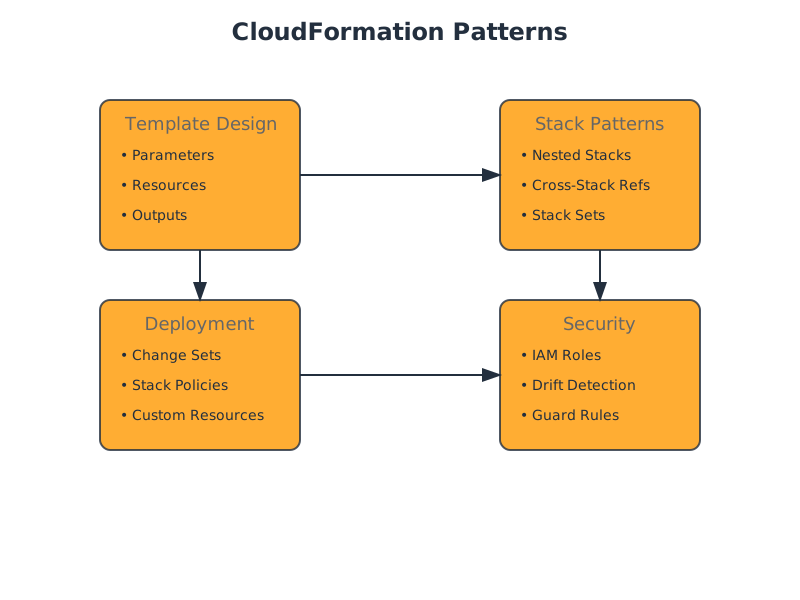
- Change Sets: Facilitate a preview of changes before they are applied, enhancing safety.
- Automatic Rollback: If a stack creation or update fails, CloudFormation attempts to roll back to the previous stable state.
HashiCorp Terraform
Terraform is an open-source IaC tool developed by HashiHashiCorp. It utilizes a declarative configuration language (HashiCorp Configuration Language - HCL, or JSON) to define infrastructure across a wide range of providers, including multiple cloud platforms, SaaS services, and on-premises infrastructure.
- Key Characteristics:
- Provider-Agnostic: Supports a vast ecosystem of providers through plugins. This allows for managing resources across AWS, Azure, GCP, Kubernetes, Datadog, and more, using a single tool and workflow.
- State File Management: Terraform maintains a state file that maps declared resources to real-world objects. This state file is critical for Terraform to understand the current infrastructure and plan changes.
- Plan/Apply Workflow: Terraform performs a operation to show what changes will be made before
planis executed. This provides a clear diff of intended modifications.apply - Extensibility: A rich module registry and a vibrant open-source community contribute to its extensive capabilities.
Detailed Comparison
1. Cloud Provider Support
| Feature | AWS CloudFormation | HashiCorp Terraform | | :------------------ | :-------------------------------------------------- | :-------------------------------------------------------- | | Scope | AWS only | Multi-cloud, SaaS, on-premises | | Integration | Deep, native AWS integration. First access to new AWS features. | Broad support via providers. New AWS features may have a slight lag in provider availability. | | Consistency | AWS-specific configuration syntax and paradigms. | Consistent workflow and language across diverse providers. | | Ecosystem | Primarily AWS services. | Extensive provider ecosystem, community modules. |
2. Language and Syntax
Both tools employ declarative syntax, but their specific languages and structures differ.
CloudFormation (YAML Example):
This example defines an S3 bucket with versioning enabled.
Resources:
  MyS3Bucket:
    Type: 'AWS::S3::Bucket'
    Properties:
      BucketName: my-unique-application-bucket-12345
      VersioningConfiguration:
        Status: Enabled
      Tags:
        - Key: Environment
          Value: Production
Terraform (HCL Example):
This example achieves the same S3 bucket configuration.
resource "aws_s3_bucket" "my_bucket" {
  bucket = "my-unique-application-bucket-12345"
  acl    = "private" # Explicitly set ACL for clarity, though default is private

  versioning {
    enabled = true
  }

  tags = {
    Environment = "Production"
  }
}
- Key Differences:
- CloudFormation uses and
Typewith AWS-specific resource schema.Properties - Terraform uses blocks with provider-specific resource types (e.g.,
resource) and attribute-based configuration.aws_s3_bucket - Terraform's HCL is generally considered more human-readable and concise for complex configurations.
- CloudFormation uses
3. State Management
This is a critical differentiator.
CloudFormation:
- Managed State: AWS manages the state of CloudFormation stacks internally. You do not directly interact with or manage a state file.
- Stack-Based: State is tied to the "stack" concept. Each stack represents a collection of AWS resources provisioned by a single template.
- Implicit Rollback: On failure, CloudFormation attempts an automatic rollback to the last known good configuration.
- Drift Detection: Can detect deviations between the actual state of resources and the state defined in the template.
Terraform:
- Explicit State File: Terraform maintains a file (or remote state backend). This file records the mapping between your configuration and the real-world infrastructure resources it manages.
terraform.tfstate - Importance of State: The state file is crucial for Terraform to know what it's managing. Accidental deletion or corruption of the state file can lead to significant operational issues.
- Remote State Backends: For production environments, it's essential to use remote state backends (e.g., S3 with DynamoDB for locking, Terraform Cloud/Enterprise) to store state files centrally, securely, and with concurrency controls.
- Plan/Apply: The command uses the state file and the configuration to generate an execution plan, which is then applied by
terraform plan.terraform apply - Manual Rollback/Revert: While Terraform can destroy and re-provision, rolling back a specific failed change often involves manually editing the state or re-running with corrected configuration and potentially destructive operations.
4. Resource Lifecycle and Dependencies
Both tools manage resource lifecycles and dependencies.
CloudFormation:
- Implicit Dependencies: CloudFormation automatically infers dependencies based on resource references (,
!Ref).!GetAtt - Explicit Dependencies: You can define explicit dependencies using .
DependsOn - Update Behavior: CloudFormation determines the order of operations for updates based on dependencies.
Terraform:
- Implicit Dependencies: Terraform automatically infers dependencies based on attribute references (e.g., ).
vpc_id = aws_vpc.main.id - Explicit Dependencies: The meta-argument can be used to force dependencies.
depends_on - Resource Graph: Terraform builds a dependency graph of all resources, which is used to determine the execution order.
Example: VPC and Security Group Dependency
CloudFormation:
Resources:
  MyVPC:
    Type: 'AWS::EC2::VPC'
    Properties:
      CidrBlock: 10.0.0.0/16
      Tags:
        - Key: Name
          Value: MainVPC

  MySecurityGroup:
    Type: 'AWS::EC2::SecurityGroup'
    Properties:
      GroupDescription: Allow SSH access
      VpcId: !Ref MyVPC # Implicit dependency: SG created after VPC
    DependsOn: MyVPC # Explicit, but often redundant due to !Ref
Terraform:
resource "aws_vpc" "main" {
  cidr_block = "10.0.0.0/16"

  tags = {
    Name = "MainVPC"
  }
}

resource "aws_security_group" "ssh" {
  name        = "ssh-access"
  description = "Allow SSH access"
  vpc_id      = aws_vpc.main.id # Implicit dependency: SG created after VPC

  ingress {
    from_port   = 22
    to_port     = 22
    protocol    = "tcp"
    cidr_blocks = ["0.0.0.0/0"]
  }

  tags = {
    Name = "SSHSecurityGroup"
  }
}
Feature Comparison Deep Dive
1. Template/Configuration Structure and Modularity
CloudFormation:
- Formats: YAML or JSON.
- Modularity: Achieved via "Nested Stacks" and "Macros" (less common). Nested stacks allow breaking down large templates into smaller, reusable units, but can introduce complexity in tracking and updating.
- Change Sets: A distinct feature for previewing updates, offering a layer of safety before deployment.
Terraform:
- Format: HCL or JSON.
- Modularity: Primarily through "Modules." Modules are self-contained packages of Terraform configurations that can be reused across different projects and environments. The Terraform Registry hosts many pre-built community modules.
- Provider Configuration: Providers are configured separately, abstracting cloud-specific authentication and endpoints.
2. Variables and Parameters
Both tools allow parameterization for flexibility and reusability.
CloudFormation Parameters:
Parameters:
  InstanceType:
    Type: String
    Default: t3.micro
    AllowedValues:
      - t3.micro
      - t3.small
      - m5.large
    Description: EC2 instance type for the web server.

  EnvironmentName:
    Type: String
    Default: dev
    Description: The name of the environment (e.g., dev, staging, prod).
Terraform Variables:
variable "instance_type" {
  description = "EC2 instance type for the web server."
  type        = string
  default     = "t3.micro"
  validation {
    condition     = contains(["t3.micro", "t3.small", "m5.large"], var.instance_type)
    error_message = "Valid instance types are t3.micro, t3.small, and m5.large."
  }
}

variable "environment_name" {
  description = "The name of the environment (e.g., dev, staging, prod)."
  type        = string
  default     = "dev"
}
- Key Differences:
- CloudFormation uses at the top level.
Parameters - Terraform uses blocks.
variable - Terraform's blocks offer more sophisticated inline validation logic compared to CloudFormation's
validationandAllowedValues.ConstraintDescription - Terraform's enforcement is generally more robust.
type
- CloudFormation uses
3. Data Fetching and Pre-computation
CloudFormation:
- : Imports values exported from other CloudFormation stacks.
Fn::ImportValue - : String substitution for constructing values.
Fn::Sub - Custom Resources: Allows invoking Lambda functions to perform custom logic during stack operations.
Terraform:
- Sources: A powerful mechanism to fetch information about existing resources or to compute values from external sources (e.g., querying Route 53, getting AMI IDs, reading remote files).
data - Built-in Functions: A rich set of functions for string manipulation, list/map operations, network calculations, etc.
Example: Fetching Latest AMI ID
CloudFormation (using Custom Resource or SSM Parameter Store lookup): This typically involves a Lambda function to query SSM Parameter Store or the EC2 API.
Terraform (using data
data "aws_ami" "latest_amazon_linux" {
  most_recent = true
  owners      = ["amazon"]

  filter {
    name   = "name"
    values = ["amzn2-ami-hvm-*-x86_64-gp2"]
  }

  filter {
    name   = "virtualization-type"
    values = ["hvm"]
  }
}

resource "aws_instance" "web_server" {
  ami           = data.aws_ami.latest_amazon_linux.id
  instance_type = var.instance_type
  # ... other configurations
}
- Advantage: Terraform's sources provide a declarative way to fetch dynamic information, simplifying common patterns like AMI lookups.
data
Use Case Scenarios
1. AWS-Only Infrastructure
- Best Choice: AWS CloudFormation
- Rationale:
- Native Integration: Seamless integration with AWS services, including IAM, service catalog, and operational tools.
- Immediate Feature Access: As an AWS native service, CloudFormation typically supports new AWS services and features from day one.
- Managed State & Rollback: AWS handles state management and provides robust automatic rollback mechanisms, reducing operational overhead for pure AWS deployments.
- Simplified IAM Permissions: CloudFormation roles and permissions are often simpler to manage within an AWS-centric IAM strategy.
- Support: Direct support from AWS for CloudFormation issues.
2. Multi-Cloud or Hybrid Cloud Infrastructure
- Best Choice: HashiCorp Terraform
- Rationale:
- Provider Agnosticism: The core strength of Terraform. Manage AWS, Azure, GCP, Kubernetes, and other infrastructure components with a single tool and consistent workflow.
- Reduced Tool Sprawl: Avoids the need for separate IaC tools for each cloud provider.
- Consistent Abstraction: Develop reusable modules that can be adapted to different cloud environments with minimal changes.
- Large Community & Ecosystem: Access to a vast library of community-contributed modules and provider extensions.
3. Managing Existing/Imported Infrastructure
- Best Choice: HashiCorp Terraform
- Rationale:
- command: Terraform has a robust built-in mechanism for importing existing, manually created infrastructure resources into its state. This is crucial for gradual adoption or migrating from manual management.
terraform import - State File Focus: Terraform's state management is designed to track and reconcile with existing resources.
- CloudFormation Import: CloudFormation has improved its import capabilities, but it can sometimes be more challenging and less flexible than Terraform's command, especially for complex or deeply nested resources.
import
4. Complex State Management & Advanced Workflows
- Best Choice: HashiCorp Terraform
- Rationale:
- Remote State Backends: Terraform's support for remote state backends (S3, GCS, Azure Blob Storage, Terraform Cloud) with locking is essential for team collaboration and preventing state corruption.
- Workspaces: Terraform Workspaces provide a way to manage multiple distinct states for a single configuration (e.g., different environments like ,
dev,stagingusing the same codebase).prod - Plan-based Auditing: The output provides a clear, auditable diff before any changes are made.
terraform plan
Best Practices
AWS CloudFormation Best Practices
- Modularize with Nested Stacks: Break down large templates into smaller, manageable, and reusable nested stacks.
- Use Parameters Effectively: Leverage parameters for environment-specific configurations, instance types, or other configurable options. Employ and
AllowedValuesfor validation.ConstraintDescription - Implement Change Sets: Always use change sets to preview updates before applying them to production environments.
- Enable Drift Detection: Regularly run drift detection to identify and remediate manual changes made outside of CloudFormation.
- Leverage Stack Policies: Use stack policies to protect critical resources from unintended updates or deletions.
- Define Clear Dependencies: While CloudFormation infers dependencies, explicitly defining can improve clarity for complex relationships.
DependsOn - Secure with IAM Roles: Ensure the CloudFormation execution role has the principle of least privilege.
- Use and
Fn::ImportValue: For sharing outputs between stacks.Export
HashiCorp Terraform Best Practices
- Remote State Management: Always use a remote state backend (e.g., S3 + DynamoDB for locking, Terraform Cloud) for team collaboration and state durability.
- State Locking: Ensure your remote state backend supports state locking to prevent concurrent modifications.
- Modularity: Design and use Terraform Modules for reusability, consistency, and maintainability. Publish them internally or use the Terraform Registry.
- Use Workspaces: Employ workspaces for managing multiple environments with the same configuration code.
- Leverage Sources: Use data sources to fetch information about existing infrastructure or external data, reducing hardcoding.
data - Sensitive Data: Use the argument for variables and outputs that contain secrets, and store secrets securely (e.g., AWS Secrets Manager, HashiCorp Vault) rather than directly in state files.
sensitive = true - and
terraform fmt: Integrate these into your CI/CD pipeline for code formatting and syntax checking.terraform validate - for Review: Make
terraform plana mandatory part of your code review process.terraform plan - Version Pinning: Pin provider versions and module sources to ensure deterministic deployments.
- Regular State Backups: Although remote backends often handle this, understand your backup strategy.
Trade-offs and Considerations
| Feature | CloudFormation Advantage | CloudFormation Disadvantage | Terraform Advantage | Terraform Disadvantage | | :---------------- | :-------------------------------------------------------------------------------------------------------------------- | :---------------------------------------------------------------------------------------------------------------------------------------------------------- | :--------------------------------------------------------------------------------------------------------------------------------------------------- | :-------------------------------------------------------------------------------------------------------------------------------------------------------------------------------------- | | State Mgmt | Managed by AWS, automatic rollbacks, no user-managed state file to corrupt. | Less visibility and control over the state itself; complex rollbacks can be challenging. | Granular control, plan/apply workflow, mature remote state options with locking. | State file is critical: requires careful management, potential for corruption, manual import needed for existing resources. | | Provider Scope| Native AWS support, immediate access to new services. | Locked into AWS. | Multi-cloud, multi-provider support, consistent workflow across diverse infrastructure. | New AWS features may have a delay in provider support; provider quality can vary. | | Language | Standard YAML/JSON, familiar to many. | Can be verbose, error-prone for complex logic, limited intrinsic functions compared to HCL. | HCL is often more human-readable and expressive for complex configurations. Rich set of built-in functions. | HCL is a new language to learn. | | Ecosystem | Deep AWS service integration. | Limited extensibility beyond AWS services. | Vast ecosystem of providers, modules, and community contributions. | Reliance on community/third-party providers for non-AWS resources. | | Learning Curve| Moderate, especially if familiar with AWS concepts. | Can become complex with nested stacks and custom resources. | Moderate to High, especially understanding state, providers, and modules. | Learning HCL, provider configurations, and state management intricacies. | | Team Adoption | Easier for teams already deeply entrenched in AWS. | Less appeal for teams with mixed cloud or diverse tech stacks. | Can unify IaC efforts across diverse teams and environments. | May require new skill sets for teams unfamiliar with Terraform. | | Cost | No direct cost for the service itself, but operational overhead for management. | N/A | Open-source is free, but Terraform Cloud/Enterprise has associated costs. | Costs for advanced features or enterprise support if using HashiCorp products. |
When Not to Use
When Not to Use AWS CloudFormation
- Multi-Cloud Strategy: If your organization utilizes or plans to utilize resources across multiple cloud providers (Azure, GCP) or hybrid environments.
- Managing Non-AWS Resources: When you need to provision or manage resources outside of AWS, such as Kubernetes clusters, Datadog monitors, or on-premises hardware.
- Complex Existing Infrastructure Import: While import capabilities exist, Terraform's command is often more robust and flexible for bringing existing, complex infrastructure under IaC management.
import - Advanced State Management Needs: If your team requires fine-grained control over state files, complex branching strategies, or advanced remote state features not natively offered by CloudFormation.
- Desire for Vendor Neutrality: To avoid being locked into a specific cloud provider's IaC tooling.
When Not to Use HashiCorp Terraform
- Strictly AWS-Native, Simple Deployments: For very simple, single-account AWS deployments where the overhead of managing Terraform state and its provider ecosystem is not justified, and CloudFormation's managed service benefits are sufficient.
- Immediate Access to Cutting-Edge AWS Features: If being the absolute first to provision a brand-new AWS service is a critical requirement and you cannot wait for provider updates.
- Teams with Zero IaC Experience and Strong AWS Background: If your team has deep AWS expertise but no IaC experience, and the project is purely AWS, starting with CloudFormation might offer a slightly gentler initial ramp-up for purely AWS-related constructs, though this is debatable.
- Security Constraints Prohibiting External Tools: In highly regulated environments where the introduction of non-AWS tooling for core infrastructure management faces significant compliance hurdles.
Decision Checklist
To aid in your decision-making process, consider the following questions:
Cloud Provider Strategy
- Will this infrastructure only run on AWS?
- [ ] Yes -> Lean towards CloudFormation
- [ ] No / Potentially multiple clouds -> Lean towards Terraform
- Is managing infrastructure across AWS, Azure, GCP, or other platforms a requirement now or in the foreseeable future?
- [ ] Yes -> Strongly lean towards Terraform
- [ ] No -> CloudFormation is viable, but Terraform still offers flexibility.
Team Expertise and Familiarity
- Is your team already highly proficient with AWS services and concepts?
- [ ] Yes -> CloudFormation might be a natural fit.
- [ ] No / Mixed -> Consider Terraform for its consistent language.
- Does your team have experience with Infrastructure as Code tools?
- [ ] Yes (specifically Terraform) -> Lean towards Terraform
- [ ] Yes (specifically CloudFormation) -> Lean towards CloudFormation
- [ ] Yes (general IaC) -> Both are viable; consider project needs.
- [ ] No -> Which tool's learning curve is more palatable for the team?
Infrastructure Complexity and Lifecycle
- Do you need to manage existing, non-IaC provisioned infrastructure?
- [ ] Yes -> Strongly lean towards Terraform (due to command maturity).
import - [ ] No -> Both are viable.
- [ ] Yes -> Strongly lean towards Terraform (due to
- Is advanced state management (locking, remote backends, workspaces) a critical requirement for collaboration and stability?
- [ ] Yes -> Strongly lean towards Terraform
- [ ] No (simple single-user or team with strict manual coordination) -> CloudFormation's managed state is simpler.
- Do you require granular control over the state file and execution plans?
- [ ] Yes -> Lean towards Terraform
- [ ] No -> CloudFormation's managed approach may suffice.
Ecosystem and Future-Proofing
- Do you anticipate needing to integrate with a wide range of third-party services or custom tooling?
- [ ] Yes -> Lean towards Terraform (due to its provider model and module ecosystem).
- [ ] No -> CloudFormation's AWS-centric integration may be sufficient.
- Is rapid access to the absolute latest AWS features critical from day one of their release?
- [ ] Yes -> Lean towards CloudFormation
- [ ] No (a few days/weeks lag is acceptable) -> Terraform is viable.
Conclusion
Both AWS CloudFormation and HashiCorp Terraform are exceptional tools for managing infrastructure as code. The choice between them is not about which is "better," but which is "more appropriate" for your specific context.
-
Choose AWS CloudFormation if:
- Your infrastructure is exclusively AWS-based.
- You prioritize deep, native AWS integration and immediate access to new AWS features.
- You prefer a fully managed state solution with automatic rollback capabilities and want to minimize operational overhead related to state file management.
- Your team has strong existing AWS expertise and prefers native tooling.
-
Choose HashiCorp Terraform if:
- You operate in a multi-cloud or hybrid cloud environment.
- You need to manage a diverse set of resources beyond just AWS (e.g., Kubernetes, SaaS platforms).
- Granular control over state management, robust import capabilities, and advanced collaboration features (remote state, locking, workspaces) are paramount.
- You value a consistent IaC language and workflow across different providers.
- Your team has existing Terraform expertise or is willing to invest in learning it.
By carefully evaluating your organization's strategic goals, team capabilities, and technical requirements against the strengths and trade-offs of each tool, you can make an informed decision that optimizes your infrastructure management practices.