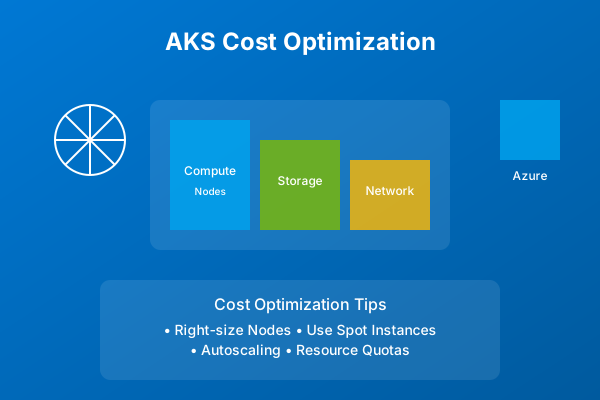
Azure Kubernetes Service Cost Optimization Guide 2024
A comprehensive guide to understanding and optimizing costs in Azure Kubernetes Service (AKS), including best practices, tools, and strategies for efficient resource utilization
Optimizing Azure Kubernetes Service (AKS) Costs in 2024
TL;DR: Achieving cost-efficiency in AKS involves a multi-faceted approach, focusing on judicious node selection, precise resource allocation at the pod and cluster levels, strategic storage and networking configurations, and continuous monitoring. Leveraging Azure Cost Management tools, Kubecost, and Azure Monitor is crucial for identifying and rectifying cost inefficiencies.
Introduction
Azure Kubernetes Service (AKS) offers a powerful, managed Kubernetes experience. However, without deliberate optimization strategies, operational costs can escalate rapidly. This guide provides experienced engineers with actionable insights and best practices for managing and reducing AKS expenditures.
Core AKS Cost Drivers
Understanding where costs originate is the first step towards optimization.
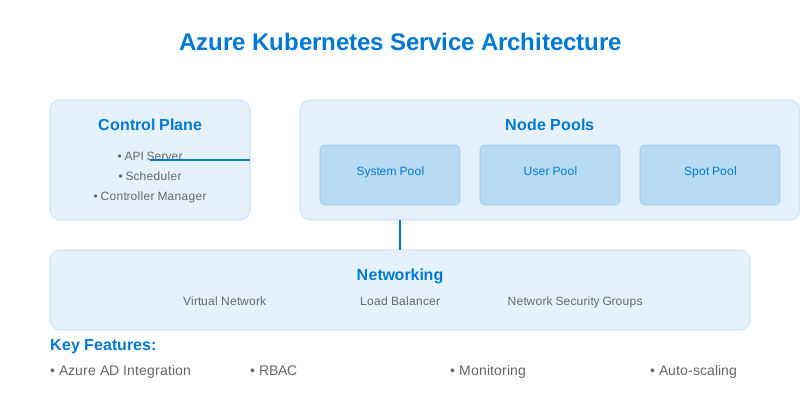
| Component | Description | Primary Cost Impact | Secondary Cost Impact | Notes | | :----------------- | :----------------------------------------------------------------------------------------- | :------------------ | :-------------------- | :---------------------------------------------------------------------------------- | | Node Pools | Underlying Virtual Machine (VM) instances that host your container workloads. | High | N/A | Directly proportional to VM size, count, and uptime. | | Storage | Persistent Volumes (PVs) backed by Azure Managed Disks (e.g., Standard HDD, Premium SSD). | Medium | Medium | Cost is driven by disk size, performance tier (IOPS/throughput), and snapshots. | | Networking | Azure Load Balancers, Application Gateways, egress bandwidth, and private endpoints. | Medium | Medium | Load Balancers incur per-hour charges and data processed. Egress bandwidth is metered. | | Management | AKS control plane (free), Azure Monitor Container Insights, logging, and diagnostics. | Low | Medium | Control plane is managed by Azure and is free. Monitoring/logging can incur costs. | | Data Transfer | Ingress/Egress traffic between AKS nodes, Azure services, and external endpoints. | Medium | Medium | Significant for applications with high network I/O or cross-region communication. |
Cost Analysis and Visibility Tools
Effective cost management hinges on robust monitoring and analysis.
- Azure Cost Management + Billing: Provides a comprehensive view of Azure spending across subscriptions and resource groups. It allows for cost breakdown by resource, tag, and time, enabling chargeback and showback capabilities.
- Kubecost: An open-source tool providing granular cost allocation and optimization recommendations directly within your Kubernetes cluster. It can be deployed as a deployment in your cluster and integrates with Azure Monitor.
- Azure Monitor for Containers (Container Insights): Offers performance and health monitoring of your AKS cluster, including containerized applications. While not a direct cost accounting tool, it provides essential utilization metrics that inform cost optimization decisions.
Node Pool Optimization Strategies
Node pools represent a significant portion of AKS operational costs.
Right-sizing Nodes
Selecting appropriate VM sizes for your node pools is paramount. Avoid over-provisioning.
- Analyze Workload Requirements: Understand the CPU, memory, and network I/O demands of your applications.
- Leverage Azure VM Series: Choose VM families optimized for your workload (e.g., D-series for general purpose, E-series for memory-optimized, F-series for compute-optimized).
- Utilize Node Autoscaling: Configure the Cluster Autoscaler to dynamically adjust the number of nodes based on pending pods. This ensures you only pay for the capacity you need.
// Example of a cost-conscious node pool configuration
const optimizedNodePool = {
  name: 'app-pool-d4sv3',
  vmSize: 'Standard_D4s_v3', // Good balance of CPU/Memory for many workloads
  enableAutoScaling: true,
  minCount: 1, // Start with minimal nodes
  maxCount: 10, // Scale up as needed
  nodeTaints: [ // Taint for specific workloads, e.g., critical apps
    'workload=critical:NoSchedule'
  ],
  tags: {
    'cost-center': 'app-dev',
    'environment': 'staging'
  }
};
Harnessing Spot Instances
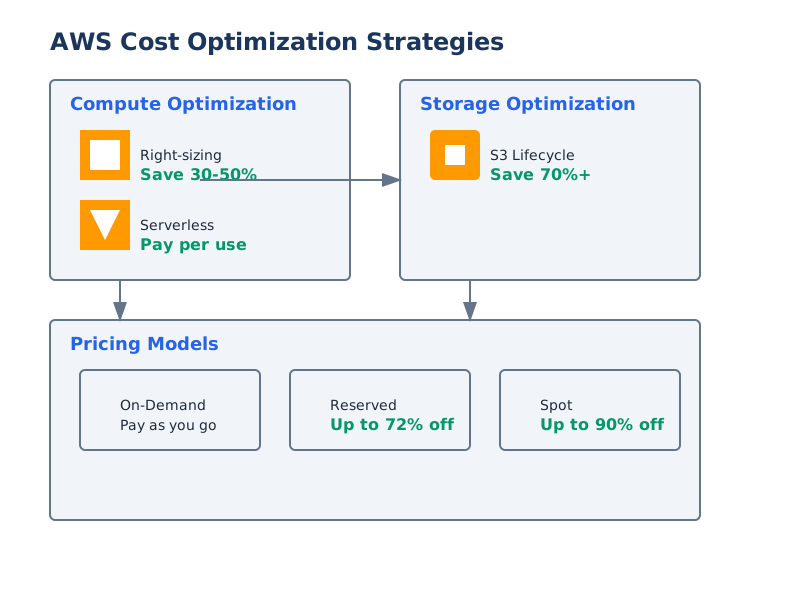
Azure Spot Virtual Machines offer significant cost savings (up to 90%) for interruptible workloads.
| Workload Type | Spot Suitability | Typical Savings | Considerations | | :-------------------- | :--------------- | :-------------- | :---------------------------------------------------------------------------------- | | Batch Processing | High | 60-80% | Workloads can tolerate interruptions and are designed for restartability. | | CI/CD Agents | High | 50-70% | Jobs can be rescheduled if interrupted. | | Stateless Web Apps | Medium | 40-60% | Requires careful affinity/anti-affinity and graceful shutdown handling. | | Development/Test | High | 50-70% | Non-production environments where downtime is less critical. | | Critical Production | Low | Not Recommended | Unpredictable eviction makes these unsuitable for stateful or highly available apps. |
Implementation Note: Use node selectors and taints to direct spot-eligible workloads to your Spot node pools.
Resource Management at the Pod and Cluster Level
Optimizing individual pod resource requests/limits and cluster-wide autoscaling is crucial.
Pod Resource Optimization
Define accurate
requestslimits- : Guarantees the minimum resources a container will receive. Essential for scheduling decisions.
requests - : Sets the maximum resources a container can consume. Prevents noisy neighbor issues and runaway processes.
limits
Recommendation: Start with conservative requests and limits, then use monitoring data (e.g., from Container Insights or Kubecost) to adjust them. Aim for utilization that isn't consistently hitting limits while also minimizing idle reserved capacity.
apiVersion: v1
kind: Pod
metadata:
  name: optimized-app-pod
spec:
  containers:
  - name: my-app-container
    image: myapp:v1.2
    resources:
      requests:
        memory: "128Mi"  # Minimal guaranteed memory
        cpu: "100m"      # 10% of a vCPU
      limits:
        memory: "512Mi"  # Max memory to prevent OOMKill, but allows some headroom
        cpu: "500m"      # Max CPU to prevent resource hogging
    readinessProbe:
      httpGet:
        path: /healthz
        port: 8080
      initialDelaySeconds: 15
      periodSeconds: 20
    livenessProbe: # Crucial for ensuring application health and avoiding unnecessary restarts
      httpGet:
        path: /healthz
        port: 8080
      initialDelaySeconds: 30
      periodSeconds: 30
Cluster Autoscaler and Vertical Pod Autoscaler (VPA)
- Cluster Autoscaler (CA): Adjusts the number of nodes in a node pool.
- Configuration: Set and
minCountappropriately for each node pool. Ensure sufficient pod disruption budgets for stateful applications.maxCount - Cost Impact: Prevents paying for idle nodes.
- Configuration: Set
- Vertical Pod Autoscaler (VPA): Recommends or automatically adjusts the and
requestsfor pods.limits- Mode: Can be set to (recommendations only),
Off(updates only on pod creation), orInitial(updates running pods, requires pod restart).Auto - Cost Impact: Fine-tunes pod resource allocation, reducing waste.
- Mode: Can be set to
# Example VPA configuration for automatic resource adjustment
apiVersion: autoscaling.k8s.io/v1
kind: VerticalPodAutoscaler
metadata:
  name: my-app-vpa
spec:
  targetRef:
    apiVersion: apps/v1
    kind: Deployment
    name: my-app-deployment # Target the Deployment managing your pods
  updatePolicy:
    updateMode: "Auto" # VPA will automatically adjust requests/limits and evict pods if needed
  resourcePolicy:
    containerPolicies:
    - containerName: '*' # Apply to all containers in the pod
      minAllowed:
        cpu: 50m
        memory: 50Mi
      maxAllowed:
        cpu: 1
        memory: 2Gi
      controlledResources: ["cpu", "memory"] # Explicitly control CPU and Memory
Trade-off: VPA in
AutoupdateModeStorage Optimization
Persistent storage can be a significant cost factor.
Storage Class Selection
Choose the appropriate Azure Managed Disk type based on I/O and performance requirements.
| Storage Type | Performance Characteristics | Use Case Examples | Approximate Cost per GB/month (USD) | | :------------- | :---------------------------------- | :---------------------------------------------- | :---------------------------------- | | Standard HDD | Low IOPS, Low Throughput | Backups, Archives, Infrequently accessed data | ~$0.05 | | Standard SSD | Medium IOPS, Medium Throughput | Dev/Test workloads, Web servers, Non-critical DBs | ~$0.10 | | Premium SSD | High IOPS, High Throughput | Production Databases, High-traffic applications | ~$0.20 | | Ultra Disk | Very High IOPS & Throughput (tunable) | Mission-critical databases, High-performance compute | ~$0.40+ (highly configurable) |
Recommendation: Use
Standard HDDStandard SSDPremium SSDUltra DiskVolume Management and Lifecycle
- Right-size PVs: Request only the storage capacity your application truly needs.
- Delete Unused PVCs: Regularly identify and delete (PVCs) that are no longer attached to pods or are no longer required.
PersistentVolumeClaims - Leverage vs.
DeleteRetain: Understand the implications for disk deletion when a PV is released.reclaimPolicyautomatically removes the underlying Azure disk, preventing orphaned resources.Delete
# Example PVC with optimized storage request
apiVersion: v1
kind: PersistentVolumeClaim
metadata:
  name: my-app-data-pvc
spec:
  accessModes:
    - ReadWriteOnce
  storageClassName: managed-csi-premium # Specify a StorageClass appropriate for your needs
  resources:
    requests:
      storage: 20Gi # Request only 20 GiB, not an arbitrary large amount
Networking Cost Considerations
Network traffic and load balancing services incur direct costs.
Load Balancer and Ingress Optimization
- Application Gateway vs. Standard Load Balancer: For complex HTTP/S routing, WAF, and SSL offloading, Azure Application Gateway might be more cost-effective than a basic Load Balancer with additional compute.
- Ingress Controllers: Consider using a single, shared Ingress controller for multiple services to consolidate external access and potentially reduce the number of load balancers.
- Internal Load Balancers: Use Azure Load Balancer's internal SKU for east-west traffic within your VNet to avoid public IP costs and egress charges.
- Zone Redundancy: While enhancing availability, ensure you understand the cost implications of zone-redundant load balancers.
Network Policy Implementation
While primarily a security feature, Network Policies can indirectly reduce costs by:
- Minimizing Unnecessary Egress Traffic: Restricting outbound connections to only necessary endpoints reduces data egress charges.
- Preventing Lateral Movement: Limiting the blast radius of a compromised pod can prevent cascading issues that might lead to increased resource consumption or unwanted network activity.
apiVersion: networking.k8s.io/v1
kind: NetworkPolicy
metadata:
  name: database-access-policy
  namespace: default
spec:
  podSelector:
    matchLabels:
      app: database # Apply policy to pods labeled as 'database'
  policyTypes:
  - Ingress
  ingress:
  - from:
    - podSelector:
        matchLabels:
          app: backend # Allow ingress only from pods labeled as 'backend'
    ports:
    - protocol: TCP
      port: 5432 # Specify the port the database listens on
  # No egress rules defined means all egress is implicitly denied by default for this policy type.
  # If egress is needed, explicitly define it.
Continuous Monitoring and Optimization Loop
Cost optimization is not a one-time task but an ongoing process.
Establishing a Cost Monitoring Dashboard
Aggregate key cost and utilization metrics into a central dashboard for visibility.
- Key Metrics:
- Total AKS spend (per day/week/month)
- Spend breakdown by Node Pool, Namespace, Resource Group
- Node count and utilization
- Pod CPU/Memory requests vs. actual usage
- Storage consumption and IOPS/throughput
// Conceptual representation of monitoring configuration for Azure Monitor
const aksCostMonitoringConfig = {
  insights: {
    enabled: true,
    logAnalyticsWorkspaceId: '/subscriptions/.../resourceGroups/.../providers/Microsoft.OperationalInsights/workspaces/...'
  },
  costAnalysis: {
    alerts: [
      {
        name: 'AKSNodePoolHighCost',
        description: 'Daily cost of a node pool exceeds $500',
        scope: '/subscriptions/.../resourceGroups/.../providers/Microsoft.ContainerService/managedClusters/.../agentPools/...',
        actionGroupId: '/subscriptions/.../resourceGroups/.../providers/Microsoft.AlertsManagement/actionGroups/...',
        condition: {
          odataQuery: 'sum(cost) by $minute ge 500', // Simplified example
          timeAggregation: 'Last 24 hours',
          operator: 'GreaterThan',
          threshold: 500
        }
      }
    ]
  }
};
Resource Utilization Targets
Define acceptable ranges for key utilization metrics to guide optimization efforts.
| Metric | Target Range | Action if Outside Range | | :-------------------- | :----------- | :---------------------------------------------------------- | | Node CPU Utilization | 60-80% | Scale up/down nodes, adjust node VM size. | | Node Memory Utilization | 70-85% | Scale up/down nodes, adjust node VM size, optimize pod memory. | | Pod CPU Usage | 50-90% of Request | Adjust pod
requestslimitsrequestslimitsCost Optimization Best Practices Summary
-
Implement Resource Governance:
- Resource Quotas: Set limits on CPU, memory, and storage per namespace to prevent runaway consumption.
- Limit Ranges: Define default resource requests/limits for pods in a namespace.
- Pod Priority and Preemption: Ensure critical workloads have higher priority to avoid being evicted by lower-priority pods, which can impact availability and indirectly cost.
# Example ResourceQuota for a development namespace apiVersion: v1 kind: ResourceQuota metadata: name: dev-namespace-quota namespace: development spec: hard: requests.cpu: "10" # Total CPU requests allowed requests.memory: 20Gi # Total Memory requests allowed limits.cpu: "20" # Total CPU limits allowed limits.memory: 40Gi # Total Memory limits allowed persistentvolumeclaims: "5" # Max number of PVCs pods: "20" # Max number of pods -
Optimize Workload Placement:
- Node Selectors & Affinity/Anti-Affinity: Use these to schedule workloads onto appropriate node pools (e.g., Spot pools for batch jobs).
- Taints and Tolerations: Prevent specific workloads from being scheduled on certain node pools unless they tolerate the taint.
-
Regularly Review and Refactor:
- Audit Unused Resources: Periodically check for unused Load Balancers, disks, and VMs.
- Review Application Architecture: Can services be made more efficient? Can dependencies be reduced?
When NOT to Use These Strategies
- Mission-Critical, Latency-Sensitive Workloads on Spot Instances: The unpredictable nature of Spot instances makes them unsuitable for applications requiring guaranteed uptime and low latency.
- Over-Optimizing for Cost at the Expense of Stability/Performance: Aggressively reducing resources below essential thresholds will lead to application instability, increased error rates, and potentially higher operational costs due to troubleshooting and downtime.
- Ignoring Monitoring Data: Making optimization decisions without solid usage data is speculative and can lead to misconfigurations.
- Complex Stateful Applications on Heavily Shared Infrastructure: While shared infrastructure can be cost-effective, ensure that Pod Disruption Budgets and careful scheduling prevent data loss or service interruption for critical stateful components.
AKS Cost Optimization Decision Checklist
| Area | Question | Yes | No | Action/Notes | | :------------------- | :-------------------------------------------------------------------------------- | :-: | :-: | :---------------------------------------------------------------------------------------------------------- | | Node Pools | Are node VM sizes appropriately matched to workload demands? | | | Review VM usage metrics. Consider smaller/different VM series. | | | Is node autoscaling configured and effectively utilized? | | | Check
minCountmaxCountrequestslimitsResourceQuotasLimitRangesminCountmaxCountAuto