devops
Building a Modern CI/CD Pipeline
Learn how to build a robust CI/CD pipeline using GitHub Actions, AWS, and Docker
January 13, 2024
DevHub Team
3 min read
Building a Modern CI/CD Pipeline
Learn how to create a robust CI/CD pipeline that automates your software delivery process from code to production.
Pipeline Overview
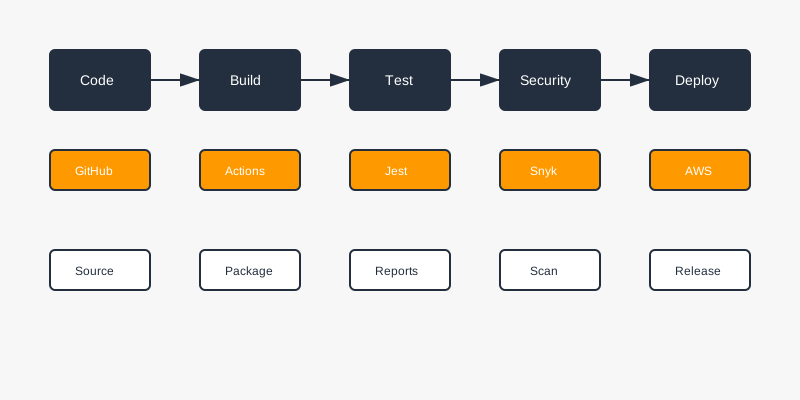
A modern CI/CD pipeline consists of several key stages:
- Code Commit & Review
- Build & Test
- Security Scanning
- Artifact Creation
- Deployment
- Monitoring
GitHub Actions Workflow
Here's a complete GitHub Actions workflow:
name: CI/CD Pipeline

on:
  push:
    branches: [ main ]
  pull_request:
    branches: [ main ]

jobs:
  build:
    runs-on: ubuntu-latest

    steps:
    - uses: actions/checkout@v3

    - name: Set up Node.js
      uses: actions/setup-node@v3
      with:
        node-version: '18'

    - name: Install dependencies
      run: npm ci

    - name: Run tests
      run: npm test

    - name: Build application
      run: npm run build

    - name: Run security scan
      uses: snyk/actions/node@master
      env:
        SNYK_TOKEN: ${{ secrets.SNYK_TOKEN }}

    - name: Build Docker image
      run: docker build -t myapp:${{ github.sha }} .

    - name: Configure AWS credentials
      uses: aws-actions/configure-aws-credentials@v1
      with:
        aws-access-key-id: ${{ secrets.AWS_ACCESS_KEY_ID }}
        aws-secret-access-key: ${{ secrets.AWS_SECRET_ACCESS_KEY }}
        aws-region: us-west-2

    - name: Login to Amazon ECR
      id: login-ecr
      uses: aws-actions/amazon-ecr-login@v1

    - name: Push to ECR
      env:
        ECR_REGISTRY: ${{ steps.login-ecr.outputs.registry }}
        ECR_REPOSITORY: myapp
        IMAGE_TAG: ${{ github.sha }}
      run: |
        docker tag myapp:$IMAGE_TAG $ECR_REGISTRY/$ECR_REPOSITORY:$IMAGE_TAG
        docker push $ECR_REGISTRY/$ECR_REPOSITORY:$IMAGE_TAG
Docker Configuration
Create an optimized Dockerfile:
# Build stage
FROM node:18-alpine AS builder
WORKDIR /app
COPY package*.json ./
RUN npm ci
COPY . .
RUN npm run build

# Production stage
FROM node:18-alpine
WORKDIR /app
COPY --from=builder /app/dist ./dist
COPY --from=builder /app/package*.json ./
RUN npm ci --only=production
EXPOSE 3000
CMD ["npm", "start"]
AWS Infrastructure
Set up your AWS infrastructure using Terraform:
resource "aws_ecr_repository" "app" {
  name = "myapp"

  image_scanning_configuration {
    scan_on_push = true
  }
}

resource "aws_ecs_cluster" "main" {
  name = "myapp-cluster"

  setting {
    name  = "containerInsights"
    value = "enabled"
  }
}

resource "aws_ecs_task_definition" "app" {
  family                   = "myapp"
  requires_compatibilities = ["FARGATE"]
  network_mode            = "awsvpc"
  cpu                     = 256
  memory                  = 512

  container_definitions = jsonencode([
    {
      name  = "myapp"
      image = "${aws_ecr_repository.app.repository_url}:latest"
      portMappings = [
        {
          containerPort = 3000
          protocol      = "tcp"
        }
      ]
    }
  ])
}
Monitoring and Alerts
Set up CloudWatch monitoring:
resource "aws_cloudwatch_metric_alarm" "service_health" {
  alarm_name          = "service-health"
  comparison_operator = "LessThanThreshold"
  evaluation_periods  = "2"
  metric_name        = "HealthyHostCount"
  namespace          = "AWS/ApplicationELB"
  period             = "60"
  statistic          = "Average"
  threshold          = "1"
  alarm_description  = "This metric monitors service health"
  alarm_actions      = [aws_sns_topic.alerts.arn]
}
Best Practices
-
Version Control
- Use feature branches
- Enforce code review
- Protect main branch
-
Testing
- Unit tests
- Integration tests
- End-to-end tests
- Performance tests
-
Security
- SAST (Static Application Security Testing)
- DAST (Dynamic Application Security Testing)
- Dependency scanning
- Container scanning
-
Deployment
- Blue-green deployment
- Canary releases
- Rollback capability
-
Monitoring
- Application metrics
- Infrastructure metrics
- Business metrics
- Alert thresholds
Automation Scripts
Create helper scripts for common tasks:
#!/bin/bash
# deploy.sh

# Set variables
ENV=$1
VERSION=$2

# Validate input
if [ -z "$ENV" ] || [ -z "$VERSION" ]; then
  echo "Usage: ./deploy.sh <environment> <version>"
  exit 1
fi

# Deploy to environment
echo "Deploying version $VERSION to $ENV..."
aws ecs update-service \
  --cluster myapp-cluster \
  --service myapp-service-$ENV \
  --force-new-deployment
Conclusion
A well-designed CI/CD pipeline is crucial for modern software development. It helps:
- Reduce deployment time
- Improve code quality
- Increase team productivity
- Ensure consistent deployments
- Enable rapid feedback
Remember to continuously improve your pipeline based on team feedback and changing requirements.
CI/CD
GitHub Actions
Docker
AWS