AWS S3 Tutorial: A Complete Guide to Cloud Storage
Learn how to effectively use Amazon S3 for cloud storage, including best practices, security configurations, and common use cases.
AWS S3: A Pragmatic Guide for Experienced Engineers
TL;DR
Amazon S3 (Simple Storage Service) is AWS's object storage solution offering high durability and availability. This guide covers its architecture, bucket management, security, performance, and common use cases, emphasizing practical considerations for experienced engineers. It includes configuration examples, performance tuning techniques, and trade-offs for informed decision-making.
Introduction to Amazon S3
Amazon S3 provides a highly scalable, secure, and durable object storage service. It is designed for a wide range of applications, from static website hosting and data archiving to data lakes and content distribution. Understanding its fundamental concepts is crucial for effective utilization.
Core Concepts
- Objects: The fundamental entities stored in S3. These can be any type of data (documents, images, videos, backups) up to 5TB in size. Each object is uniquely identified by a key within a bucket and includes metadata.
- Buckets: Global, unique containers for objects. Buckets are region-specific and can contain an unlimited number of objects. Bucket names must adhere to DNS naming conventions and be globally unique.
- Keys: The unique identifier for an object within a bucket. Keys are often referred to as object names or paths.
- Storage Classes: S3 offers various storage classes optimized for different access patterns and cost requirements, including:
- S3 Standard: For frequently accessed data requiring low latency.
- S3 Intelligent-Tiering: Automatically optimizes costs by moving data between access tiers based on usage.
- S3 Standard-Infrequent Access (S3 Standard-IA): For data accessed less frequently but requiring rapid access when needed.
- S3 One Zone-Infrequent Access (S3 One Zone-IA): Similar to Standard-IA but data is stored in a single Availability Zone, offering lower cost but reduced resilience.
- S3 Glacier Instant Retrieval: For archival data requiring milliseconds retrieval.
- S3 Glacier Flexible Retrieval: For archival data with retrieval times from minutes to hours.
- S3 Glacier Deep Archive: The lowest-cost storage for long-term archiving (12-48 hours retrieval).
S3 Architecture and Durability
S3's architecture is designed for extreme durability (99.999999999% - eleven 9s) and high availability. It achieves this through redundancy across multiple Availability Zones (AZs) within a region for most storage classes.
Key Architectural Components
- Regional Service: Buckets are created within specific AWS Regions.
- Multi-AZ Redundancy: Data is automatically replicated across at least three AZs for S3 Standard, Intelligent-Tiering, Standard-IA, and Glacier storage classes. S3 One Zone-IA data resides in a single AZ.
- S3 API Endpoints: Access to S3 is provided via RESTful APIs, SDKs, and the AWS Management Console.
- Internal Services: A complex interplay of load balancers, metadata services, and storage services manages requests, object placement, and retrieval.
Trade-off: While S3 offers high durability, the cost of data retrieval varies significantly between storage classes. S3 One Zone-IA offers lower cost but is susceptible to AZ-level failures.
Bucket Management
Effective bucket management is the foundation of S3 operations.
Bucket Naming and Creation
- Global Uniqueness: Bucket names must be globally unique across all AWS accounts.
- Naming Conventions:
- 3-63 characters long.
- Lowercase letters, numbers, dots (), and hyphens (
.).- - Must start and end with a letter or number.
- Cannot be formatted as an IP address.
- Should avoid using sensitive information.
- Regionality: Buckets are created in a specific AWS Region. Choosing the right region impacts latency and cost.
Best Practice: Adopt a consistent naming convention that includes environment (e.g.,
proddevmycompany-app-logs-us-east-1Key Bucket Configurations
-
Versioning:
- Purpose: Preserves, retrieves, and restores every version of every object stored. Crucial for accidental deletions or overwrites.
- Enabling:
{ "VersioningConfiguration": { "Status": "Enabled" } } - Trade-off: Increases storage costs due to multiple object versions. Requires lifecycle policies to manage old versions.
-
Lifecycle Rules:
- Purpose: Automates the transition of objects to different storage classes or their expiration. Essential for cost management and data retention policies.
- Example (Transition to Glacier Deep Archive after 180 days):
{ "Rules": [ { "ID": "TransitionToDeepArchive", "Status": "Enabled", "Filter": { "Prefix": "archive/" }, "Transition": { "Days": 180, "StorageClass": "DEEP_ARCHIVE" }, "Expiration": { "Days": 3650 } } ] } - Trade-off: Requires careful planning to avoid premature deletion or transition of frequently accessed data.
Security Best Practices
S3 security is a shared responsibility, with AWS securing the infrastructure and users securing their data and access.
Access Control Mechanisms
-
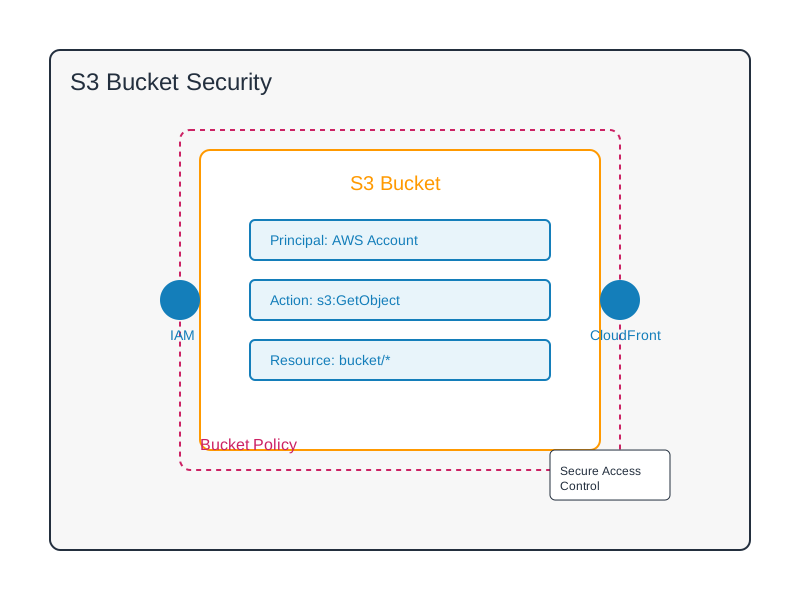
IAM Policies: Define permissions for users, groups, and roles to access S3 buckets and objects. Principle of Least Privilege is paramount.
{ "Version": "2012-10-17", "Statement": [ { "Effect": "Allow", "Action": "s3:GetObject", "Resource": "arn:aws:s3:::my-secure-data-bucket/sensitive/*" } ] } -
Bucket Policies: Resource-based policies attached to buckets. Useful for granting cross-account access or specific conditions.
{ "Version": "2012-10-17", "Statement": [ { "Sid": "AllowPublicReadForStaticAssets", "Effect": "Allow", "Principal": "*", "Action": "s3:GetObject", "Resource": "arn:aws:s3:::my-public-assets-bucket/*", "Condition": { "IpAddress": { "aws:SourceIp": ["203.0.113.0/24"] } } } ] }Caution: Avoid public read access unless absolutely necessary. Use conditions to restrict access further.
-
Access Control Lists (ACLs): Legacy mechanism; generally superseded by IAM and bucket policies for most use cases. Can be useful for granting specific permissions to AWS services (e.g., for S3 log delivery).
Data Encryption
- Server-Side Encryption (SSE): Data is encrypted by S3 on the server.
- SSE-S3: Managed by AWS using AES-256.
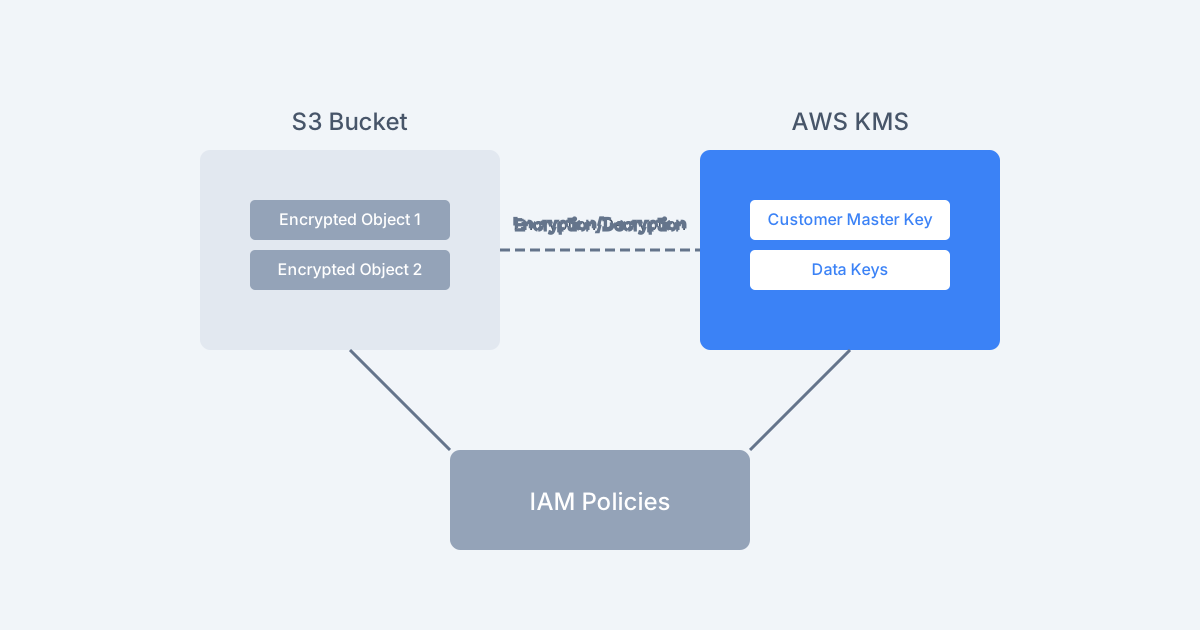
- SSE-KMS: Managed by AWS Key Management Service (KMS), offering auditability and finer-grained control.
- SSE-C: Customer-provided keys; S3 encrypts/decrypts data using keys provided by the customer per request.
- Client-Side Encryption: Data is encrypted by the client before uploading to S3. Offers maximum control but adds complexity.
Enabling SSE-S3 by Default:
{
    "Rules": [
        {
            "ApplyServerSideEncryptionByDefault": {
                "SSEAlgorithm": "AES256"
            }
        }
    ]
}
Trade-off: SSE-KMS incurs KMS API request costs. SSE-C requires careful key management.
Blocking Public Access
- Purpose: A crucial security feature to prevent accidental public exposure of data. It's enabled by default at the account level and can be enforced at the bucket level.
- Configuration: Ensure "Block all public access" settings are enabled unless there's a specific, well-justified need to disable them.
Performance Optimization
Optimizing S3 performance involves understanding request patterns, object characteristics, and network factors.
Request Rate and Key Design
- S3 Prefix Limits: S3 scales request rates by partitioning prefixes. A highly sequential prefix (e.g., ) can become a bottleneck.
logs/YYYY/MM/DD/HH/ - Key Structure: Distribute requests across prefixes by using a random or hash-based prefix.
- Poor:
/logs/2024/03/20/app.log - Better: (where
/a3b1/logs/2024/03/20/app.logis a random hash)a3b1
- Poor:
- Retry Logic: Implement robust retry mechanisms with exponential backoff and jitter to handle transient errors and throttling.
Trade-off: Random prefixes can make certain types of range queries or listing operations more complex.
Object Size and Multipart Upload
- Large Objects: For objects larger than 100MB (and recommended for >16MB), use Multipart Upload.
- Benefits:
- Allows parallel uploads of object parts, increasing throughput.
- Enables pausing and resuming uploads.
- Can upload parts independently and in any order.
- Example (AWS SDK v3 for Node.js):
import { S3Client, CreateMultipartUploadCommand, UploadPartCommand, CompleteMultipartUploadCommand } from "@aws-sdk/client-s3";

const s3Client = new S3Client({ region: "us-east-1" });
const bucketName = "my-large-files-bucket";
const objectKey = "large-dataset.csv";
const fileContent = await fs.promises.readFile("path/to/large-dataset.csv"); // Assume fileContent is a Buffer
const partSize = 10 * 1024 * 1024; // 10 MB

const uploadParams = { Bucket: bucketName, Key: objectKey };
const multipartUpload = await s3Client.send(new CreateMultipartUploadCommand(uploadParams));

const uploadPromises = [];
for (let i = 0; i < fileContent.length; i += partSize) {
    const partParams = {
        Bucket: bucketName,
        Key: objectKey,
        UploadId: multipartUpload.UploadId,
        PartNumber: Math.floor(i / partSize) + 1,
        Body: fileContent.subarray(i, Math.min(i + partSize, fileContent.length)),
    };
    uploadPromises.push(s3Client.send(new UploadPartCommand(partParams)));
}

const partEtags = await Promise.all(uploadPromises);

const completeMultipartUploadParams = {
    Bucket: bucketName,
    Key: objectKey,
    UploadId: multipartUpload.UploadId,
    MultipartUpload: {
        Parts: partEtags.map((etag, index) => ({
            ETag: etag.ETag,
            PartNumber: index + 1,
        })),
    },
};

await s3Client.send(new CompleteMultipartUploadCommand(completeMultipartUploadParams));
console.log("Multipart upload complete.");
S3 Transfer Acceleration
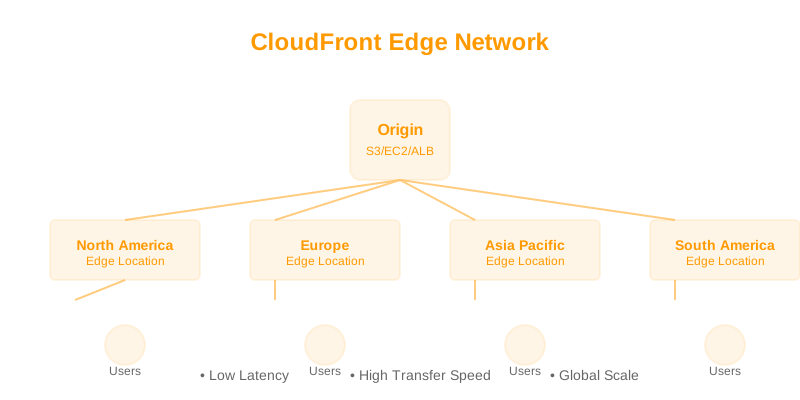
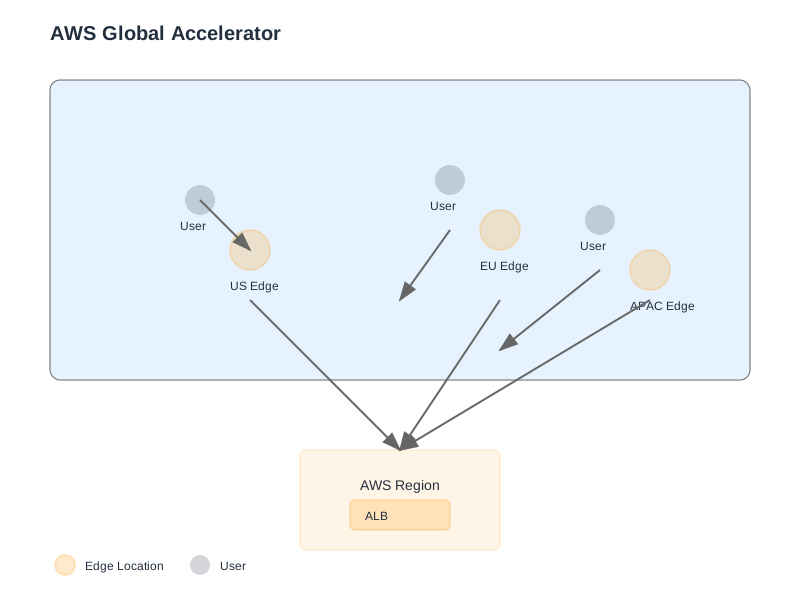
- Purpose: Accelerates uploads and downloads to and from S3 by routing traffic through AWS's globally distributed edge locations.
- Mechanism: Utilizes CloudFront's network infrastructure.
- Use Cases: Ideal for geographically dispersed users or applications transferring large files over long distances.
- Trade-off: Incurs additional costs. May not provide significant benefits for uploads/downloads within the same AWS region.
Caching
- CloudFront Integration: For frequently accessed read data, use Amazon CloudFront as a caching layer in front of S3. This reduces S3 request costs and improves latency for end-users.
Common Use Cases
S3 is a versatile service supporting numerous application patterns.
1. Static Website Hosting
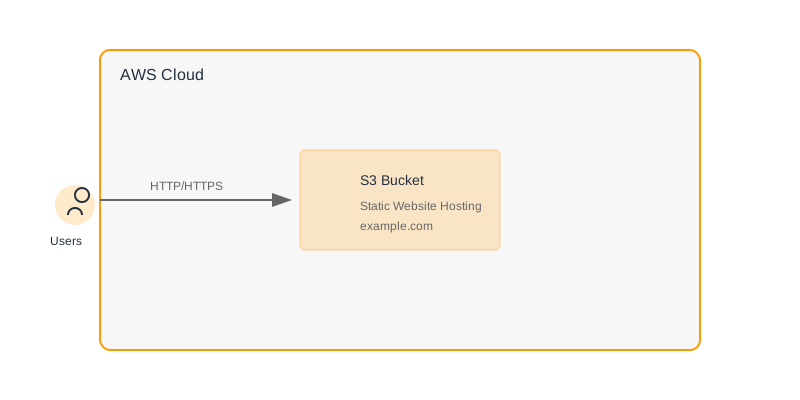
- Setup: Configure a bucket for static website hosting, specify index and error documents, and upload static assets (HTML, CSS, JS, images).
- Configuration (AWS CLI):
# Enable website hosting aws s3 website s3://my-static-site-bucket/ --index-document index.html --error-document error.html # Set public read access (use with caution or via CloudFront) aws s3api put-bucket-acl --bucket my-static-site-bucket --acl public-read # Sync website files aws s3 sync ./website-build/ s3://my-static-site-bucket/ - Best Practice: Use CloudFront with S3 as the origin for production websites to benefit from caching, global distribution, and HTTPS.
2. Data Lake Storage
- Role: S3 is the de facto standard for data lake storage due to its scalability, cost-effectiveness, and integration with analytics services (Athena, EMR, Glue).
- Organization: Employ a logical prefix structure (e.g., ,
raw/source=<source_system>/date=<YYYY-MM-DD>/).processed/dataset=<name>/version=<v1>/ - Example (Python SDK):
import boto3
import pandas as pd

s3_client = boto3.client('s3')
data_lake_bucket = 'my-company-data-lake'

# Example: Storing processed data
df = pd.DataFrame({'col1': [1, 2], 'col2': [3, 4]})
output_key = 'processed/sales_data/version=v2/sales_2024_03_20.parquet'

from io import BytesIO
buffer = BytesIO()
df.to_parquet(buffer)
buffer.seek(0)

s3_client.put_object(Bucket=data_lake_bucket, Key=output_key, Body=buffer)
print(f"Data saved to s3://{data_lake_bucket}/{output_key}")
3. Backup and Archival
- Strategy: Utilize S3 Standard-IA, Glacier Instant Retrieval, Glacier Flexible Retrieval, or Glacier Deep Archive based on RTO/RPO and cost constraints.
- Automation: Implement lifecycle rules to transition backups to colder storage tiers over time.
- Versioning: Essential for recovering from corruption or accidental deletion of backups.
- Trade-off: Retrieval times and costs vary dramatically. Deep Archive is cheapest but slowest and most expensive to retrieve from.
4. Application Assets and Content Distribution
- Serving User-Generated Content: Storing images, videos, documents, and other assets uploaded by users.
- Distribution: Combine with CloudFront for efficient global delivery of media files, software downloads, etc.
When Not to Use S3
While powerful, S3 is not suitable for all data storage needs:
- Transactional Databases: S3 is not a relational database. For transactional workloads requiring ACID compliance, use services like Amazon RDS, Aurora, or DynamoDB.
- Block Storage for OS/Databases: S3 is object storage. For boot volumes or persistent storage for EC2 instances requiring file system access, use Amazon EBS.
- Low-Latency, High-IOPS Workloads: For applications requiring sub-millisecond latency and extremely high I/O operations per second on structured data, consider in-memory caches (ElastiCache) or high-performance file systems.
- Small, Frequently Updated Files with High Transaction Volume: While S3 can handle this, the per-request costs (GET, PUT, LIST) can accumulate. Consider alternatives if the object size is consistently small and updates are very frequent.
Decision Checklist
Before implementing an S3 solution, consider the following:
- Data Access Frequency: How often will the data be accessed? (Impacts Storage Class choice)
- Retrieval Time Requirements: What is the acceptable latency for data retrieval? (Impacts Storage Class choice)
- Durability and Availability Needs: What level of resilience is required? (Impacts Storage Class choice, e.g., S3 One Zone-IA vs. Standard)
- Security Requirements: What are the data sensitivity levels and access control needs? (Impacts encryption, IAM/bucket policies, Block Public Access)
- Cost Constraints: What is the budget for storage and data transfer? (Impacts Storage Class, lifecycle rules, Transfer Acceleration)
- Data Volume and Growth: How much data will be stored, and how quickly will it grow? (Impacts bucket structure, lifecycle policies)
- Application Integration: How will applications interact with S3? (SDKs, CLI, APIs, CloudFront)
- Disaster Recovery Strategy: Does S3 fit into the overall DR plan? (Versioning, cross-region replication)
- Compliance Requirements: Are there regulatory needs for data retention or access logging? (Lifecycle rules, S3 Access Logs, CloudTrail)
By carefully evaluating these points, engineers can design robust, cost-effective, and secure storage solutions using Amazon S3.