Optimizing AWS CloudFront for High-Performance Content Delivery
Learn how to optimize AWS CloudFront configurations for faster content delivery, reduced latency, and cost efficiency.
Mastering AWS CloudFront for High-Performance Content Delivery
TL;DR
This guide provides engineers with advanced strategies for optimizing AWS CloudFront. We cover architectural insights, nuanced caching policies, origin configurations, cost-saving techniques, robust security measures, and effective monitoring. The objective is to maximize content delivery speed, minimize origin load, reduce operational costs, and enhance security posture for global applications.
Introduction
Amazon CloudFront is a foundational service for delivering web content globally with low latency and high transfer speeds. Effectively tuning CloudFront is critical for applications sensitive to performance, scalability, and cost. This document assumes a working knowledge of CloudFront and delves into advanced optimization techniques and architectural considerations.
For instance, consider a global SaaS platform serving dynamic, user-specific dashboards. Without proper CloudFront configuration, latency for users far from the origin can be significant, impacting perceived application responsiveness and potentially leading to increased API costs due to unoptimized caching. Optimizing CloudFront for such workloads involves fine-grained control over caching TTLs, query string parameters, and leveraging Lambda@Edge for dynamic content manipulation at the edge.
Understanding CloudFront Architecture and Performance Drivers
CloudFront's performance is a function of its distributed infrastructure and intelligent caching mechanisms. Understanding these components is key to effective optimization.
The Global Edge Network: From Edge Locations to Origin Shield
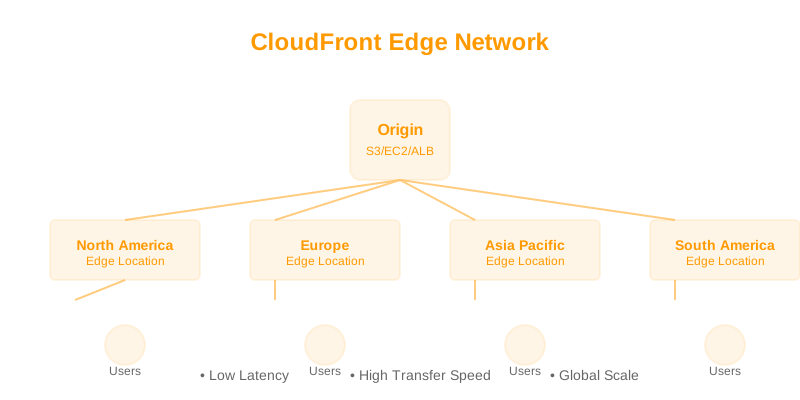
CloudFront's architecture is designed to bring content closer to end-users, reducing latency and origin load.
-
Edge Locations: These are the first point of presence for end-user requests. Content is served from edge locations if cached.
- Impact: Direct reduction in latency for cache hits. The sheer number and geographic distribution are primary performance drivers.
- Example: A user requesting an image from a website. If the image is cached at a nearby edge location, the retrieval time is measured in milliseconds, vastly superior to a round-trip to the origin.
-
Regional Edge Caches: These caches sit between edge locations and origins. They aggregate traffic from multiple edge locations, offering a larger cache capacity and a reduced chance of an origin fetch for content that has been recently requested by users served by different edge locations.
- Impact: Improves cache hit ratios for content that might be popular across a region but not globally. Reduces origin load by serving as an intermediary cache.
- Example: For a popular video being streamed in Europe, a regional edge cache serving multiple European edge locations can absorb a significant portion of requests, preventing repeated fetches from the origin.
-
Origin Shield: An optional, centralized caching layer that sits between your edge locations and your origin. It helps reduce origin load by aggregating requests from all edge locations to a single point before they reach your origin.
- Impact: Significantly reduces requests to the origin, especially during cache misses or for infrequently accessed content. It acts as a highly efficient intermediary cache, protecting origin servers from traffic spikes.
- Example: During a flash sale, thousands of edge locations might miss the cache for a new product listing. Origin Shield consolidates these requests, sending only one request to the origin to fetch the data, which is then cached and distributed.
Flowchart DiagramRendering diagram...
Content Types and Their Cache Requirements
Different content necessitates distinct caching and delivery strategies:
-
Static Assets (Images, JS, CSS, Fonts):
- Characteristics: Unchanging content, typically served with long directives.
Cache-Control - Optimization: High TTLs (e.g., 1 year) with versioned URLs (cache busting). Leverage compression (Gzip/Brotli) and modern image formats (WebP, AVIF).
- Example: Serving product images for an e-commerce site.
- Configuration: Set at the origin. CloudFront respects this and caches aggressively. Use URLs like
Cache-Control: public, max-age=31536000, immutable./images/product-v1.2.jpg - Impact: Near-zero origin load for these assets after initial fetch, minimal bandwidth costs, fastest delivery to users.
- Configuration: Set
- Characteristics: Unchanging content, typically served with long
-
Dynamic Content (API Responses, Personalized Pages):
- Characteristics: Varies based on user, time, or other factors. Requires frequent origin interaction or edge computation.
- Optimization: Short TTLs, strategies, Lambda@Edge for request/response manipulation, careful consideration of query string/header caching.
stale-while-revalidate - Example: A personalized user dashboard or an API endpoint returning real-time stock prices.
- Configuration: TTL of 60 seconds with seconds. Use Lambda@Edge to add/remove headers for caching control or to personalize content without an origin trip.
stale-while-revalidate=300 - Impact: Balances freshness with reduced origin load. Improves perceived performance by serving stale data briefly while fetching fresh data in the background.
- Configuration: TTL of 60 seconds with
-
Streaming Media (Video, Audio):
- Characteristics: Large files, continuous delivery, requires adaptive streaming protocols.
- Optimization: Segmented delivery (HLS, DASH). Aggressive caching of manifest files and segments with appropriate TTLs. Use of origin shield is critical here to handle the bursty nature of streaming requests.
- Example: A live sports broadcast or an on-demand video library.
- Configuration: Cache media segments for 24-72 hours. Manifest files might have shorter TTLs (e.g., 30 seconds). Ensure origin can handle high-concurrency requests during peak streaming events.
- Impact: Smooth playback, reduced buffering, efficient delivery of large media files.
Performance Optimization Deep Dive
Advanced Caching Strategies
Effective caching is the cornerstone of CloudFront performance. Beyond basic TTLs, fine-grained control is crucial.
-
Forwarding Query Strings:
- Trade-off: Caching based on query strings significantly increases cache object count, potentially reducing the global cache hit ratio if query strings are arbitrary or change frequently. However, it's essential for dynamic parameters.
- Best Practice: Forward only necessary query strings. Use policy to specify which parameters to forward. Ignore parameters that don't affect cacheable content (e.g., analytics tracking IDs, irrelevant sorting parameters).
Cache - Example: An e-commerce product page with .
/product/123?size=M&color=blue&sort=price_asc- Optimal: Forward and
sizeas they define a unique product variant.color - Suboptimal: Forwarding which doesn't change the product's content, only its presentation.
sort
- Optimal: Forward
// Example CloudFront Cache Policy configuration (conceptual) { "Name": "ProductVariantCache", "CachePolicyConfig": { "Comment": "Cache product variants by size and color", "ParametersInCacheKeyAndForwardedToOrigin": { "QueryStringsConfig": { "Mode": "whitelist", "Items": [ "size", "color" ] }, "HeadersConfig": { "Mode": "none" }, "CookiesConfig": { "Mode": "none" } }, "DefaultTTL": 3600, // 1 hour "MaxTTL": 86400, // 1 day "MinTTL": 300 // 5 minutes } } -
Forwarding Headers:
- Trade-off: Similar to query strings, forwarding headers increases cache object diversity. Consider headers like ,
Accept-Language,User-Agent.Accept-Encoding - Best Practice: Forward for compression negotiation (Gzip/Brotli). Forward
Accept-Encodingif you serve localized content. Be cautious withAccept-Languageif it doesn't drastically alter content. Consider using Lambda@Edge to set standardized cache keys based on headers.User-Agent - Example: Serving a website that adapts content for different languages.
- Configuration: Forward . CloudFront will cache
Accept-Languageseparately forexample.com/pageanden-US.fr-FR - Impact: Ensures users receive content appropriate for their language settings without compromising cache efficiency excessively.
- Configuration: Forward
- Trade-off: Similar to query strings, forwarding headers increases cache object diversity. Consider headers like
-
Forwarding Cookies:
- Trade-off: Cookies are often user-specific and can completely invalidate caching. Overuse drastically reduces cache hit ratios.
- Best Practice: Forward cookies only when absolutely necessary for content personalization that cannot be handled by other means. If possible, use Lambda@Edge to set a unique cookie for caching purposes after origin interaction.
- Example: A shopping cart where the cart ID is passed via cookie.
- Scenario 1 (Bad): Forwarding the entire header. Every user gets a unique cache entry.
Set-Cookie - Scenario 2 (Better): Use Lambda@Edge to read the cart ID, add it to a custom header like , and configure CloudFront to cache based on
X-Cart-ID. This allows other non-personalized content to be cached effectively.X-Cart-ID
- Scenario 1 (Bad): Forwarding the entire
-
Compression:
- Trade-off: Compression adds a small CPU overhead at the origin or edge (if using Lambda@Edge). However, the bandwidth savings and reduced transfer times typically far outweigh this.
- Best Practice: Enable CloudFront's automatic compression for common file types (Gzip). If serving dynamic content via Lambda@Edge, ensure it compresses responses when is present.
Accept-Encoding - Example: Enabling Gzip compression for ,
.js,.cssfiles. CloudFront automatically handles this for static content served from S3/custom origins..html
-
Cache Invalidation:
- Trade-off: Cache invalidation incurs costs and is asynchronous. Frequent invalidations for large numbers of files can be expensive and lead to temporary cache misses.
- Best Practice: Use versioned URLs for static assets as the primary strategy for cache busting. Use CloudFront invalidation sparingly for critical updates to unversioned content or when versioning is not feasible.
- Example: Updating a critical CSS file that is not versioned.
- Action: Invalidate the path .
/css/styles.css - Consideration: If this happens frequently, a strategy change to versioning (e.g., ) is recommended.
/css/styles-v1.5.css
- Action: Invalidate the path
Origin Configuration and Optimization
The origin is the source of truth. Its performance and configuration directly impact CloudFront's effectiveness.
-
Origin Response Timeout and Keep-Alive:
- Impact: CloudFront needs to connect to your origin. Long timeouts increase the chance of CloudFront timing out waiting for the origin, resulting in errors. Long keep-alive connections can conserve resources.
- Best Practice: Configure origin timeouts in CloudFront to be slightly longer than your origin's expected response time under load. Ensure your origin server supports and utilizes HTTP Keep-Alive connections for efficient TCP reuse.
- Example: If your ALB typically responds within 5 seconds, set CloudFront's origin response timeout to 10-15 seconds.
-
Origin Protocol Policy:
- Impact: Determines whether CloudFront connects to the origin using HTTP or HTTPS. HTTPS provides encryption but can add a slight overhead.
- Best Practice: Use for secure origins (e.g., ALB, EC2 instances). Use
HTTPS onlyfor HTTP origins if applicable (though generally discouraged for security). UseMatch Viewerif your origin truly doesn't support HTTPS (rare and insecure).HTTP only - Example: Using an ALB as an origin. Set Origin Protocol Policy to .
HTTPS only
-
Origin Failover:
- Impact: Provides resilience if your primary origin becomes unavailable.
- Best Practice: Configure a secondary origin (e.g., a different availability zone, a static S3 bucket for error pages) for failover. This ensures content delivery continuity.
- Example: Primary origin is an ALB in . Secondary origin is a static S3 bucket containing an "Our site is temporarily unavailable" page. If the ALB fails health checks, CloudFront serves content from the S3 bucket.
us-east-1a
-
Origin Shield Configuration:
- Impact: Centralized caching layer that drastically reduces origin load.
- Best Practice: Enable Origin Shield for distributions with a large number of edge locations or geographically dispersed users where origin requests could otherwise overwhelm the origin. Select a Region for Origin Shield that is geographically central to your origins or has low latency to them.
- Example: For a global application with origins in and
us-east-1, configuring Origin Shield ineu-west-1can effectively cache and consolidate requests before they reach either origin.us-east-1
// Example CloudFront Origin Request Policy configuration (conceptual)
{
  "Name": "OriginShieldPolicy",
  "OriginRequestPolicyConfig": {
    "Comment": "Policy for Origin Shield to consolidate requests",
    "HeadersConfig": {
      "Mode": "whitelist",
      "Items": [ "Host", "Authorization" ] // Forward necessary headers
    },
    "CookiesConfig": {
      "Mode": "none" // Typically avoid forwarding cookies to Origin Shield
    },
    "QueryStringsConfig": {
      "Mode": "all" // Forward all query strings to allow distinct caching at Shield level
    },
    "EnableAcceptEncodingGzip": true,
    "EnableAcceptEncodingBrotli": true
  }
}
Leveraging Lambda@Edge
Lambda@Edge allows you to run Lambda functions at CloudFront edge locations, enabling dynamic content manipulation, custom authentication, and sophisticated request/response processing.
-
Request Modification:
- Use Case: Modifying URLs, adding/removing headers, performing custom authentication/authorization before the request reaches the origin.
- Example: Rewriting URLs to a canonical form or adding an header.
X-Forwarded-Proto - Trade-off: Adds latency to cache misses. Each function execution incurs a cost.
-
Response Modification:
- Use Case: Adding/modifying response headers (e.g., ,
Cache-Control), performing A/B testing, serving customized error messages.Set-Cookie - Example: Setting headers dynamically based on user attributes or content type.
Cache-Control - Trade-off: Adds latency to cache hits and misses. Increases complexity and debugging effort.
- Use Case: Adding/modifying response headers (e.g.,
-
Origin Response Handling:
- Use Case: Handling errors from the origin, transforming origin responses before they are cached and sent to the viewer.
- Example: Catching a 404 from the origin and returning a custom 404 page from S3.
- Trade-off: Adds latency to origin response processing.
// Example Lambda@Edge viewer response function (Node.js)
exports.handler = async (event) => {
    const response = event.Records[0].cf.response;
    const headers = response.headers;

    // Add custom header for caching verification
    headers['x-lambda-processed'] = [{ key: 'x-lambda-processed', value: 'true' }];

    // Example: Set Cache-Control for dynamic content
    // Note: This assumes the origin did NOT set Cache-Control or you want to override it.
    // Be very careful with overriding origin Cache-Control.
    if (response.status === '200') {
        // Example for dynamic content - cache for 5 minutes
        headers['cache-control'] = [{ key: 'cache-control', value: 'public, max-age=300, stale-while-revalidate=60' }];
    } else {
        // Cache error responses for shorter duration
        headers['cache-control'] = [{ key: 'cache-control', value: 'public, max-age=60' }];
    }

    return response;
};
Cost Optimization Strategies
CloudFront costs are primarily driven by data transfer out and request volume. Optimization focuses on reducing these.
-
Price Class Selection:
- Understanding: CloudFront offers different price classes (All, 200, 100) that correspond to geographical regions. Higher price classes include more locations, offering better performance but at a higher cost.
- Strategy: Select the price class that best matches your user base's geographic distribution. If your users are predominantly in North America and Europe, Price Class 100 might be sufficient and cost-effective. Regularly review traffic logs to ensure your selection aligns with user location.
- Trade-off: Aggressively selecting a lower price class for cost savings can negatively impact performance for users outside those regions.
-
Data Transfer Optimization:
- Compression: Enable Gzip and Brotli compression for eligible file types. This significantly reduces the amount of data transferred.
- Caching: Maximize cache hit ratios. Every cache hit avoids data transfer from the origin, saving costs.
- File Formats: Use modern, efficient formats for images (WebP, AVIF) and videos. Optimize CSS and JavaScript by minifying and bundling.
- Example: A JPEG image optimized and converted to WebP can be 30-50% smaller. For a site serving millions of images, this translates to substantial data transfer savings.
-
Request Volume Reduction:
- Caching: As mentioned, maximize cache hits.
- Origin Shield: Reduces the number of requests reaching your origin, potentially lowering origin-side request costs (e.g., S3 request costs, API Gateway request costs).
- Lambda@Edge for Simple Responses: For common, static-like dynamic content (e.g., banners, small configuration snippets), consider serving them via Lambda@Edge directly from edge memory if feasible, bypassing the origin entirely.
- Example: Serving a small or
robots.txtvia Lambda@Edge can eliminate origin requests for these common assets.favicon.ico
-
Reserved Capacity (Commitment Discounts):
- Understanding: For predictable, high-volume traffic, AWS offers commitment-based discounts for CloudFront.
- Strategy: Analyze your historical traffic patterns and forecast future needs. If your usage is stable and substantial, a commitment can offer significant savings over pay-as-you-go rates.
- Trade-off: Requires upfront commitment and accurate forecasting. Underestimating can lead to paying for unused capacity; overestimating can result in paying higher on-demand rates for committed capacity.
Security Best Practices
CloudFront integrates with various AWS security services to provide a robust defense.
-
Origin Access Control (OAC) / Origin Access Identity (OAI):
- Purpose: Restricts direct access to your origin (e.g., S3 bucket). Ensures content is only served via CloudFront.
- Configuration: Use OAC (recommended for newer setups) or OAI to grant CloudFront specific permissions to access your origin. Bucket policies or IAM policies should be configured to allow access only from the CloudFront OAC/OAI principal.
- Example: An S3 bucket policy that looks like:
{
    "Version": "2008-10-17",
    "Statement": [
        {
            "Sid": "AllowCloudFrontServicePrincipal",
            "Effect": "Allow",
            "Principal": {
                "Service": "cloudfront.amazonaws.com"
            },
            "Action": "s3:GetObject",
            "Resource": "arn:aws:s3:::your-bucket-name/*",
            "Condition": {
                "StringEquals": {
                    "AWS:SourceArn": "arn:aws:cloudfront::YOUR_ACCOUNT_ID:distribution/YOUR_DISTRIBUTION_ID"
                }
            }
        }
    ]
}
-
AWS WAF Integration:
- Purpose: Protects your application from common web exploits (SQL injection, XSS), bots, and other threats.
- Configuration: Associate an AWS WAF Web ACL with your CloudFront distribution. Define rules based on managed rule groups (e.g., AWSManagedRulesCommonRuleSet) and custom rules tailored to your application's specific threats.
- Example: Blocking requests with suspicious SQL injection patterns or rate-limiting requests from specific IP addresses.
-
Signed URLs and Signed Cookies:
- Purpose: For restricting access to private content. Content is only accessible via a unique, time-limited URL or cookie generated by your application.
- Configuration: Requires configuring CloudFront key pairs and using CloudFront SDKs or libraries in your application to generate signed URLs/cookies.
- Example: Providing temporary access to premium video content or downloadable files.
- Trade-off: Increases application complexity. Managing key pairs and signing logic requires careful implementation.
-
HTTPS/SSL/TLS Configuration:
- Purpose: Encrypts data in transit between viewers and CloudFront, and between CloudFront and the origin.
- Configuration:
- Viewer Protocol Policy: Enforce HTTPS for viewer connections (e.g., or
Redirect HTTP to HTTPS).HTTPS only - Origin Protocol Policy: Ensure CloudFront communicates securely with its origin (preferably ).
HTTPS only - SNI Custom SSL Certificates: Upload your own SSL certificates to AWS Certificate Manager (ACM) in the region for CloudFront distributions, or use the ACM-provided certificate.
us-east-1
- Viewer Protocol Policy: Enforce HTTPS for viewer connections (e.g.,
- Trade-off: Using custom certificates adds a step in certificate management. can reject older clients that don't support modern TLS versions.
HTTPS only
-
Geo-Restrictions:
- Purpose: Allow or deny access to content based on the geographic location of the viewer.
- Configuration: Configure settings in CloudFront to whitelist or blacklist specific countries.
Geo-restriction - Example: Restricting access to certain content to specific regions due to licensing agreements.
Monitoring and Troubleshooting
Effective monitoring is crucial for maintaining performance and identifying issues proactively.
Key Metrics and Tools
- CloudFront Reports & Analytics: Provides insights into traffic, cache performance, error rates, and geography.
- Amazon CloudWatch Metrics: Monitor ,
Requests,BytesDownloaded,BytesUploaded,4xxErrorRate,5xxErrorRate.CacheHitRate - CloudWatch Logs (Standard/Real-time):
- Standard Logs: Batch logs for detailed request analysis. Useful for post-mortem analysis and identifying trends.
- Real-Time Logs: Stream logs to destinations like Kinesis Data Streams or Kinesis Data Firehose for near real-time analysis. Invaluable for immediate troubleshooting.
- AWS X-Ray: For tracing requests that pass through CloudFront and Lambda@Edge to your origin services.
Troubleshooting Scenarios
-
High 5xx Error Rate:
- Possible Causes: Origin server issues (overload, downtime, application errors), CloudFront origin timeouts, network connectivity problems between CloudFront and origin.
- Troubleshooting Steps:
- Check CloudWatch metric.
5xxErrorRate - Examine CloudFront logs (Real-time logs if available) for specific error codes and origin IP addresses.
- Check origin server health (ALB health checks, EC2 instance metrics, S3 status).
- Verify CloudFront origin response timeouts are adequate.
- Use AWS X-Ray to trace requests to the origin.
- Check CloudWatch
-
Low Cache Hit Ratio:
- Possible Causes: Aggressive caching policies, frequent invalidations, dynamic content being served with long TTLs, incorrect query string/header/cookie forwarding.
- Troubleshooting Steps:
- Analyze CloudFront metric.
CacheHitRate - Review distribution's cache policies: check TTLs, query string, header, and cookie forwarding settings. Ensure they align with content type.
- Examine CloudFront logs for headers (e.g.,
X-Cache,Hit from cloudfront,Miss from cloudfront).RefreshHit from cloudfront - If using Lambda@Edge, verify its logic for setting cache headers.
- Analyze CloudFront
-
High Latency:
- Possible Causes: High origin latency, network congestion, cache misses, geographical distance from edge locations.
- Troubleshooting Steps:
- Measure latency from various geographic locations using client-side tools or monitoring services.
- Check CloudWatch metrics for .
OriginLatency - If origin latency is high, investigate origin performance.
- If cache hit ratio is low, focus on improving caching strategies.
- Consider optimizing if users are geographically distant from the selected regions.
Price Class
Conclusion
Optimizing AWS CloudFront is a continuous process that yields substantial benefits in performance, scalability, and cost efficiency. By deeply understanding its architecture, implementing intelligent caching, configuring origins meticulously, leveraging edge computing, and adopting robust security measures, engineers can transform content delivery from a bottleneck into a competitive advantage. Regular monitoring and proactive tuning are essential to maintain peak performance and adapt to evolving application needs and traffic patterns.
When Not to Use Advanced CloudFront Optimization
While CloudFront