Improving Application Performance with AWS Global Accelerator
Learn how to use AWS Global Accelerator to optimize network performance and availability for global applications.
Enhancing Global Application Performance and Availability with AWS Global Accelerator
TL;DR
AWS Global Accelerator leverages the AWS global network to provide static IP addresses and route user traffic to the optimal application endpoint based on latency and health. This guide details its architecture, implementation patterns, performance optimization techniques, failover mechanisms, monitoring strategies, cost considerations, and security best practices for experienced engineers.
Introduction
As applications scale to serve a global user base, delivering consistent low latency and high availability becomes a critical engineering challenge. Traditional approaches often involve complex DNS configurations, regional deployments, and manual failover mechanisms. AWS Global Accelerator offers a managed solution that addresses these challenges by abstracting away much of the underlying network complexity. It routes traffic through the AWS global network, providing static anycast IP addresses that serve as a single, global entry point for your applications.
This guide provides a deep dive into designing, implementing, and optimizing applications using AWS Global Accelerator, aimed at seasoned engineers familiar with cloud infrastructure and networking concepts.
Understanding AWS Global Accelerator Architecture
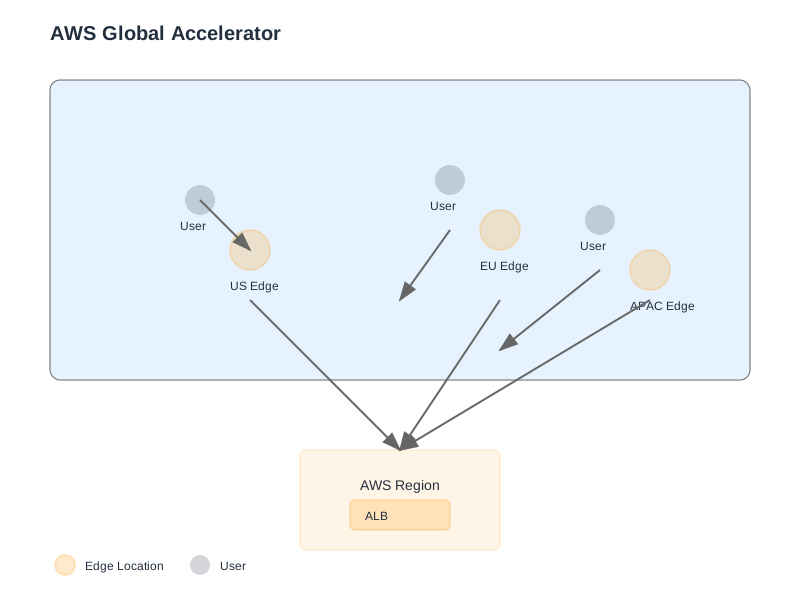
Global Accelerator acts as a network traffic director, improving application availability and performance by directing user traffic to the closest healthy application endpoint.
Key Components
| Component | Purpose | Benefits | | :-------------------- | :----------------------------------------------------------------------------------------------------------------- | :------------------------------------------------------------------------------------------------------- | | Static IP Addresses | Two static, anycast IP addresses provided by AWS. These are the entry points for your end-users. | Provides a stable, predictable entry point, simplifying DNS management and client configurations. | | Accelerator | The main resource that manages traffic flow to your application endpoints. It is associated with the static IPs. | Manages endpoint groups, listeners, and traffic distribution across AWS regions. | | Listener | Processes incoming connections from clients to the accelerator. Configured with ports and protocols. | Enables protocol-specific handling (TCP/UDP) and port forwarding. | | Endpoint Group | A collection of regional resources (e.g., Application Load Balancers, EC2 instances) that serve traffic for a specific AWS region. | Allows for regional failover and granular traffic control within a given AWS region. | | Endpoints | The actual resources that receive traffic, such as Application Load Balancers (ALBs), Network Load Balancers (NLBs), or EC2 instances. | The targets for traffic distribution; must be registered within an endpoint group. | | Health Checks | Probes that Global Accelerator performs on your endpoints to determine their availability. | Ensures traffic is only directed to healthy resources, enabling automatic failover. |
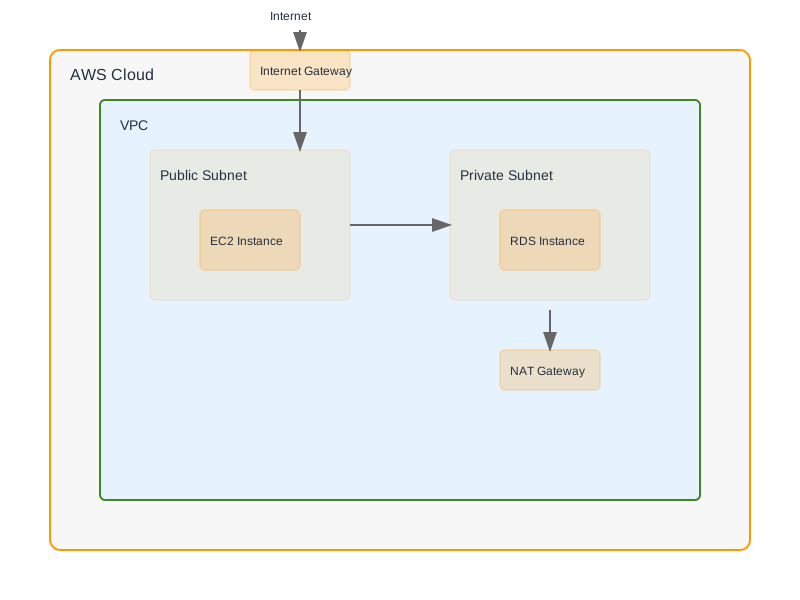
Global Accelerator Basic Flow
Implementation Patterns and Strategies
Deploying Global Accelerator involves configuring the accelerator, listener, and endpoint groups.
Basic Accelerator and Listener Configuration
This example demonstrates provisioning a Global Accelerator with two static IP addresses and a listener for HTTP/HTTPS traffic using AWS CDK (TypeScript).
import * as aws from '@aws-cdk/aws-globalaccelerator-alpha';
import * as cdk from 'aws-cdk-lib';
import { Construct } from 'constructs';

interface GlobalAcceleratorProps extends cdk.StackProps {
  readonly flowLogsBucketName: string;
}

export class GlobalAcceleratorStack extends cdk.Stack {
  constructor(scope: Construct, id: string, props: GlobalAcceleratorProps) {
    super(scope, id, props);

    const accelerator = new aws.Accelerator(this, 'AppAccelerator', {
      acceleratorName: 'my-global-app-accelerator',
      flowLogsBucketName: props.flowLogsBucketName,
      flowLogsS3Prefix: 'ga-logs',
      // If enabled, flow logs are enabled by default.
      // You can explicitly set enabled: true to ensure it.
    });

    const listener = accelerator.addListener('AppListener', {
      // Enable this if you require consistent source IP for downstream services.
      // Note: This can impact failover behavior if endpoints are in different VPCs.
      clientAffinity: aws.ClientAffinity.SOURCE_IP,
      protocol: aws.Protocol.TCP,
      portRanges: [
        { fromPort: 80 },
        { fromPort: 443 },
      ],
    });
  }
}
Explanation:
- : Creates the Global Accelerator resource.
aws.AcceleratorandflowLogsBucketNameare crucial for traffic analysis and debugging.flowLogsS3Prefix - : Configures the listener to accept incoming TCP traffic on ports 80 and 443.
accelerator.addListener - : Configures client affinity, directing requests from the same client IP to the same endpoint within a region. This is useful for maintaining session state on stateless applications, but requires careful consideration regarding regional endpoint availability.
clientAffinity.SOURCE_IP
Endpoint Group and Regional Deployment
This TypeScript example shows how to create two endpoint groups, one for
us-west-2us-east-1import * as aws from '@aws-cdk/aws-globalaccelerator-alpha'; import * as cdk from 'aws-cdk-lib'; import { Construct } from 'constructs'; interface EndpointGroupProps { readonly listener: aws.Listener; readonly primaryRegion: string; readonly secondaryRegion: string; readonly primaryEndpointArn: string; readonly secondaryEndpointArn: string; } export class EndpointGroupsStack extends cdk.Stack { constructor(scope: Construct, id: string, props: EndpointGroupProps) { super(scope, id); // Primary Endpoint Group (e.g., us-west-2) const primaryGroup = props.listener.addEndpointGroup('PrimaryEndpointGroup', { endpointGroupRegion: props.primaryRegion, trafficDialPercentage: 100, // Initially send 100% of traffic here healthCheck: { port: 80, protocol: aws.HealthCheckProtocol.HTTP, path: '/health', interval: cdk.Duration.seconds(10), thresholdCount: 3, }, }); primaryGroup.addEndpoint('PrimaryEndpoint', { endpoint: aws.Endpoint.fromArn(props.primaryEndpointArn), weight: 100, }); // Secondary Endpoint Group (e.g., us-east-1) const secondaryGroup = props.listener.addEndpointGroup('SecondaryEndpointGroup', { endpointGroupRegion: props.secondaryRegion, trafficDialPercentage: 0, // Initially send 0% of traffic here healthCheck: { port: 80, protocol: aws.HealthCheckProtocol.HTTP, path: '/health', interval: cdk.Duration.seconds(10), thresholdCount: 3, }, }); secondaryGroup.addEndpoint('SecondaryEndpoint', { endpoint: aws.Endpoint.fromArn(props.secondaryEndpointArn), weight: 100, }); } }
Explanation:
- : Creates an endpoint group within a specified AWS region.
listener.addEndpointGroup - : Controls the percentage of traffic sent to this endpoint group. Setting one to 100% and others to 0% establishes a primary/secondary failover configuration.
trafficDialPercentage - : Defines how Global Accelerator monitors the health of endpoints. A robust
healthCheckendpoint is critical./health - : Associates specific AWS resources (like ALBs) with the endpoint group.
aws.Endpoint.fromArnis used for distributing traffic among endpoints within the same group.weight
Performance Optimization Techniques
Global Accelerator's core value proposition lies in its ability to optimize application performance through intelligent traffic routing.
Traffic Management Strategies
| Strategy | Implementation Details | Use Case | | :------------------- | :---------------------------------------------------------------------------------------- | :----------------------------------------------------------------------------------------------------------------------------------------------------------------------------------- | | Regional Routing | Global Accelerator routes traffic over the AWS global network to the closest healthy region. | Minimizes latency for geographically dispersed users. Directs traffic to the nearest AWS region, bypassing public internet congestion. | | Traffic Dial | A percentage setting on an endpoint group. | Enables phased rollouts, A/B testing, or gradual failover. For example, directing 90% to
us-east-1us-west-2CLIENT_IPNONECLIENT_IPSOURCE_IPNONEHealth Checks and Failover Configuration
Robust health checking is paramount for ensuring application availability and enabling seamless failover.
Health Check Configuration and Failover Flow
Global Accelerator continuously monitors the health of registered endpoints based on configured health check parameters.
Health Check and Automatic Failover
Key Considerations for Health Checks:
- Protocol and Port: Use protocols (HTTP, HTTPS, TCP) and ports that accurately reflect how your application is served.
- Path: For HTTP/HTTPS checks, specify a dedicated health check endpoint (e.g., ,
/health) that returns a/status. This endpoint should be lightweight and quickly report the application's readiness.200 OK - Threshold Count: The number of consecutive successful or failed health checks required to change an endpoint's status. A higher threshold increases resilience against transient network blips but can delay failover.
- Interval: The frequency of health checks. Shorter intervals detect failures faster but increase load on endpoints and network.
Failover Behavior: When an endpoint in an endpoint group becomes unhealthy, Global Accelerator automatically reroutes traffic to healthy endpoints in other available endpoint groups. If an endpoint group's
trafficDialPercentageMonitoring and Analytics
Comprehensive monitoring is essential for understanding performance, detecting issues, and validating the effectiveness of your Global Accelerator configuration.
Key Performance Metrics and Analysis
| Metric | Description | Target/Considerations | Monitoring Tools | | :---------------------------- | :------------------------------------------------------------------------------------ | :---------------------------------------------------------------------------------------------- | :----------------------------------------------- | | Latency | Time taken for requests to travel from the user to the application endpoint. | Target < 100ms for most web applications. Monitor with CloudWatch custom metrics or RUM. | CloudWatch, AWS Real User Monitoring (RUM) | | Healthy Endpoint Count | Number of healthy endpoints in each endpoint group. | Should ideally remain at the configured number of healthy endpoints. Alarms on dips. | CloudWatch (via custom metrics or alarms) | | Bytes Processed | Data volume passing through the accelerator. | Track trends to understand traffic patterns and capacity planning. | CloudWatch | | Packets Processed | Number of packets handled by the accelerator. | Useful for understanding traffic patterns and potential network bottlenecks. | CloudWatch | | Flow Logs (S3) | Detailed records of network traffic flowing to and from the accelerator. | Crucial for security analysis, traffic debugging, and understanding traffic sources. | S3, Athena for querying, CloudWatch Logs Insights | | Application-level Metrics | Application-specific metrics like request rate, error rate, response time (from app). | Correlate with Global Accelerator metrics to pinpoint issues. | CloudWatch, Prometheus, Grafana |
Practical Monitoring Example: Configure CloudWatch alarms on
HealthyEndpointCount-- Example Athena query to find traffic to a specific endpoint group SELECT srcaddr, dstaddr, bytes, start FROM "your_flow_logs_database"."your_flow_logs_table" WHERE region = 'us-west-2' AND start BETWEEN '2023-10-27 00:00:00' AND '2023-10-27 23:59:59' LIMIT 100;
Cost Optimization Strategies
While Global Accelerator enhances performance and availability, understanding its cost structure is essential for efficient resource utilization.
Cost Management Strategies
| Strategy | Implementation Details | Impact | | :----------------------------- | :------------------------------------------------------------------------------------------------------------------------------- | :-------------------------------------------------------------------------------------------------------- | | Optimize Regional Endpoints | Deploy application resources in regions geographically closer to your primary user base. | Reduces data transfer costs from the Global Accelerator edge locations to your regional endpoints. | | Fine-tune Health Checks | Adjust
intervalthresholdCounttrafficDialPercentageGlobal Accelerator Pricing: Costs are primarily based on:
- Hourly Charges: Per accelerator.
- Data Transfer Charges: For data processed by the accelerator. These are generally lower than direct internet egress costs due to optimized routing.
Security Best Practices
Securing your Global Accelerator configuration is critical for protecting your application and data.
Security Considerations and Implementation
- Enable Flow Logs: Always enable flow logs for the accelerator and store them in S3 for auditing, security analysis, and troubleshooting. Query with Athena for insights.
- DDoS Protection: Global Accelerator integrates with AWS Shield Advanced for enhanced DDoS protection. Ensure this is provisioned and configured if required.
- HTTPS/TLS Listeners: If your application supports it, configure listeners for HTTPS to encrypt traffic between the client and the Global Accelerator edge. Client-to-endpoint encryption must be handled by your regional endpoints (e.g., ALB with SSL certificates).
- Network Access Control: Implement security groups and network ACLs on your regional endpoints (EC2 instances, ALBs) to restrict traffic only from Global Accelerator's IP ranges or specific subnets.
- IAM Roles and Policies: Adhere to the principle of least privilege when granting permissions to manage Global Accelerator resources. Use IAM roles for programmatic access.
- Resource Tagging: Implement a consistent tagging strategy for accelerators, listeners, and endpoint groups to aid in cost allocation, access control, and resource management.
- API Activity Monitoring: Use AWS CloudTrail to monitor API calls made to Global Accelerator, detecting unauthorized or suspicious actions.
When Not to Use Global Accelerator
While powerful, Global Accelerator may not be the optimal solution in all scenarios:
- Single Region Applications: If your application is deployed and primarily accessed within a single, localized AWS region, the benefits of Global Accelerator's global network routing are minimal, and it introduces unnecessary complexity and cost.
- Static IP Requirements Only: If your sole requirement is static IP addresses and you don't need optimized global routing or multi-region failover, consider other AWS services like Elastic IPs with NAT Gateways or Elastic Load Balancers configured with static IPs.
- Extremely Low Latency Sensitive Applications with Localized Users: For applications where every millisecond counts and users are concentrated in a very specific geographic area, a carefully optimized regional deployment might offer slightly lower latency than routing through Global Accelerator, though Global Accelerator still provides significant improvements over standard internet routing.
- Cost-Sensitive Applications with Minimal Global Reach: The hourly charges and data processing fees for Global Accelerator can be a factor. If your application has a limited global user base and cost is a primary constraint, alternative solutions might be more economical.
- Applications Requiring Direct Inbound Connections to Specific EC2 Instances without Load Balancing: While Global Accelerator can target EC2 instances directly, it's typically used in conjunction with load balancers for better availability and management. If direct, non-load-balanced access to specific instances is a strict requirement without any regional abstraction, Global Accelerator might add complexity.
Decision Checklist
Use this checklist to determine if AWS Global Accelerator is the right choice for your application.
I. Application Requirements:
- [ ] Does the application serve a geographically dispersed user base?
- [ ] Is low latency and consistent performance a critical requirement for global users?
- [ ] Is high availability and automatic failover across multiple AWS regions necessary?
- [ ] Is there a need for stable, static entry points (IP addresses) for clients?
- [ ] Does the application require session persistence () across requests?
Client Affinity = SOURCE_IP
II. Existing Infrastructure & Architecture:
- [ ] Are you currently using or planning to use multiple AWS regions for redundancy?
- [ ] Are you using or planning to use AWS Load Balancers (ALB/NLB) or EC2 instances as backend endpoints?
- [ ] Does your DNS strategy need simplification or improvement for global reach?
III. Operational & Cost Considerations:
- [ ] Are you willing to incur the additional costs associated with Global Accelerator (hourly rate, data transfer)?
- [ ] Do you have the operational capacity to monitor and manage Global Accelerator configurations (health checks, endpoint groups)?
- [ ] Is the complexity of managing Global Accelerator acceptable compared to alternative solutions (e.g., advanced DNS, regional LBs)?
IV. Security & Compliance:
- [ ] Does your application require DDoS protection at the network edge?
- [ ] Do you need detailed network traffic logs for auditing and analysis?
If you answered "Yes" to most questions in sections I and II, and "Yes" to relevant questions in sections III and IV, AWS Global Accelerator is likely a strong candidate for your application.
Conclusion
AWS Global Accelerator provides a robust and scalable solution for optimizing the performance and availability of applications serving a global audience. By understanding its architectural components, leveraging its traffic management capabilities, implementing thorough health checks, and adhering to security and cost optimization best practices, engineers can design and deploy highly resilient applications that deliver exceptional user experiences worldwide. Its ability to abstract network complexities and route traffic intelligently through the AWS global network makes it a compelling choice for modern, distributed applications.