Advanced DNS Strategies with AWS Route 53
Explore advanced routing policies, health checks, and DNS failover strategies using AWS Route 53.
Advanced DNS Strategies with AWS Route 53
TL;DR
This guide explores advanced AWS Route 53 routing policies and health check configurations for enhancing application availability, performance, and disaster recovery. It covers weighted, latency, failover, and geolocation routing, with practical examples and considerations for implementation, monitoring, and cost optimization.
Introduction
AWS Route 53 offers a robust suite of DNS services that extend far beyond simple record resolution. For engineers building resilient, high-performance, and globally distributed applications, understanding and leveraging its advanced routing policies and health check capabilities is paramount. This document delves into these advanced strategies, providing practical insights for their implementation and optimization.
Understanding Route 53 Routing Policies
Route 53 provides several routing policies, each designed for specific architectural needs. Selecting the appropriate policy is foundational to achieving your desired outcome.
Routing Policy Comparison
| Routing Policy | Primary Use Case | Key Benefits | When to Consider | | :----------------- | :------------------------------------------------ | :-------------------------------------------------- | :---------------------------------------------------------------------------------- | | Simple | Single endpoint, basic DNS resolution | Ease of setup, no complex configurations | For applications with a single, static IP or CNAME. | | Weighted | Traffic distribution, A/B testing, gradual rollouts | Granular control over traffic allocation | Migrating to new versions, testing features, distributing load across multiple endpoints. | | Latency | Global applications, performance optimization | Reduced latency for end-users by directing them to the closest endpoint | Serving users across diverse geographic regions where response time is critical. | | Failover | High availability, disaster recovery | Automatic traffic redirection to a healthy secondary endpoint upon primary failure | Critical applications requiring minimal downtime and automated recovery. | | Geolocation | Content localization, regional routing | Delivering content or services based on user's geographic location | Serving region-specific content, compliance requirements, or optimizing for regional performance. | | Multivalue | High availability for multiple healthy endpoints | Returns up to 8 healthy IP addresses, increasing availability and load distribution | When you have multiple healthy resources and want to distribute traffic without complex weighting. |
Implementing Advanced Routing Policies
This section provides practical code examples and conceptual architectures for implementing key advanced routing policies.
Weighted Routing for Traffic Shifting and A/B Testing
Weighted routing allows you to distribute traffic across multiple resources based on assigned weights. This is invaluable for phased rollouts, A/B testing, or gradually shifting traffic to a new deployment.
Example: Shifting traffic from v1.api.example.comv2.api.example.com
import * as AWS from 'aws-sdk';

const route53 = new AWS.Route53();
const HOSTED_ZONE_ID = 'YOUR_HOSTED_ZONE_ID'; // e.g., Z1A2BC3D4E5F6G

// Function to update weighted records for API traffic
const updateApiTrafficWeights = async (
  primaryWeight: number,
  secondaryWeight: number
) => {
  const params: AWS.Route53.ChangeResourceRecordSetsRequest = {
    HostedZoneId: HOSTED_ZONE_ID,
    ChangeBatch: {
      Comment: `Update API traffic weights: Primary=${primaryWeight}%, Secondary=${secondaryWeight}%`,
      Changes: [
        {
          Action: 'UPSERT',
          ResourceRecordSet: {
            Name: 'api.example.com',
            Type: 'A', // or CNAME depending on your endpoints
            SetIdentifier: 'api-v1', // Unique identifier for this record set
            Weight: primaryWeight,
            AliasTarget: {
              HostedZoneId: 'Z35SX4DHQT786K', // Example Hosted Zone ID for ALB
              DNSName: 'alb-v1.example.com',
              EvaluateTargetHealth: true,
            },
          },
        },
        {
          Action: 'UPSERT',
          ResourceRecordSet: {
            Name: 'api.example.com',
            Type: 'A', // or CNAME
            SetIdentifier: 'api-v2',
            Weight: secondaryWeight,
            AliasTarget: {
              HostedZoneId: 'Z35SX4DHQT786K', // Example Hosted Zone ID for ALB
              DNSName: 'alb-v2.example.com',
              EvaluateTargetHealth: true,
            },
          },
        },
      ],
    },
  };

  try {
    const response = await route53.changeResourceRecordSets(params).promise();
    console.log('Successfully updated API traffic weights:', response);
    return response;
  } catch (error) {
    console.error('Error updating API traffic weights:', error);
    throw error;
  }
};

// Example usage: gradually shift 90% to v1, 10% to v2
// updateApiTrafficWeights(90, 10);
Trade-offs:
- Pros: Fine-grained control over traffic distribution, seamless rollouts, supports A/B testing.
- Cons: Requires careful management of weights, health checks are crucial for reliable failover. If is
EvaluateTargetHealth, Route 53 respects the health of the associated resource. Iftrue, it will continue to send traffic even if the endpoint is unhealthy.false
Failover Configuration with Health Checks
Failover routing provides high availability by directing traffic to a secondary endpoint when the primary endpoint becomes unhealthy. This is typically implemented with two identical environments (e.g., in different AWS regions or Availability Zones).
Example: Configuring a primary and secondary record set with health checks
import * as AWS from 'aws-sdk';

const route53 = new AWS.Route53();
const HOSTED_ZONE_ID = 'YOUR_HOSTED_ZONE_ID'; // e.g., Z1A2BC3D4E5F6G

// Assume health checks with IDs 'hc-primary' and 'hc-secondary' already exist.
const PRIMARY_HEALTH_CHECK_ID = 'hc-primary';
const SECONDARY_HEALTH_CHECK_ID = 'hc-secondary';

const configureFailoverRecords = async () => {
  const params: AWS.Route53.ChangeResourceRecordSetsRequest = {
    HostedZoneId: HOSTED_ZONE_ID,
    ChangeBatch: {
      Comment: 'Configure DNS Failover for primary and secondary endpoints',
      Changes: [
        {
          Action: 'UPSERT',
          ResourceRecordSet: {
            Name: 'app.example.com',
            Type: 'A', // or CNAME
            SetIdentifier: 'primary-endpoint',
            Failover: 'PRIMARY',
            TTL: 60, // Time to Live for DNS records
            AliasTarget: {
              HostedZoneId: 'Z1A2BC3D4E5F6G', // Hosted Zone ID of the primary endpoint's ALB/CloudFront
              DNSName: 'primary.app.example.com',
              EvaluateTargetHealth: true, // Crucial for failover
            },
            HealthCheckId: PRIMARY_HEALTH_CHECK_ID,
          },
        },
        {
          Action: 'UPSERT',
          ResourceRecordSet: {
            Name: 'app.example.com',
            Type: 'A', // or CNAME
            SetIdentifier: 'secondary-endpoint',
            Failover: 'SECONDARY',
            TTL: 60,
            AliasTarget: {
              HostedZoneId: 'Z1A2BC3D4E5F6G', // Hosted Zone ID of the secondary endpoint's ALB/CloudFront
              DNSName: 'secondary.app.example.com',
              EvaluateTargetHealth: true,
            },
            HealthCheckId: SECONDARY_HEALTH_CHECK_ID,
          },
        },
      ],
    },
  };

  try {
    const response = await route53.changeResourceRecordSets(params).promise();
    console.log('Successfully configured failover records:', response);
    return response;
  } catch (error) {
    console.error('Error configuring failover records:', error);
    throw error;
  }
};

// configureFailoverRecords();
Trade-offs:
- Pros: Automatic failover significantly reduces Mean Time To Recovery (MTTR), enhances application availability.
- Cons: Requires maintaining two or more identical environments, can be more complex to set up and manage.
Latency-Based Routing for Global Performance
Latency-based routing directs users to the AWS resource that provides the fastest response time for their geographic location.
Example: Setting up latency records for a global application
import * as AWS from 'aws-sdk';

const route53 = new AWS.Route53();
const HOSTED_ZONE_ID = 'YOUR_HOSTED_ZONE_ID'; // e.g., Z1A2BC3D4E5F6G

const createLatencyRecords = async () => {
  const regionalEndpoints = [
    { region: 'us-east-1', dnsName: 'app-us-east-1.example.com', hostedZoneId: 'Z1A2BC3D4E5F6G' },
    { region: 'eu-west-1', dnsName: 'app-eu-west-1.example.com', hostedZoneId: 'Z2FDTNDATAQYW2' },
    { region: 'ap-southeast-2', dnsName: 'app-ap-southeast-2.example.com', hostedZoneId: 'Z1RLZ7ZXOB9Z92' },
  ];

  const changes = regionalEndpoints.map(endpoint => ({
    Action: 'UPSERT',
    ResourceRecordSet: {
      Name: 'global.app.example.com',
      Type: 'A', // or CNAME
      SetIdentifier: `${endpoint.region}-app`,
      Region: endpoint.region, // Specifies the AWS region for this record
      AliasTarget: {
        HostedZoneId: endpoint.hostedZoneId,
        DNSName: endpoint.dnsName,
        EvaluateTargetHealth: true, // Optional, but recommended if endpoints have health checks
      },
      // For non-Alias targets (e.g., A records pointing to an IP address)
      // TTL: 300,
      // ResourceRecords: [{ Value: 'IP_ADDRESS' }]
    },
  }));

  const params: AWS.Route53.ChangeResourceRecordSetsRequest = {
    HostedZoneId: HOSTED_ZONE_ID,
    ChangeBatch: {
      Comment: 'Latency-based routing for global application',
      Changes: changes,
    },
  };

  try {
    const response = await route53.changeResourceRecordSets(params).promise();
    console.log('Successfully created latency records:', response);
    return response;
  } catch (error) {
    console.error('Error creating latency records:', error);
    throw error;
  }
};

// createLatencyRecords();
Trade-offs:
- Pros: Improves end-user experience by minimizing latency, distributes load globally.
- Cons: Requires deploying resources in multiple AWS regions, can increase infrastructure costs. Health checks are vital to ensure users aren't directed to unhealthy regional endpoints.
Geolocation Routing for Regional Content Delivery
Geolocation routing directs users to specific resources based on their geographic location (continent, country, or subdivision).
Example: Routing users to different language versions of a website
import * as AWS from 'aws-sdk';

const route53 = new AWS.Route53();
const HOSTED_ZONE_ID = 'YOUR_HOSTED_ZONE_ID'; // e.g., Z1A2BC3D4E5F6G

const configureGeolocationRecords = async () => {
  const changes: AWS.Route53.Change[] = [
    // Default routing for all other locations
    {
      Action: 'UPSERT',
      ResourceRecordSet: {
        Name: 'www.example.com',
        Type: 'A',
        SetIdentifier: 'default-routing',
        TTL: 300,
        AliasTarget: {
          HostedZoneId: 'Z1A2BC3D4E5F6G', // e.g., ALB in a primary region
          DNSName: 'default.www.example.com',
          EvaluateTargetHealth: true,
        },
      },
    },
    // Routing for users in France
    {
      Action: 'UPSERT',
      ResourceRecordSet: {
        Name: 'www.example.com',
        Type: 'A',
        SetIdentifier: 'france-routing',
        GeoLocation: { Country: 'FR' },
        TTL: 300,
        AliasTarget: {
          HostedZoneId: 'Z1A2BC3D4E5F6G', // e.g., ALB serving French content
          DNSName: 'fr.www.example.com',
          EvaluateTargetHealth: true,
        },
      },
    },
    // Routing for users in Germany
    {
      Action: 'UPSERT',
      ResourceRecordSet: {
        Name: 'www.example.com',
        Type: 'A',
        SetIdentifier: 'germany-routing',
        GeoLocation: { Country: 'DE' },
        TTL: 300,
        AliasTarget: {
          HostedZoneId: 'Z1A2BC3D4E5F6G', // e.g., ALB serving German content
          DNSName: 'de.www.example.com',
          EvaluateTargetHealth: true,
        },
      },
    },
  ];

  const params: AWS.Route53.ChangeResourceRecordSetsRequest = {
    HostedZoneId: HOSTED_ZONE_ID,
    ChangeBatch: {
      Comment: 'Geolocation routing for www.example.com',
      Changes: changes,
    },
  };

  try {
    const response = await route53.changeResourceRecordSets(params).promise();
    console.log('Successfully configured geolocation records:', response);
    return response;
  } catch (error) {
    console.error('Error configuring geolocation records:', error);
    throw error;
  }
};

// configureGeolocationRecords();
Trade-offs:
- Pros: Optimizes user experience by delivering localized content, can comply with regional data residency laws.
- Cons: Requires managing resources specific to each targeted region, can lead to increased operational complexity.
Multivalue Answer Routing
Multivalue answer routing returns up to eight healthy IP addresses for a given DNS query. This is useful for increasing the availability and load-balancing capacity of your application.
Example: Providing multiple healthy IP addresses for a critical service
import * as AWS from 'aws-sdk';

const route53 = new AWS.Route53();
const HOSTED_ZONE_ID = 'YOUR_HOSTED_ZONE_ID'; // e.g., Z1A2BC3D4E5F6G

const createMultivalueRecord = async () => {
  const params: AWS.Route53.ChangeResourceRecordSetsRequest = {
    HostedZoneId: HOSTED_ZONE_ID,
    ChangeBatch: {
      Comment: 'Multivalue routing for critical service',
      Changes: [
        {
          Action: 'UPSERT',
          ResourceRecordSet: {
            Name: 'service.example.com',
            Type: 'A', // Or CNAME
            SetIdentifier: 'multivalue-service',
            TTL: 60,
            MultiValueAnswer: true, // Enable multivalue routing
            ResourceRecords: [ // Example IP addresses. In a real scenario, these would be dynamically determined or managed via AliasTarget.
              { Value: '192.0.2.1' },
              { Value: '192.0.2.2' },
              { Value: '192.0.2.3' },
            ],
            // If using AliasTarget with multivalue, each target must have its own record set with the same SetIdentifier and MultiValueAnswer: true.
            // Example with AliasTarget (requires separate records for each target):
            // AliasTarget: {
            //   HostedZoneId: 'Z35SX4DHQT786K', // e.g., ALB
            //   DNSName: 'alb1.service.example.com',
            //   EvaluateTargetHealth: true,
            // },
          },
        },
        // For each additional healthy endpoint when using AliasTarget:
        // {
        //   Action: 'UPSERT',
        //   ResourceRecordSet: {
        //     Name: 'service.example.com',
        //     Type: 'A',
        //     SetIdentifier: 'multivalue-service', // Must be the same SetIdentifier
        //     TTL: 60,
        //     MultiValueAnswer: true,
        //     AliasTarget: {
        //       HostedZoneId: 'Z35SX4DHQT786K', // e.g., ALB
        //       DNSName: 'alb2.service.example.com',
        //       EvaluateTargetHealth: true,
        //     },
        //   },
        // },
      ],
    },
  };

  try {
    const response = await route53.changeResourceRecordSets(params).promise();
    console.log('Successfully created multivalue record:', response);
    return response;
  } catch (error) {
    console.error('Error creating multivalue record:', error);
    throw error;
  }
};

// createMultivalueRecord();
Trade-offs:
- Pros: Increases availability by returning multiple healthy IP addresses, provides inherent load balancing without explicit weighting.
- Cons: Client-side resolvers determine which IP to use and how to handle multiple responses, which can vary. Not suitable for scenarios requiring strict traffic distribution ratios.
Health Check Configuration and Monitoring
Route 53 health checks are critical for active monitoring of your application's endpoints, enabling intelligent routing decisions.
Health Check Types and Configuration
| Health Check Type | Configuration Options | Use Case | Monitoring Granularity | | :----------------------- | :----------------------------------------------------- | :----------------------------------------------------------------------------- | :------------------------------------------------------------- | | Endpoint | Protocol (HTTP, HTTPS, TCP), Port, Path, Timeout, Interval, Failure Threshold | Monitoring specific endpoints (ALB, EC2, CloudFront, external servers) | Direct health of the monitored endpoint. | | Calculated | Combines the health status of other health checks | Creating complex health states based on multiple component health (e.g., primary + secondary). | Aggregate health of multiple components. | | CloudWatch Alarm | Links to a CloudWatch alarm metric | Monitoring custom metrics or AWS resource health that can be alarmed on. | Health as defined by a specific CloudWatch metric threshold. |
Example: Creating an HTTPS endpoint health check
import * as AWS from 'aws-sdk';

const route53 = new AWS.Route53();

const createEndpointHealthCheck = async (fqdn: string, resourcePath: string) => {
  const params: AWS.Route53.CreateHealthCheckRequest = {
    CallerReference: `hc-endpoint-${Date.now()}`, // Unique identifier for this creation request
    HealthCheckConfig: {
      Type: 'HTTPS', // Can be HTTP, HTTPS, TCP
      FullyQualifiedDomainName: fqdn, // e.g., 'api.example.com'
      Port: 443,
      RequestInterval: 30, // Seconds between checks
      FailureThreshold: 3, // Number of consecutive failures to mark unhealthy
      ResourcePath: resourcePath, // e.g., '/health' or '/'
      EnableSNI: true, // For HTTPS, enables Server Name Indication
      // Regions: ['us-east-1', 'eu-west-1'], // Optionally specify regions from which to perform checks
    },
  };

  try {
    const response = await route53.createHealthCheck(params).promise();
    console.log(`Successfully created health check for ${fqdn}:`, response.HealthCheck.Id);
    return response;
  } catch (error) {
    console.error(`Error creating health check for ${fqdn}:`, error);
    throw error;
  }
};

// Example usage:
// createEndpointHealthCheck('api.example.com', '/status');
Best Practices for Health Checks:
- Use meaningful : Ensure your endpoint returns a
ResourcePathstatus code for a valid health check path (e.g.,200 OK,/health)./status - Configure appropriately: A lower threshold means quicker failover but higher susceptibility to transient network issues. A higher threshold is more resilient but slower to detect failures.
FailureThreshold - is crucial: When using
EvaluateTargetHealth: true, setting this toAliasTargetensures Route 53 respects the health of the underlying resource (e.g., an ALB's target group health).true - Monitor Health Check Status: Utilize CloudWatch metrics for Route 53 health checks to track their status and receive alerts.
DNS Failover Architecture Example
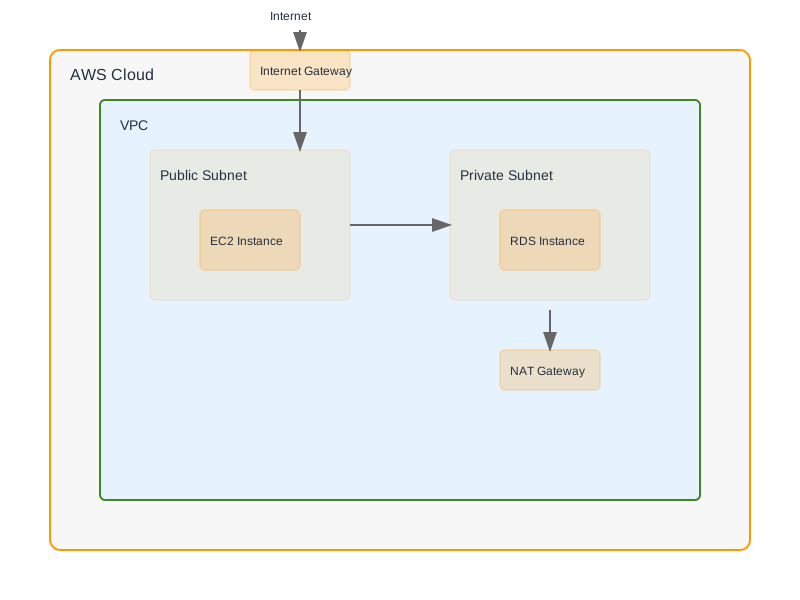
A common DNS failover architecture involves two distinct deployment environments, often in different AWS regions or Availability Zones.
DNS Failover Setup
In this setup:
- Route 53 is configured with routing policy for
Failover.app.example.com - A record points to the primary region's endpoint (e.g., an ALB).
PRIMARY - A record points to the secondary region's endpoint (e.g., another ALB).
SECONDARY - Each record is associated with a Route 53 health check monitoring its respective endpoint.
- If the primary health check fails for the configured threshold, Route 53 automatically directs traffic to the secondary endpoint.
Monitoring and Optimization
Continuous monitoring and proactive optimization are key to maintaining a robust DNS infrastructure.
Key Metrics to Monitor
| Metric | Description | Target/Recommendation | AWS Monitoring Source | | :------------------------ | :------------------------------------------------------- | :----------------------------------------------- | :---------------------------- | | DNS Query Latency | Time taken for Route 53 to respond to DNS queries. | < 100ms (depends on client location and DNS resolver) | Route 53 API metrics | | Health Check Status | Percentage of health checks that are healthy. | 100% healthy for critical endpoints. | Route 53 Health Check metrics | | Failover Time | Time elapsed from primary endpoint failure to secondary traffic redirection. | < 60 seconds (dependent on TTL, health check interval/threshold) | CloudWatch (custom metric/logs) | | DNS Query Volume | Total number of DNS queries handled by Route 53. | Monitor for anomalies, track usage patterns. | Route 53 API metrics | | Health Check Failures | Number of health check failures. | Zero for healthy endpoints. | Route 53 Health Check metrics |
Cost Optimization Strategies
- Health Check Optimization:
- Right-size intervals: Use longer intervals (e.g., 60 seconds) for non-critical endpoints. Shorter intervals (e.g., 10-30 seconds) are necessary for rapid failover.
- Combine health checks: Use calculated health checks to reduce the number of individual health checks if applicable.
- Endpoint Health Checks: Leverage with Alias targets to use the underlying resource's health (e.g., ALB health checks), which may be more efficient and cost-effective than duplicating checks.
EvaluateTargetHealth: true
- Query Logging:
- Enable selectively: Log queries only for specific domains or traffic patterns that require deep analysis, as logging incurs costs.
- Use Amazon CloudWatch Logs Insights: Query logs efficiently to analyze traffic patterns, identify common query types, or troubleshoot issues.
- Traffic Management:
- Optimize Routing Policies: Choose the most cost-effective policy that meets your needs. Simple routing is cheapest, while latency and geolocation can increase costs due to multi-region deployments.
- Caching: Ensure DNS caching is effectively utilized by clients and resolvers to reduce the number of Route 53 queries.
When Not to Use Advanced Route 53 Strategies
- Simple, single-region applications with minimal availability requirements: If your application is a small internal tool with low traffic and downtime is acceptable, simple DNS records suffice.
- Environments where external DNS management is preferred or mandated: While Route 53 is