kubernetes
Kubernetes Basics: A Comprehensive Guide to Container Orchestration
Learn the fundamentals of Kubernetes, including core concepts, architecture, and basic operations. Perfect for beginners starting with container orchestration.
March 15, 2024
Admin KC
5 min read
Introduction to Kubernetes
Kubernetes (K8s) is an open-source container orchestration platform that automates the deployment, scaling, and management of containerized applications. This guide will walk you through the fundamental concepts and components.
Core Concepts
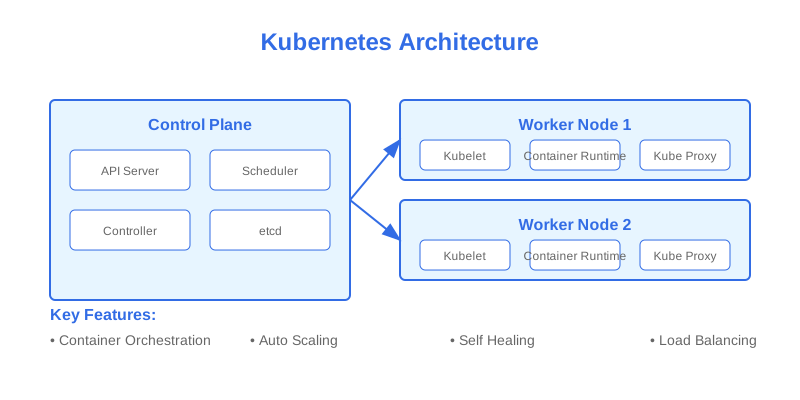
1. Kubernetes Architecture
Control Plane Components
- API Server
- etcd
- Scheduler
- Controller Manager
Node Components
- kubelet
- kube-proxy
- Container Runtime
2. Basic Objects
Pods
The smallest deployable unit in Kubernetes:
# basic-pod.yaml
apiVersion: v1
kind: Pod
metadata:
  name: nginx-pod
  labels:
    app: nginx
spec:
  containers:
  - name: nginx
    image: nginx:1.14.2
    ports:
    - containerPort: 80
Deployments
Manages Pod lifecycle and updates:
# deployment.yaml
apiVersion: apps/v1
kind: Deployment
metadata:
  name: nginx-deployment
  labels:
    app: nginx
spec:
  replicas: 3
  selector:
    matchLabels:
      app: nginx
  template:
    metadata:
      labels:
        app: nginx
    spec:
      containers:
      - name: nginx
        image: nginx:1.14.2
        ports:
        - containerPort: 80
Services
Exposes Pods to the network:
# service.yaml
apiVersion: v1
kind: Service
metadata:
  name: nginx-service
spec:
  selector:
    app: nginx
  ports:
  - port: 80
    targetPort: 80
  type: LoadBalancer
Basic Operations
1. Cluster Management
# View cluster information
kubectl cluster-info

# Get nodes status
kubectl get nodes

# View system components
kubectl get pods -n kube-system
2. Application Deployment
# Create resources
kubectl apply -f deployment.yaml

# View deployments
kubectl get deployments

# Scale deployment
kubectl scale deployment nginx-deployment --replicas=5

# Update image
kubectl set image deployment/nginx-deployment nginx=nginx:1.16.1
3. Monitoring and Debugging
# Get pod logs
kubectl logs nginx-pod

# Execute command in pod
kubectl exec -it nginx-pod -- /bin/bash

# Describe resource
kubectl describe pod nginx-pod
Working with ConfigMaps and Secrets
ConfigMaps
Store configuration data:
# configmap.yaml
apiVersion: v1
kind: ConfigMap
metadata:
  name: app-config
data:
  database_url: "mongodb://localhost:27017"
  api_endpoint: "https://api.example.com"
Using ConfigMap in Pod:
apiVersion: v1
kind: Pod
metadata:
  name: app-pod
spec:
  containers:
  - name: app
    image: my-app:1.0
    envFrom:
    - configMapRef:
        name: app-config
Secrets
Store sensitive information:
# secret.yaml
apiVersion: v1
kind: Secret
metadata:
  name: app-secrets
type: Opaque
data:
  username: dXNlcm5hbWU=  # base64 encoded
  password: cGFzc3dvcmQ=  # base64 encoded
Using Secret in Pod:
apiVersion: v1
kind: Pod
metadata:
  name: app-pod
spec:
  containers:
  - name: app
    image: my-app:1.0
    env:
    - name: DB_USERNAME
      valueFrom:
        secretKeyRef:
          name: app-secrets
          key: username
Storage Management
Persistent Volumes
Define storage resource:
# pv.yaml
apiVersion: v1
kind: PersistentVolume
metadata:
  name: app-pv
spec:
  capacity:
    storage: 10Gi
  accessModes:
    - ReadWriteOnce
  hostPath:
    path: "/mnt/data"
Persistent Volume Claims
Request storage:
# pvc.yaml
apiVersion: v1
kind: PersistentVolumeClaim
metadata:
  name: app-pvc
spec:
  accessModes:
    - ReadWriteOnce
  resources:
    requests:
      storage: 5Gi
Using PVC in Pod:
apiVersion: v1
kind: Pod
metadata:
  name: app-pod
spec:
  containers:
  - name: app
    image: my-app:1.0
    volumeMounts:
    - name: data-volume
      mountPath: /app/data
  volumes:
  - name: data-volume
    persistentVolumeClaim:
      claimName: app-pvc
Networking
Service Types
- ClusterIP (default):
apiVersion: v1
kind: Service
metadata:
  name: backend-service
spec:
  type: ClusterIP
  selector:
    app: backend
  ports:
  - port: 80
    targetPort: 8080
- NodePort:
apiVersion: v1
kind: Service
metadata:
  name: frontend-service
spec:
  type: NodePort
  selector:
    app: frontend
  ports:
  - port: 80
    targetPort: 80
    nodePort: 30080
- LoadBalancer:
apiVersion: v1
kind: Service
metadata:
  name: web-service
spec:
  type: LoadBalancer
  selector:
    app: web
  ports:
  - port: 80
    targetPort: 80
Network Policies
Control traffic flow:
apiVersion: networking.k8s.io/v1
kind: NetworkPolicy
metadata:
  name: api-allow
spec:
  podSelector:
    matchLabels:
      app: api
  policyTypes:
  - Ingress
  ingress:
  - from:
    - podSelector:
        matchLabels:
          role: frontend
    ports:
    - protocol: TCP
      port: 8080
Resource Management
Resource Requests and Limits
apiVersion: v1
kind: Pod
metadata:
  name: resource-pod
spec:
  containers:
  - name: app
    image: my-app:1.0
    resources:
      requests:
        memory: "64Mi"
        cpu: "250m"
      limits:
        memory: "128Mi"
        cpu: "500m"
Horizontal Pod Autoscaling
apiVersion: autoscaling/v2
kind: HorizontalPodAutoscaler
metadata:
  name: app-hpa
spec:
  scaleTargetRef:
    apiVersion: apps/v1
    kind: Deployment
    name: app-deployment
  minReplicas: 2
  maxReplicas: 10
  metrics:
  - type: Resource
    resource:
      name: cpu
      target:
        type: Utilization
        averageUtilization: 80
Best Practices
1. Health Checks
apiVersion: v1
kind: Pod
metadata:
  name: app-pod
spec:
  containers:
  - name: app
    image: my-app:1.0
    livenessProbe:
      httpGet:
        path: /health
        port: 8080
      initialDelaySeconds: 3
      periodSeconds: 3
    readinessProbe:
      httpGet:
        path: /ready
        port: 8080
      initialDelaySeconds: 5
      periodSeconds: 5
2. Security Context
apiVersion: v1
kind: Pod
metadata:
  name: secure-pod
spec:
  securityContext:
    runAsNonRoot: true
    runAsUser: 1000
  containers:
  - name: app
    image: my-app:1.0
    securityContext:
      allowPrivilegeEscalation: false
      readOnlyRootFilesystem: true
Conclusion
Key takeaways for Kubernetes:
- Understand core concepts and architecture
- Master basic operations
- Implement proper resource management
- Follow security best practices
- Use declarative configuration
Next Steps
- Set up a local Kubernetes cluster
- Practice with sample applications
- Learn advanced concepts
- Explore Kubernetes operators
- Study service mesh implementations
Resources
Kubernetes
Container Orchestration
DevOps
Cloud Native