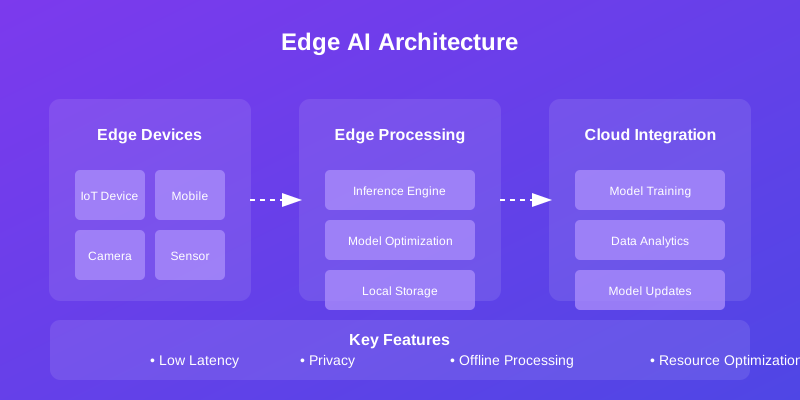
Edge Computing with AI: Architectures and Implementation Strategies
Master edge computing implementation with AI capabilities. Learn about edge architectures, deployment strategies, and real-world use cases.
Architecting and Implementing Edge AI Systems
TL;DR
This guide details architectural patterns and implementation strategies for deploying Artificial Intelligence (AI) at the network edge. It covers core components, hierarchical and distributed architectures, model optimization techniques (quantization, pruning), deployment methodologies (containerization, scaling), security considerations, monitoring, and real-world use cases, concluding with best practices for building robust and efficient edge AI solutions.
Introduction
The convergence of edge computing and Artificial Intelligence (AI) is a transformative force, enabling real-time data processing and intelligent decision-making directly at the data source. This document provides a technical deep dive into the architectural considerations and practical implementation strategies for engineers building and deploying sophisticated edge AI systems. We will explore established patterns, essential components, and critical aspects like model optimization, security, and operational management.
Core Components of Edge AI Systems
A robust edge AI system is composed of several interconnected layers. Understanding these components is foundational to designing effective architectures.
1. Edge Devices and Hardware
These are the physical endpoints where data is generated and computations occur.
- Sensors and IoT Devices: The primary data sources (e.g., cameras, microphones, environmental sensors, accelerometers).
- Edge Gateways: Act as intermediaries, aggregating data from multiple sensors, performing initial filtering, and often hosting more substantial processing capabilities.
- Processing Units: Specialized hardware for AI workloads, including CPUs, GPUs, TPUs, FPGAs, and dedicated AI accelerators (NPUs), tailored for efficiency and performance at the edge.
- Local Storage: Non-volatile memory for temporary data buffering, model storage, and logging, crucial for offline operation and data resilience.
2. AI Software Stack
This layer encompasses the AI models and the infrastructure to run them.
- Deployed Models: Optimized AI/ML models (e.g., neural networks, decision trees) ready for inference.
- Inference Engines: Software libraries and runtimes (e.g., TensorFlow Lite, ONNX Runtime, TensorRT) designed for efficient model execution on resource-constrained edge hardware.
- Model Optimization: Techniques applied to reduce model size, computational complexity, and power consumption for edge deployment (detailed in a later section).
- Data Preprocessing Modules: Libraries and code for cleaning, transforming, and formatting raw sensor data into a format suitable for model inference.
3. Network and Communication Infrastructure
Connectivity and data management are critical for distributed edge AI.
- Communication Protocols: Protocols optimized for edge environments, such as MQTT, CoAP, AMQP, and lightweight HTTP, ensuring efficient data exchange.
- Data Routing and Orchestration: Mechanisms for directing data flow between devices, gateways, edge servers, and the cloud.
- Security Measures: Encryption, authentication, authorization, and secure key management to protect data and devices at the edge.
- Load Balancing and Connectivity Management: Ensuring reliable operation and distributing workloads across available edge resources.
Architectural Patterns for Edge AI
The choice of architecture significantly impacts scalability, latency, and resource utilization.
1. Hierarchical Edge Architecture
This pattern organizes processing capabilities in layers, ranging from the cloud down to individual devices.
- Description: Data flows upwards from sensors, undergoing processing at each hierarchical level. Models are typically trained in the cloud and deployed downwards.
- Use Case: Applications requiring a balance of localized processing for low latency and centralized control or training. Example: Smart traffic management systems where local intersections analyze traffic flow, and regional centers coordinate city-wide flow.
2. Distributed AI Processing Architecture
This model emphasizes decentralization, allowing AI processing to occur across various edge nodes, not strictly dictated by a rigid hierarchy.
- Description: Processing and inference can happen on individual devices, gateways, or local edge servers. This allows for flexible placement of AI capabilities based on latency, bandwidth, and privacy requirements. Model training and global oversight remain in the cloud.
- Use Case: Scenarios demanding high autonomy at the edge, such as autonomous vehicles or industrial robotics, where immediate local decisions are paramount.
Implementation Strategies
Translating architectural patterns into tangible systems requires careful consideration of device, data, and model management.
1. Edge Device and Model Deployment
Deploying AI models efficiently to edge devices is crucial. This often involves specialized libraries and runtime environments.
# Example using a hypothetical edge_ai SDK
from edge_ai_sdk import EdgeDeviceManager, ModelDeployer

class EdgeAIController:
    def __init__(self, device_id: str, model_registry_url: str):
        self.device = EdgeDeviceManager.get_device(device_id)
        self.deployer = ModelDeployer(model_registry_url)
        self.edge_model = self.deploy_optimized_model("latest_vision_model")

    def deploy_optimized_model(self, model_name: str):
        """Fetches and deploys an optimized model to the edge device."""
        print(f"Attempting to deploy model '{model_name}' to device {self.device.id}...")
        try:
            # Model fetching and optimization logic is abstracted by the SDK
            deployed_model = self.deployer.deploy(model_name, target_device=self.device)
            print(f"Model '{model_name}' deployed successfully.")
            return deployed_model
        except Exception as e:
            print(f"Failed to deploy model: {e}")
            return None

    def perform_inference(self, input_data):
        """Preprocesses data and runs inference on the deployed model."""
        if not self.edge_model:
            print("No model deployed. Cannot perform inference.")
            return None

        # Preprocessing logic is often integrated with the device runtime
        preprocessed_data = self.device.preprocess(input_data)

        # Inference execution
        results = self.edge_model.inference(preprocessed_data)
        print(f"Inference complete. Results: {results}")
        return results

# Example Usage:
# controller = EdgeAIController("device-123", "http://model-registry.internal:8080")
# image_data = load_image("path/to/image.jpg")
# controller.perform_inference(image_data)
2. Edge Data Pipeline and Inference Batching
Efficiently handling data streams and batching for inference can significantly improve throughput.
import numpy as np
import time

class EdgeDataPipeline:
    def __init__(self, device_inference_func, batch_size: int = 32, batch_timeout_sec: float = 0.5):
        self.inference_func = device_inference_func # A function that takes a batch and returns results
        self.buffer = []
        self.batch_size = batch_size
        self.batch_timeout_sec = batch_timeout_sec
        self.last_batch_time = time.time()

    def collect_data(self, sensor_data):
        """Collects sensor data, buffering until batch conditions are met."""
        self.buffer.append(sensor_data)

        current_time = time.time()
        if len(self.buffer) >= self.batch_size or (current_time - self.last_batch_time) >= self.batch_timeout_sec:
            self.process_current_batch()

    def process_current_batch(self):
        """Processes the buffered data if any exists."""
        if not self.buffer:
            return

        batch_to_process = np.array(self.buffer) # Convert buffer to a NumPy array for efficient processing
        self.buffer = [] # Clear buffer after creating the batch
        self.last_batch_time = time.time()

        print(f"Processing batch of {len(batch_to_process)} items.")
        try:
            # Assuming device_inference_func handles multiple inputs
            results = self.inference_func(batch_to_process)
            self.forward_results(results) # Send results to the next stage (e.g., cloud, local actuator)
        except Exception as e:
            print(f"Error during batch inference: {e}")

    def forward_results(self, results):
        """Placeholder for sending results to cloud or downstream systems."""
        # In a real system, this would involve network communication (e.g., MQTT, HTTP POST)
        print(f"Forwarding {len(results)} results.")
        # Example: mqtt_client.publish("results/topic", json.dumps(results))

# Example Usage:
# def dummy_inference(batch):
#     # Simulate inference time and return dummy results
#     time.sleep(0.01 * len(batch))
#     return [f"result_for_{item}" for item in batch]

# data_pipeline = EdgeDataPipeline(dummy_inference, batch_size=16, batch_timeout_sec=1.0)
# for i in range(50):
#     data_pipeline.collect_data(f"sensor_reading_{i}")
#     time.sleep(0.1)
# # Ensure any remaining buffered data is processed (e.g., on system shutdown)
# data_pipeline.process_current_batch()
Model Optimization for Edge Deployment
Deploying large, complex models directly to edge devices is often infeasible due to resource constraints. Optimization techniques are critical.
1. Quantization
Reducing the precision of model weights and activations (e.g., from float32 to int8) significantly decreases model size and speeds up inference, with minimal accuracy loss for many applications.
# Hypothetical example using a framework like TensorFlow or PyTorch with edge extensions
from edge_ai_framework.optimization import quantize_model

def optimize_model_for_edge(original_model, target_hardware: str = "cpu", precision: str = "int8"):
    """
    Applies quantization to an AI model for efficient edge deployment.

    Args:
        original_model: The loaded AI model object.
        target_hardware: The target hardware type (e.g., 'cpu', 'gpu', 'npu').
        precision: The target precision for quantization (e.g., 'int8', 'float16').

    Returns:
        The quantized model object, optimized for the target.
    """
    print(f"Quantizing model for {target_hardware} with {precision} precision...")
    try:
        # The actual implementation depends on the ML framework and optimization library used.
        # This call abstracts the process of representative dataset calibration,
        # quantization scheme selection (e.g., dynamic, static), and weight conversion.
        quantized_model = quantize_model(
            original_model,
            target_hardware=target_hardware,
            precision=precision,
            calibration_dataset=None # Typically requires a small, representative dataset for static quantization
        )
        print("Quantization complete.")
        return quantized_model
    except Exception as e:
        print(f"Quantization failed: {e}")
        return original_model # Fallback to original model if optimization fails

# Example Usage:
# loaded_model = load_my_model("path/to/model.h5")
# edge_optimized_model = optimize_model_for_edge(loaded_model, target_hardware="npu", precision="int8")
2. Model Pruning
Removing redundant weights or connections in a neural network reduces its size and computational cost.
# Hypothetical example using a framework like TensorFlow or PyTorch with pruning utilities
from edge_ai_framework.optimization import prune_model

class ModelPruner:
    def __init__(self, model):
        self.model = model

    def prune(self, target_sparsity: float = 0.5, pruning_method: str = 'magnitude'):
        """
        Applies pruning to the model to reduce its size and complexity.

        Args:
            target_sparsity: The desired proportion of weights to remove (0.0 to 1.0).
            pruning_method: The method used for pruning (e.g., 'magnitude', 'l1_unstructured').

        Returns:
            The pruned model object.
        """
        print(f"Pruning model to achieve {target_sparsity*100:.0f}% sparsity using '{pruning_method}' method...")
        try:
            # The pruning process typically involves identifying and removing low-magnitude weights,
            # followed by fine-tuning to recover accuracy. This simplified example assumes
            # the framework handles fine-tuning implicitly or it's a separate step.
            pruned_model = prune_model(
                self.model,
                sparsity=target_sparsity,
                method=pruning_method,
                fine_tune_epochs=5 # Example: fine-tuning after pruning
            )
            print("Pruning complete.")
            return pruned_model
        except Exception as e:
            print(f"Pruning failed: {e}")
            return self.model # Fallback to original model

# Example Usage:
# pruner = ModelPruner(loaded_model)
# sparse_model = pruner.prune(target_sparsity=0.7, pruning_method='magnitude')
Deployment Strategies
Effective deployment ensures that optimized models are available and functional on edge infrastructure.
1. Container-based Deployment
Utilizing containerization (e.g., Docker) provides consistency across development, testing, and production environments, simplifying deployment and management of edge AI applications.
# Example Kubernetes Deployment manifest for an edge AI service
apiVersion: apps/v1
kind: Deployment
metadata:
  name: edge-ai-inference-service
  labels:
    app: edge-ai
spec:
  replicas: 2 # Number of pods to run on the edge node(s)
  selector:
    matchLabels:
      app: edge-ai
  template:
    metadata:
      labels:
        app: edge-ai
    spec:
      containers:
      - name: inference-container
        image: your-docker-registry/edge-ai-inference:v1.2.0 # Image built with model and inference engine
        ports:
        - containerPort: 8080 # Port for API or gRPC endpoint
        resources:
          requests: # Minimum resources required
            cpu: "500m" # 0.5 CPU core
            memory: "1Gi" # 1 Gigabyte of RAM
          limits: # Maximum resources allowed
            cpu: "2" # 2 CPU cores
            memory: "2Gi" # 2 Gigabytes of RAM
        env:
        - name: MODEL_PATH
          value: "/app/models/optimized_model.tflite" # Path within the container
        - name: LOG_LEVEL
          value: "INFO"
      # Affinity rules can be used to schedule pods on specific edge nodes
      # nodeSelector:
      #   hardwareType: "gpu"
2. Scaling and Load Distribution at the Edge
Ensuring high availability and performance requires intelligent scaling and load balancing mechanisms, even in distributed edge environments.
- Description: A load balancer distributes incoming inference requests across available edge nodes. Each edge node can host multiple instances (containers) of the inference service. This approach allows for horizontal scaling by adding more edge nodes or increasing the number of pods per node.
- Considerations: Edge environments can have intermittent connectivity. Local caching, retry mechanisms, and techniques like edge-native Kubernetes (e.g., K3s) are important.
Security Implementation for Edge AI
Security is paramount given the distributed and often physically accessible nature of edge deployments.
1. Secure Communication and Data Integrity
Protecting data in transit and ensuring its integrity is critical.
# Example using a hypothetical edge_security library
from edge_security_sdk import SecurityManager, Cryptography

class EdgeSecurityHandler:
    def __init__(self, security_manager: SecurityManager):
        self.security_manager = security_manager

    def secure_outbound_data(self, raw_data: bytes) -> tuple[bytes, bytes]:
        """Encrypts data and creates a digital signature."""
        try:
            encrypted_data = self.security_manager.encrypt(raw_data)
            signature = self.security_manager.sign(encrypted_data)
            print("Data encrypted and signed.")
            return encrypted_data, signature
        except Cryptography.EncryptionError as e:
            print(f"Encryption failed: {e}")
            raise
        except Cryptography.SigningError as e:
            print(f"Signing failed: {e}")
            raise

    def verify_and_decrypt_inbound(self, encrypted_data: bytes, signature: bytes) -> bytes:
        """Verifies the signature and decrypts incoming data."""
        try:
            is_valid = self.security_manager.verify(encrypted_data, signature)
            if not is_valid:
                raise SecurityException("Data integrity verification failed.")

            decrypted_data = self.security_manager.decrypt(encrypted_data)
            print("Data verified and decrypted successfully.")
            return decrypted_data
        except Cryptography.VerificationError as e:
            print(f"Verification failed: {e}")
            raise
        except Cryptography.DecryptionError as e:
            print(f"Decryption failed: {e}")
            raise

# Example Usage:
# Initialize SecurityManager with keys/certificates (details omitted for brevity)
# sec_manager = SecurityManager(private_key_path="edge.key", public_key_path="cloud.cert")
# sec_handler = EdgeSecurityHandler(sec_manager)

# Simulate sending data
# payload = b"critical sensor readings..."
# encrypted_payload, sig = sec_handler.secure_outbound_data(payload)
# print(f"Sent: {encrypted_payload.hex()[:10]}..., Sig: {sig.hex()[:10]}...")

# Simulate receiving data
# try:
#     original_payload = sec_handler.verify_and_decrypt_inbound(encrypted_payload, sig)
#     print(f"Received: {original_payload.decode()}")
# except SecurityException as e:
#     print(f"Security check failed: {e}")
2. Access Control and Authentication
Ensuring only authorized devices and services can access resources is vital.
class EdgeAccessControlList:
    def __init__(self):
        # Stores policies: { device_id: { operation: allowed (bool) } }
        self.policies = {
            "device-001": {"inference": True, "update_config": False},
            "gateway-A": {"inference": True, "update_config": True, "forward_data": True}
        }

    def check_permission(self, device_id: str, operation: str) -> bool:
        """Checks if a device is allowed to perform a specific operation."""
        if device_id not in self.policies:
            print(f"Access denied: Unknown device '{device_id}'.")
            return False

        if operation not in self.policies[device_id]:
            print(f"Access denied: Operation '{operation}' not defined for device '{device_id}'.")
            return False

        allowed = self.policies[device_id][operation]
        if not allowed:
            print(f"Access denied: Operation '{operation}' is forbidden for device '{device_id}'.")
        else:
            print(f"Access granted: Operation '{operation}' allowed for device '{device_id}'.")
        return allowed

# Example Usage:
# acl = EdgeAccessControlList()
# print(acl.check_permission("device-001", "inference")) # True
# print(acl.check_permission("device-001", "update_config")) # False
# print(acl.check_permission("device-xyz", "inference")) # False
Monitoring and Management
Continuous monitoring and effective management are essential for maintaining the health and performance of edge AI systems.
1. Health and Performance Monitoring
Real-time insights into system status are crucial for proactive maintenance and issue resolution.
import time
import random

class EdgeMetricsCollector:
    def __init__(self, device_id: str):
        self.device_id = device_id
        self.metrics = {}

    def collect_metrics(self):
        """Collects simulated real-time metrics for an edge device."""
        current_time = time.time()
        self.metrics = {
            'timestamp': current_time,
            'device_id': self.device_id,
            'cpu_usage_percent': random.uniform(10.0, 85.0),
            'memory_usage_mb': random.randint(100, 1500),
            'gpu_usage_percent': random.uniform(0.0, 70.0) if random.random() > 0.3 else 0.0, # GPU may not always be used
            'network_rx_mbps': random.uniform(0.1, 10.0),
            'network_tx_mbps': random.uniform(0.05, 5.0),
            'inference_latency_ms': random.uniform(5.0, 150.0),
            'model_accuracy_proxy': random.uniform(0.85, 0.99), # A proxy metric for model performance
            'battery_level_percent': random.uniform(20.0, 100.0) if random.random() > 0.1 else None # For mobile/battery-powered devices
        }
        # In a real system, this would interact with OS APIs, hardware sensors, and inference engine stats.
        print(f"Collected metrics for {self.device_id}: {self.metrics['cpu_usage_percent']:.1f}% CPU, {self.metrics['inference_latency_ms']:.1f}ms latency.")
        return self.metrics

# Example Usage:
# collector = EdgeMetricsCollector("device-edge-node-5")
# for _ in range(5):
#     metrics_data = collector.collect_metrics()
#     # Simulate sending metrics to a central monitoring system
#     # send_to_monitoring_system(metrics_data)
#     time.sleep(2)
2. Performance Analytics and Diagnostics
Analyzing collected metrics helps identify performance bottlenecks, predict failures, and optimize resource allocation.
from collections import defaultdict

class EdgePerformanceAnalyzer:
    def __init__(self):
        self.historical_data = defaultdict(list) # Store metrics per device_id

    def add_metrics(self, metrics_data: dict):
        """Adds new metrics data to historical storage."""
        device_id = metrics_data.get('device_id')
        if device_id:
            self.historical_data[device_id].append(metrics_data)
            # Optional: Implement data retention policies to manage memory usage
            if len(self.historical_data[device_id]) > 1000: # Keep last 1000 readings
                self.historical_data[device_id] = self.historical_data[device_id][-1000:]

    def analyze_trends(self, device_id: str, metric_name: str, lookback: int = 50):
        """Analyzes trends for a specific metric over a lookback period."""
        if device_id not in self.historical_data or not self.historical_data[device_id]:
            return None

        data_points = [m.get(metric_name) for m in self.historical_data[device_id][-lookback:] if m.get(metric_name) is not None]

        if not data_points:
            return None

        avg_value = np.mean(data_points)
        std_dev = np.std(data_points)

        print(f"Analysis for {device_id} - {metric_name} (last {lookback}): Avg={avg_value:.2f}, StdDev={std_dev:.2f}")

        # Simple anomaly detection: if current value is significantly outside std dev
        current_value = data_points[-1]
        if abs(current_value - avg_value) > 2 * std_dev and std_dev > 0.1: # Thresholds can be tuned
             print(f"Anomaly detected: {metric_name} ({current_value:.2f}) is deviating from average.")
             return "anomaly"

        return {"average": avg_value, "std_deviation": std_dev}

    def identify_bottlenecks(self, device_id: str, lookback: int = 1