AWS EventBridge Patterns: Building Event-Driven Architectures
Learn how to implement event-driven architectures using AWS EventBridge, including patterns, best practices, and real-world examples
Mastering AWS EventBridge: Patterns, Best Practices, and Operational Excellence
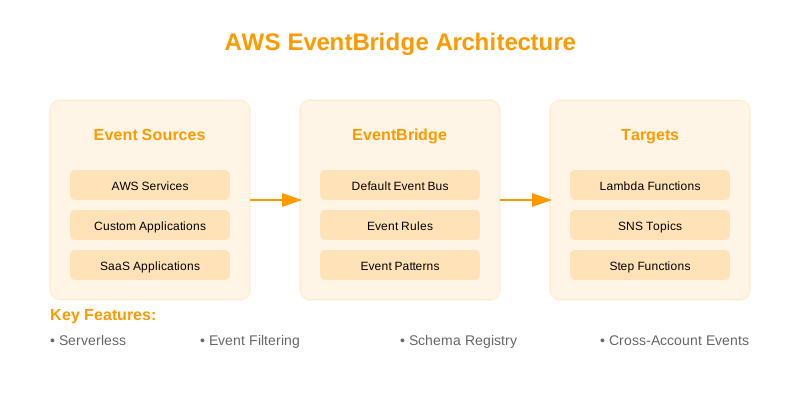
TL;DR: AWS EventBridge is a robust, serverless event bus for decoupling services. This guide details common integration patterns (scheduled tasks, event pattern matching, cross-account routing, API/SaaS integration), robust error handling with DLQs and retry policies, effective monitoring strategies, and essential best practices for schema management, performance, security, and cost optimization.
Core EventBridge Patterns
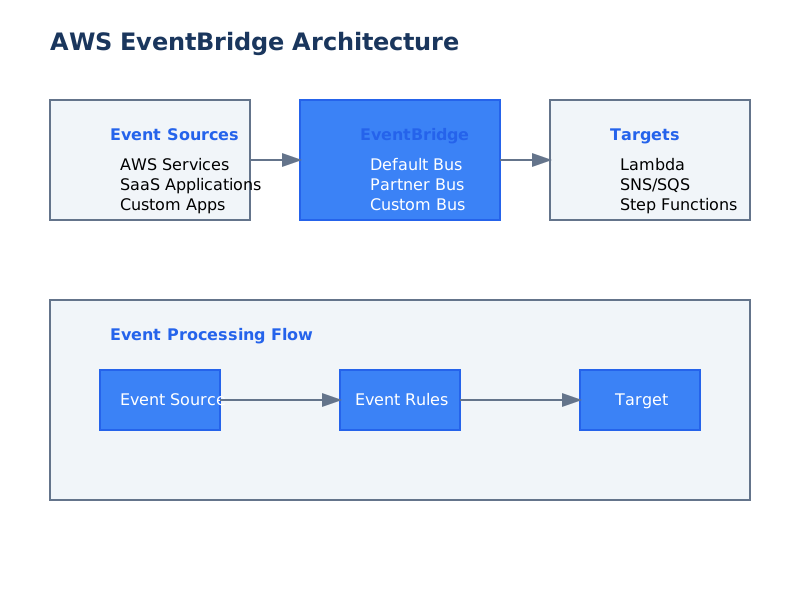
EventBridge's flexibility lies in its ability to route events based on defined patterns. Understanding these core patterns is crucial for effective system design.
1. Scheduled Event Generation
This pattern is ideal for executing tasks at regular intervals. EventBridge rules can be configured with
ScheduleExpressionExample: Daily Backup Task
const AWS = require('aws-sdk');
const eventbridge = new AWS.EventBridge();

const params = {
  Name: 'DailyBackupRule',
  ScheduleExpression: 'cron(0 0 * * ? *)', // UTC midnight daily
  State: 'ENABLED',
  Description: 'Triggers daily backup Lambda function',
  Targets: [{
    Id: 'BackupLambdaTarget',
    Arn: 'arn:aws:lambda:us-east-1:123456789012:function:my-backup-function',
    // RoleArn: 'arn:aws:iam::123456789012:role/EventBridgeInvokeLambdaRole' // Required if not using default service role
  }]
};

async function createScheduledRule() {
  try {
    const response = await eventbridge.putRule(params).promise();
    console.log('Scheduled rule created successfully:', response.RuleArn);
  } catch (error) {
    console.error('Error creating scheduled rule:', error);
  }
}

createScheduledRule();
Considerations:
- expressions offer precise scheduling.
cron() - expressions (e.g.,
rate()) can be used for simpler, recurring intervals.rate(5 minutes)
2. Event Pattern Filtering
This is EventBridge's primary mechanism for routing events. Rules can define detailed filters based on event
sourcedetail-typedetailExample: Filtering S3 Object Operations
This pattern matches
PutObjectDeleteObject{ "source": ["aws.s3"], "detail-type": ["AWS API Call via CloudTrail"], "detail": { "eventSource": ["s3.amazonaws.com"], "eventName": ["PutObject", "DeleteObject"], "requestParameters": { "bucketName": ["my-important-bucket"] } } }
Considerations:
- Be specific to reduce unnecessary invocations.
- Use or similar tools to explore event structures for precise filtering.
jq - CloudTrail events provide valuable context for S3, EC2, and other AWS service API calls.
3. Cross-Account Event Routing
Enabling secure event sharing between AWS accounts is vital for distributed architectures. This involves configuring permissions on the receiving account's event bus.
Example: Allowing Inbound Events from Account 111122223333
On the target account's event bus (e.g.,
defaultconst AWS = require('aws-sdk'); const eventbridge = new AWS.EventBridge({ region: 'us-west-2' }); // Region of the target account's event bus const permissionParams = { Action: 'events:PutEvents', // The action the principal is allowed to perform on the event bus Principal: '111122223333', // The AWS account ID of the event producer StatementId: 'CrossAccountAccessFromProducerAccount', EventBusName: 'default' // Specify if not the default bus }; async function grantCrossAccountAccess() { try { await eventbridge.putPermission(permissionParams).promise(); console.log('Cross-account permission granted successfully.'); } catch (error) { console.error('Error granting cross-account permission:', error); } } grantCrossAccountAccess();
Considerations:
- The is the AWS Account ID of the producer.
Principal - should be
Actionto allow publishing to the bus.events:PutEvents - You may also need to create a custom Event Bus in the target account for better isolation.
Advanced Integration Patterns
EventBridge facilitates complex workflows by integrating with a wide array of AWS services.
1. API-driven Event Publication
Applications can publish events to EventBridge programmatically, enabling event-driven architectures for custom microservices.
Example: Publishing an order.created
import boto3
import json

eventbridge = boto3.client('events')
EVENT_BUS_NAME = 'default' # Or your custom event bus name

def publish_order_created_event(order_details):
    """Publishes an order.created event to AWS EventBridge."""
    response = eventbridge.put_events(
        Entries=[
            {
                'Source': 'custom.ecommerce.orders',
                'DetailType': 'order.created',
                'Detail': json.dumps(order_details),
                'EventBusName': EVENT_BUS_NAME
            }
        ]
    )
    print(f"EventBridge put_events response: {response}")
    return response

def lambda_handler(event, context):
    # Assume event contains order details that triggered this Lambda
    order_payload = {
        'orderId': event.get('orderId', 'N/A'),
        'amount': event.get('amount', 0.0),
        'customerEmail': event.get('customerEmail', 'anonymous@example.com'),
        'timestamp': context.get_remaining_time_in_millis() # Example metadata
    }
    return publish_order_created_event(order_payload)

# Example usage within another context or for testing:
# sample_order = {'orderId': 'ORD7890', 'amount': 150.75, 'customerEmail': 'alice@example.com'}
# publish_order_created_event(sample_order)
Considerations:
- Ensure the IAM role executing the code has permissions.
events:PutEvents - and
Sourceare critical for event pattern matching.DetailType
2. SaaS Integration Patterns
EventBridge supports integration with SaaS providers through Partner Event Sources. This allows SaaS applications to send events directly into your AWS environment.
Example: Setting up a Partner Event Source (Conceptual)
This typically involves configuration on both the SaaS provider's side and AWS. In AWS, you'd register the partner source.
const AWS = require('aws-sdk');
const eventbridge = new AWS.EventBridge();

const PARTNER_NAMESPACE = 'com.zendesk'; // Example namespace provided by the SaaS partner
const EVENT_BUS_NAME = 'partner-events-bus'; // A custom event bus dedicated to partner events

async function registerPartnerSource() {
  try {
    // First, create a custom event bus if it doesn't exist
    await eventbridge.createEventBus({ Name: EVENT_BUS_NAME }).promise();
    console.log(`Event bus "${EVENT_BUS_NAME}" ensured.`);

    // Register the partner event source
    const params = {
      Name: PARTNER_NAMESPACE,
      EventBusName: EVENT_BUS_NAME
    };
    const response = await eventbridge.createPartnerEventSource(params).promise();
    console.log(`Partner event source "${PARTNER_NAMESPACE}" registered:`, response);

    // After registration, AWS provides an ARN. You'll need to give this ARN
    // to your SaaS provider to configure their event publishing.
    // You'll also need to configure permissions on the partner bus for the provider.

  } catch (error) {
    console.error('Error registering partner event source:', error);
    // Handle cases where the event bus or source already exists.
  }
}

registerPartnerSource();
Considerations:
- Requires coordination with the SaaS provider.
- You typically create a custom Event Bus for partner events to segregate them.
- Cross-account permissions will be needed for the SaaS provider to publish to your bus.
Robust Error Handling and Resilience
EventBridge offers built-in mechanisms to handle failures gracefully, preventing data loss and ensuring system stability.
Dead-Letter Queues (DLQs) and Retry Policies
When a target fails to process an event, EventBridge can retry delivery or send the failed event to a Dead-Letter Queue (DLQ) for later inspection.
Example: AWS CloudFormation Configuration
This snippet defines an EventBridge rule with a target configured for retries and a DLQ.
Resources:
  MyEventBridgeRule:
    Type: AWS::Events::Rule
    Properties:
      Name: CriticalDataProcessingRule
      Description: Processes critical data events with retry and DLQ
      EventPattern:
        source: ["custom.data.pipeline"]
        detail-type: ["data.processed"]
      State: ENABLED
      Targets:
        - Id: ProcessDataTarget
          Arn: !GetAtt MyDataProcessingLambda.Arn
          DeadLetterConfig:
            Arn: !GetAtt EventProcessingDLQ.Arn # ARN of an SQS queue or SNS topic
          RetryPolicy:
            MaximumRetryAttempts: 5
            MaximumEventAgeInSeconds: 7200 # 2 hours

  MyDataProcessingLambda:
    Type: AWS::Lambda::Function
    Properties:
      FunctionName: DataProcessingLambda
      Handler: index.handler
      Role: !GetAtt LambdaExecutionRole.Arn
      Code:
        ZipFile: |
          exports.handler = async (event) => {
              console.log("Received event:", JSON.stringify(event, null, 2));
              // Simulate processing failure for demonstration
              if (Math.random() < 0.3) { // 30% chance of failure
                  throw new Error("Simulated processing error");
              }
              console.log("Event processed successfully.");
              return { statusCode: 200, body: 'Success' };
          };
      Runtime: nodejs18.x

  EventProcessingDLQ:
    Type: AWS::SQS::Queue
    Properties:
      QueueName: EventBridgeProcessingFailures

  LambdaExecutionRole:
    Type: AWS::IAM::Role
    Properties:
      AssumeRolePolicyDocument:
        Version: '2012-10-17'
        Statement:
          - Effect: Allow
            Principal:
              Service: lambda.amazonaws.com
            Action: sts:AssumeRole
      Policies:
        - PolicyName: LambdaBasicExecution
          PolicyDocument:
            Version: '2012-10-17'
            Statement:
              - Effect: Allow
                Action:
                  - logs:CreateLogGroup
                  - logs:CreateLogStream
                  - logs:PutLogEvents
                Resource: "*"
        - PolicyName: EventBridgeInvokeLambda
          PolicyDocument:
            Version: '2012-10-17'
            Statement:
              - Effect: Allow
                Action: lambda:InvokeFunction
                Resource: !GetAtt MyDataProcessingLambda.Arn
Considerations:
- DLQ Target: Must be an SQS queue or an SNS topic. SQS is generally preferred for individual message inspection.
- Retry Policy: The event is retried up to . If it still fails after all retries, or if
MaximumRetryAttemptsis exceeded, it's sent to the DLQ.MaximumEventAgeInSeconds - Event Age: is a crucial safeguard against endlessly retrying stale events.
MaximumEventAgeInSeconds
Monitoring, Debugging, and Observability
Effective monitoring is key to understanding EventBridge's behavior, identifying issues, and optimizing performance.
1. CloudWatch Metrics for EventBridge
EventBridge emits metrics that can be queried in CloudWatch. Key metrics include:
- : Number of times a rule's target was invoked.
Invocations - : Number of times a target invocation failed.
FailedInvocations - : Number of rules that matched an event.
TriggeredRules - : Number of events successfully put to an event bus.
PutEvents
Example: Retrieving EventBridge Invocations for a Specific Rule
import boto3
from datetime import datetime, timedelta, timezone

cloudwatch = boto3.client('cloudwatch')
RULE_NAME = 'MyEventRule'
START_TIME = datetime.now(timezone.utc) - timedelta(hours=24)
END_TIME = datetime.now(timezone.utc)

def get_rule_invocation_metric():
    """Retrieves the Sum of Invocations for a given EventBridge rule."""
    try:
        response = cloudwatch.get_metric_statistics(
            Namespace='AWS/Events',
            MetricName='Invocations',
            Dimensions=[
                {
                    'Name': 'RuleName',
                    'Value': RULE_NAME
                }
            ],
            StartTime=START_TIME,
            EndTime=END_TIME,
            Period=3600,  # Hourly aggregation
            Statistics=['Sum']
        )
        print(f"CloudWatch Metric Statistics for {RULE_NAME}:")
        for dp in response.get('Datapoints', []):
            print(f"  Timestamp: {dp['Timestamp']}, Sum: {dp['Sum']}")
        return response
    except Exception as e:
        print(f"Error retrieving metric: {e}")
        return None

get_rule_invocation_metric()
2. Event Pattern Testing Utility
The
testEventPatternExample: Testing a Rule's Event Pattern
const AWS = require('aws-sdk');
const eventbridge = new AWS.EventBridge();

// Define the event you want to test
const testEvent = {
  version: '0',
  id: 'unique-event-id-123',
  'detail-type': 'order.created',
  source: 'custom.ecommerce.orders',
  account: '123456789012',
  time: new Date().toISOString(),
  region: 'us-east-1',
  detail: {
    orderId: 'ORD7890',
    amount: 150.75,
    customerEmail: 'alice@example.com',
    items: [
        { sku: 'SKU101', quantity: 1 },
        { sku: 'SKU205', quantity: 2 }
    ]
  }
};

// Define the event pattern of your rule
const eventPattern = {
  source: ["custom.ecommerce.orders"],
  'detail-type': ["order.created"],
  detail: {
    amount: [{ "numeric": [">", 100] }], // Example: greater than 100
    items: {
        sku: [{ "prefix": "SKU" }] // Example: sku starts with "SKU"
    }
  }
};

const testParams = {
  Event: JSON.stringify(testEvent),
  EventPattern: JSON.stringify(eventPattern)
};

async function testPattern() {
  try {
    const response = await eventbridge.testEventPattern(testParams).promise();
    console.log('Test Event Pattern Result:', response.Matches);
    // If response.Matches is true, the event matches the pattern.
  } catch (error) {
    console.error('Error testing event pattern:', error);
  }
}

testPattern();
3. Log Analysis
- Target Logs: Ensure your Lambda, Step Functions, or other targets are configured to log sufficient detail. Failures within target execution often provide the root cause.
- EventBridge Service Logs: While EventBridge itself doesn't produce verbose logs, CloudTrail logs will show API calls made to EventBridge (e.g., ,
PutRule).PutEvents
Best Practices for Operational Excellence
Adhering to these practices ensures EventBridge deployments are maintainable, scalable, and cost-effective.
-
Event Schema Management:
- Use AWS EventBridge Schema Registry: Centralize, version, and discover event schemas. This prevents drift and ensures producers and consumers agree on the event structure.
- Document Event Contracts: Clearly define the expected fields, data types, and semantics for each event type.
- Consistent Naming Conventions: Use clear and hierarchical and
sourcevalues (e.g.,detail-type).com.mycompany.service.user.created
-
Performance and Scalability Optimization:
- Precise Event Patterns: Filter events as early as possible in the rule to minimize processing by downstream systems and reduce costs.
- Strategic Use of Event Buses: Use custom event buses to isolate traffic, apply specific permissions, and manage different event types (e.g., internal, partner, audit).
- Batching: If publishing many events, consider batching them using for efficiency.
PutEvents - Target Throughput: Ensure your targets (e.g., Lambda concurrency, SQS queue throughput) can handle the event volume.
-
Security Best Practices:
- Least Privilege IAM Roles: Grant only necessary permissions to EventBridge to invoke targets and to services to publish events.
- Resource Policies: Use resource-based policies on event buses for fine-grained access control, especially for cross-account scenarios.
- Encryption: While EventBridge itself doesn't encrypt events in transit (uses TLS), ensure targets handle sensitive data securely and consider encrypting sensitive fields within the event payload if necessary.
-
Cost Management:
- Monitor Event Volume: Keep an eye on the number of events published and rules triggered.
- Optimize Event Patterns: Highly specific patterns reduce the number of rules evaluated and targets invoked, lowering costs.
- Clean Up Unused Resources: Regularly review and remove stale or unused rules and event buses.
Troubleshooting Checklist
| Issue | Potential Cause | Action Steps | | :------------------------- | :-------------------------------------------------------------------------------- | :----------------------------------------------------------------------------------------------------------------------------------------- | | Event Not Reaching Target | Incorrect Event Pattern | Use
testEventPatternsourcedetail-typedetailevents:PutEventsEventBusNamePutEventsdefaultPutEventsWhen Not to Use EventBridge
While powerful, EventBridge may not be the optimal choice in all scenarios:
- Synchronous Request/Response: For immediate, tightly coupled request-response interactions, traditional API Gateway/Lambda or direct service-to-service calls are more suitable. EventBridge introduces asynchronous latency.
- Simple Task Queues: For basic task distribution where complex filtering or event routing isn't required, a simple SQS queue might be more straightforward and cost-effective.
- Real-time, Low-Latency Streaming: For high-throughput, millisecond-latency streaming data processing, services like Kinesis Data Streams or MSK might be more appropriate. EventBridge has higher latency guarantees.
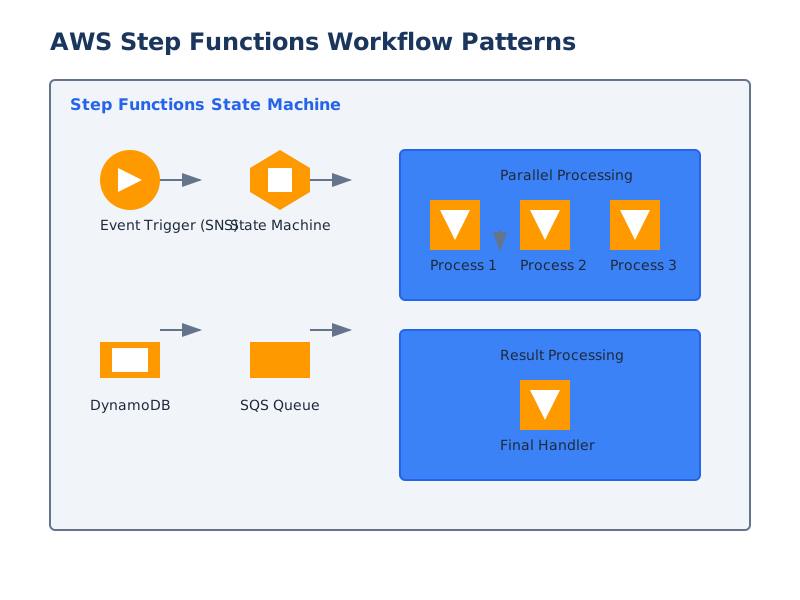
- Orchestration of Complex, State-Dependent Workflows: While EventBridge can trigger Step Functions, for managing complex state machines with many dependencies and rollback logic, Step Functions should be the primary orchestrator.
Decision Checklist
Use this checklist to determine if EventBridge is the right solution and to guide your implementation:
- [ ] Is the interaction inherently asynchronous? (Event publication and later processing)
- [ ] Do you need to decouple event producers from event consumers?
- [ ] Is event filtering and routing based on message content required?
- [ ] Do events originate from multiple AWS services, SaaS applications, or custom applications?
- [ ] Do you need to trigger multiple different downstream consumers based on the same event?
- [ ] Is scheduled event generation needed for recurring tasks?
- [ ] Is cross-account event sharing a requirement?
- [ ] Are error handling mechanisms like retries and DLQs essential for resilience?
- [ ] Do you require a serverless, managed event bus service?
- [ ] Are the expected latency characteristics compatible with an event-driven, asynchronous model?
If the answer to most of these questions is "Yes," AWS EventBridge is likely a strong candidate for your architecture.
References
- AWS EventBridge Documentation - Official documentation
- Event Patterns - Pattern syntax guide
- EventBridge Quotas - Service limits
- EventBridge Schemas - Schema registry
- EventBridge Security - Security best practices
- EventBridge API Reference - API documentation
- EventBridge Targets - Target configuration
- EventBridge Monitoring - Monitoring guide