AWS API Gateway Patterns: Building Scalable APIs
Learn essential patterns and best practices for designing and implementing APIs using Amazon API Gateway, including security, integration patterns, and performance optimization
Mastering AWS API Gateway: A Strategic Configuration Guide for Engineers
TL;DR: AWS API Gateway offers powerful ways to expose backend services. The primary decision point is between HTTP APIs and REST APIs. HTTP APIs are more cost-effective and lower-latency for most common use cases (Lambda/HTTP backends, JWT auth), while REST APIs provide advanced features like WAF integration, API key management, and request transformations. Carefully consider authentication, caching, and when to use alternative AWS services like ALB, CloudFront, or AppSync.
Why This Matters
API Gateway acts as the critical front door to your backend infrastructure. A misconfigured API layer can become a performance bottleneck, inflate operational costs, and introduce security vulnerabilities. Conversely, a well-architected API Gateway setup provides significant advantages:
- Decoupled Scalability: Scale your API layer independently from your backend services.
- Performance Optimization: Mitigate Lambda cold starts through effective caching strategies.
- Cost Efficiency: Achieve substantial cost reductions (up to 71%) by selecting HTTP APIs over REST APIs for simpler use cases.
- Backend Protection: Shield your backend services from traffic surges and DDoS attacks.
The architectural decisions made at the API Gateway level have far-reaching implications across your entire system.
Strategic Configuration: HTTP API vs. REST API
The initial and most impactful decision is choosing between HTTP APIs and REST APIs. These two service types offer significantly different feature sets and cost structures.
When to Select HTTP API (Recommended for Most Modern Use Cases)
Choose HTTP API when:
- Your backend integrations are limited to Lambda functions or HTTP endpoints.
- Authentication requirements are met by JWTs (e.g., Amazon Cognito, Auth0, Okta) or Lambda Authorizers.
- Minimizing operational costs is a primary concern (HTTP APIs are up to 71% cheaper).
- Low latency is critical, as HTTP APIs incur less overhead.
- Advanced API Gateway features like request/response transformation, API keys, or usage plans are not required.
Practical Example: A mobile application backend that leverages Cognito for user authentication and Lambda functions for business logic. In this scenario, an HTTP API will provide a more cost-effective and performant solution, potentially saving thousands of dollars monthly at scale.
When to Select REST API
Choose REST API when:
- Integration with AWS WAF for advanced security filtering is a requirement.
- API key management and granular usage plans (e.g., for B2B partners) are necessary.
- You need to perform request or response transformations using mapping templates.
- Edge-optimized endpoints leveraging CloudFront are desired.
- API Gateway-level caching is a specific architectural need.
- VPC Link integration with private Application Load Balancers (ALBs) or Network Load Balancers (NLBs) is required.
Practical Example: A B2B API serving external partners, requiring distinct API keys per partner, rate limiting based on partner tiers, and the ability to transform incoming XML requests into JSON for backend processing by Lambda.
Cost Comparison at Scale
| Monthly Requests | REST API Cost (approx.) | HTTP API Cost (approx.) | Percentage Savings | | :--------------- | :---------------------- | :---------------------- | :----------------- | | 1 million | $3.50 | $1.00 | 71% | | 10 million | $35.00 | $10.00 | 71% | | 100 million | $350.00 | $100.00 | 71% | | 1 billion | $3,500.00 | $1,000.00 | 71% |
(Note: Costs are illustrative and based on standard pricing for API Gateway requests. Always consult the official AWS pricing page for the most current figures.)
Critical Trade-offs to Evaluate
Authentication and Authorization Strategies
| Approach | Latency Impact | Flexibility | Implementation Complexity | Cost (per invocation) | | :------------------- | :----------------- | :---------- | :------------------------ | :-------------------- | | Cognito User Pools | Low | Medium | Low | Free tier, then usage | | Lambda Authorizer | Medium (50-200ms)¹ | High | Medium | Per-invocation cost | | IAM (SigV4) | Low | Low | Medium | No additional cost | | API Keys | Lowest | Lowest | Lowest | No additional cost |
¹ Senior Insight: Lambda Authorizers can introduce significant latency, particularly on cold starts. Aggressively cache authorization decisions (TTL up to 3600 seconds) to amortize this cost across multiple requests. For high-volume APIs, the cost of the authorization Lambda itself can rival or exceed API Gateway request costs.
Caching Considerations
| Cache TTL | Typical Hit Rate | Data Freshness | Impact on Backend Load | Cost Impact | | :-------- | :--------------- | :------------- | :--------------------- | :---------------------- | | 0 (Disabled) | 0% | Perfect | Highest | Highest backend cost | | 60 seconds | ~60-80% | Good | Medium | Medium | | 300 seconds | ~85-95% | Acceptable | Lower | Lower | | 3600 seconds | ~95%+ | Risk of Stale | Lowest | Lowest |
Critical Warning: API Gateway caching is configured at the stage level, not on a per-customer basis. If you cache responses containing user-specific data without incorporating user identity into the cache key, you risk serving data intended for one user to another. Always include relevant user authentication headers (e.g.,
AuthorizationWhen NOT to Use API Gateway
While powerful, API Gateway isn't universally the optimal solution. Consider these alternatives:
Use Application Load Balancer (ALB) Instead When:
- You are deploying long-running applications or microservices in container orchestration platforms (ECS, EKS).
- Sticky sessions are a hard requirement for your application architecture.
- You have predictable traffic patterns and can leverage reserved capacity pricing for cost optimization.
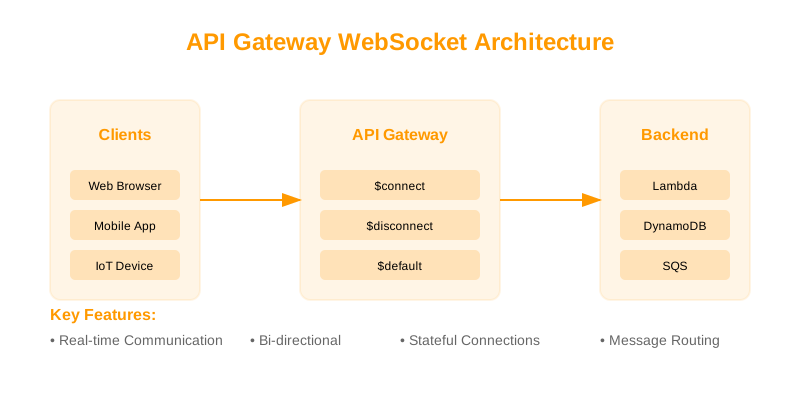
- Your application heavily relies on WebSocket connections, potentially exceeding API Gateway's concurrent connection limits (10,000 for REST, 2,000 for HTTP).
Use CloudFront with Lambda@Edge Instead When:
- Sub-10ms response times at the edge are critical for performance.
- Your API responses are highly cacheable globally.
- You are architecting a distributed, global API with significant edge computing requirements.
Use AWS AppSync Instead When:
- Your primary requirement is a GraphQL API with real-time subscription capabilities.
- You want to leverage automatic resolvers for direct integration with DynamoDB.
- Your mobile or web applications require offline data synchronization capabilities.
Proven API Design Patterns
1. Standardized RESTful API Structure via OpenAPI
Leveraging OpenAPI (formerly Swagger) provides a formal contract, documentation, and a basis for code generation.
openapi: 3.0.0
info:
  title: Product Catalog API
  version: 1.2.0
  description: API for managing product information.
servers:
  - url: https://api.example.com/v1
    description: Production server
paths:
  /products:
    get:
      summary: Retrieve a list of products
      operationId: listProducts
      parameters:
        - name: category
          in: query
          description: Filter products by category
          schema:
            type: string
        - name: limit
          in: query
          description: Maximum number of products to return
          schema:
            type: integer
            minimum: 1
            maximum: 100
            default: 20
        - name: cursor
          in: query
          description: Pagination cursor for retrieving the next page of results
          schema:
            type: string
      responses:
        '200':
          description: A list of products matching the query
          content:
            application/json:
              schema:
                type: object
                properties:
                  items:
                    type: array
                    items:
                      $ref: '#/components/schemas/Product'
                  nextCursor:
                    type: string
                    description: Cursor for the next page, or null if this is the last page.
        '400':
          description: Invalid query parameters provided
  /products/{productId}:
    get:
      summary: Retrieve a specific product by ID
      operationId: getProductById
      parameters:
        - name: productId
          in: path
          required: true
          description: The unique identifier of the product
          schema:
            type: string
      responses:
        '200':
          description: Product details
          content:
            application/json:
              schema:
                $ref: '#/components/schemas/Product'
        '404':
          description: Product not found
components:
  schemas:
    Product:
      type: object
      properties:
        id:
          type: string
          readOnly: true
        name:
          type: string
        description:
          type: string
        price:
          type: number
          format: float
        category:
          type: string
      required:
        - name
        - price
        - category
2. Efficient Lambda Integration Patterns
Design Lambda handlers to be modular and handle API Gateway event structures effectively.
// src/handler.js - Optimized Lambda integration for API Gateway
import { Logger } from './utils/logger'; // Assuming a utility for structured logging
import { ProductService } from './services/productService';
import { ApiError, ValidationError, NotFoundError } from './utils/errors';

const logger = new Logger('ProductHandler');

/**
 * AWS Lambda handler for API Gateway proxy integration.
 * @param {object} event - The API Gateway event object.
 * @param {object} context - The Lambda context object.
 * @returns {Promise<object>} - The API Gateway response object.
 */
export const handler = async (event, context) => {
    const { httpMethod, pathParameters, queryStringParameters, body, requestContext } = event;
    const requestId = requestContext?.requestId || context.awsRequestId; // Utilize requestContext for correlation ID
    logger.setCorrelationId(requestId); // Ensure logs are traceable

    // Default to GET for root path if no specific route matches
    const resource = pathParameters?.resource || 'products';
    const id = pathParameters?.id;
    const queryParams = queryStringParameters || {};
    const payload = body ? JSON.parse(body) : {};

    logger.info('Received request', { httpMethod, resource, id, queryParams });

    try {
        let result;
        switch (httpMethod) {
            case 'GET':
                result = id
                    ? await ProductService.getById(id, requestId)
                    : await ProductService.list(queryParams, requestId);
                return formatResponse(200, result, requestId);
            case 'POST':
                if (!id) { // POST to /products
                    result = await ProductService.create(payload, requestId);
                    return formatResponse(201, result, requestId);
                } else { // POST to /products/{id} is unusual, treat as PUT or error
                    return formatResponse(405, { error: 'Method POST not allowed on specific resource ID' }, requestId);
                }
            case 'PUT':
                if (id) {
                    result = await ProductService.update(id, payload, requestId);
                    return formatResponse(200, result, requestId);
                } else {
                    return formatResponse(400, { error: 'Product ID is required for PUT operation' }, requestId);
                }
            case 'DELETE':
                if (id) {
                    await ProductService.delete(id, requestId);
                    return formatResponse(204, null, requestId);
                } else {
                    return formatResponse(400, { error: 'Product ID is required for DELETE operation' }, requestId);
                }
            default:
                throw new ApiError(405, 'Method Not Allowed');
        }
    } catch (error) {
        logger.error('Request processing failed', { error: error.message, stack: error.stack });

        if (error instanceof ValidationError) {
            return formatResponse(400, { error: error.message }, requestId);
        }
        if (error instanceof NotFoundError) {
            return formatResponse(404, { error: 'Resource not found' }, requestId);
        }
        if (error instanceof ApiError) {
            return formatResponse(error.statusCode, { error: error.message }, requestId);
        }
        // Catch-all for unexpected server errors
        return formatResponse(500, { error: 'An internal server error occurred.' }, requestId);
    }
};

/**
 * Formats the Lambda function response for API Gateway proxy integration.
 * Includes caching headers for successful GET requests.
 * @param {number} statusCode - The HTTP status code.
 * @param {object|null} body - The response body.
 * @param {string} requestId - The correlation ID.
 * @returns {object} - The API Gateway response object.
 */
function formatResponse(statusCode, body, requestId) {
    const headers = {
        'Content-Type': 'application/json',
        'X-Request-Id': requestId,
    };

    // Apply caching headers only for successful GET requests with data
    if (statusCode === 200 && body && !Array.isArray(body) && Object.keys(body).length > 0) {
        // Example: Cache for 5 minutes (300 seconds)
        headers['Cache-Control'] = 'public, max-age=300';
    } else if (statusCode !== 200) {
        // Prevent caching for non-success or error responses
        headers['Cache-Control'] = 'no-store';
    }

    return {
        statusCode,
        headers,
        body: body ? JSON.stringify(body) : '',
    };
}
3. Direct Service Integration for Reduced Latency and Cost
For specific AWS services like DynamoDB, direct integration bypasses Lambda entirely, improving performance and reducing cost.
# AWS CloudFormation snippet for API Gateway -> DynamoDB GetItem direct integration
Resources:
  RestApi:
    Type: AWS::ApiGateway::RestApi
    Properties:
      Name: ProductApi
      EndpointConfiguration:
        Types:
          - REGIONAL

  ItemResource:
    Type: AWS::ApiGateway::Resource
    Properties:
      RestApiId: !Ref RestApi
      ParentId: !GetAtt RestApi.RootResourceId
      PathPart: "items" # Example path: /items/{id}

  ItemIdResource:
    Type: AWS::ApiGateway::Resource
    Properties:
      RestApiId: !Ref RestApi
      ParentId: !Ref ItemResource
      PathPart: "{id}" # Example path: /items/{id}

  GetItemMethod:
    Type: AWS::ApiGateway::Method
    Properties:
      RestApiId: !Ref RestApi
      ResourceId: !Ref ItemIdResource
      HttpMethod: GET
      AuthorizationType: AWS_IAM # Or other auth types as needed
      Integration:
        Type: AWS
        IntegrationHttpMethod: POST # DynamoDB API actions are POST
        Uri: !Sub arn:aws:apigateway:${AWS::Region}:dynamodb:action/GetItem
        Credentials: !GetAtt ApiGatewayDynamoDBRole.Arn # IAM Role for API Gateway to access DynamoDB
        RequestTemplates:
          application/json: |
            {
              "TableName": "MyProductsTable", # Replace with your actual table name
              "Key": {
                "productId": {"S": "$input.params('id')"} # Assuming 'id' is the partition key and type String
              }
            }
        # Explicitly define integration response to map DynamoDB output
        IntegrationResponses:
          - StatusCode: 200
            ContentHandling: CONVERT_TO_TEXT
            ResponseTemplates:
              application/json: |
                #set($inputRoot = $input.path('$'))
                #set($item = $inputRoot.Item)
                {
                  "productId": $item.productId.S,
                  "name": $item.name.S,
                  "price": $item.price.N,
                  "description": $item.description.S
                }
      # Define method response for documentation and contract
      MethodResponses:
        - StatusCode: 200
          ResponseModels:
            application/json: Empty
        - StatusCode: 404
          ResponseModels:
            application/json: Empty

  ApiGatewayDynamoDBRole:
    Type: AWS::IAM::Role
    Properties:
      AssumeRolePolicyDocument:
        Version: "2012-10-17"
        Statement:
          - Effect: "Allow"
            Principal:
              Service:
                - apigateway.amazonaws.com
            Action:
              - "sts:AssumeRole"
      Policies:
        - PolicyName: ApiGatewayDynamoDBPolicy
          PolicyDocument:
            Version: "2012-10-17"
            Statement:
              - Effect: "Allow"
                Action:
                  - "dynamodb:GetItem"
                Resource: !Sub "arn:aws:dynamodb:${AWS::Region}:${AWS::AccountId}:table/MyProductsTable" # Replace with your table ARN

Outputs:
  ApiEndpoint:
    Description: "The endpoint URL for the API Gateway"
    Value: !Sub "https://${RestApi}.execute-api.${AWS::Region}.amazonaws.com/prod"
Comprehensive Best Practices Checklist
API Design Principles
- [ ] Consistency: Employ consistent naming conventions for resources and parameters (e.g., for URLs,
kebab-casefor JSON properties).camelCase - [ ] Versioning: Implement API versioning, typically via the URL path (e.g., ,
/v1/users)./v2/users - [ ] Backward Compatibility: Strive for backward compatibility within versions where possible. Introduce breaking changes in new major versions.
- [ ] HTTP Semantics: Utilize appropriate HTTP methods (GET, POST, PUT, DELETE, PATCH) and status codes (2xx for success, 4xx for client errors, 5xx for server errors).
- [ ] Pagination: For collections returning many items, implement cursor-based pagination for efficient data retrieval.
Security Posture
- [ ] WAF Integration: For REST APIs, integrate AWS WAF for enhanced protection against common web exploits.
- [ ] Robust Authentication: Prioritize Cognito or Lambda Authorizers over simple API Keys for authenticating users or services. API Keys are suitable for identification and basic rate limiting, not secure authentication.
- [ ] Input Validation: Implement request validation at the API Gateway level (supported by REST APIs) to filter malformed or malicious requests before they reach your backend.
- [ ] Auditing: Enable AWS CloudTrail for comprehensive logging of API calls for compliance and auditing purposes.
- [ ] Transport Security: Enforce HTTPS exclusively. API Gateway handles SSL/TLS termination.
Performance Tuning
- [ ] Caching Strategy: Implement caching for read-heavy, infrequently changing data. Configure appropriate TTLs.
- [ ] Timeout Management: Set judicious API Gateway integration timeouts, respecting the maximum 29-second limit for Lambda integrations.
- [ ] Throttling: Configure throttling limits to protect backend services from overload and ensure fair usage.
- [ ] Endpoint Selection: Use regional endpoints for lower latency within a region, and edge-optimized endpoints (REST API only) for global distribution via CloudFront.
- [ ] Compression: Enable gzip compression for responses to reduce bandwidth usage and improve transfer times.
Monitoring and Observability
- [ ] Error Alarms: Set up CloudWatch alarms on API Gateway metrics for 4xx and 5xx error rates.
- [ ] Structured Logging: Configure access logging with a structured JSON format for easier parsing and analysis.
- [ ] Distributed Tracing: Enable AWS X-Ray integration for end-to-end tracing across API Gateway and backend services.
- [ ] Cache Performance: Monitor API Gateway cache hit/miss ratios and adjust TTLs based on observed performance.
- [ ] Latency Metrics: Track latency percentiles (p50, p95, p99) to understand user experience under various load conditions.