Understanding AWS Lambda: Use Cases, Setup, and Best Practices
A comprehensive guide to AWS Lambda, covering serverless architecture, common use cases, and implementation best practices.
Mastering AWS Lambda: Advanced Use Cases, Deployment, and Optimization
This guide provides an in-depth exploration of AWS Lambda for experienced engineers, focusing on practical implementation, advanced patterns, and critical optimization strategies.
TL;DR: AWS Lambda offers a powerful serverless compute model. This article details its advanced use cases, robust deployment patterns, performance tuning techniques, and essential security and cost considerations, equipping engineers to build highly scalable and efficient serverless applications.
Core Concepts and Benefits Recap
AWS Lambda is an event-driven, serverless compute service that executes code in response to triggers without requiring server provisioning or management.
- Event-Driven Architecture: Code execution is triggered by events from various AWS services or custom sources.
- Automatic Scaling: Lambda automatically scales the underlying compute resources to match incoming request volumes.
- Pay-Per-Use Pricing: You are billed only for the compute time consumed and the number of requests.
- High Availability & Fault Tolerance: AWS manages the underlying infrastructure, ensuring high availability and resilience.
- Seamless AWS Integration: Native integration with a broad spectrum of AWS services simplifies application development.
Advanced Use Cases and Architectural Patterns
Beyond basic API backends, Lambda excels in complex, event-driven scenarios.
1. Real-time Stream Processing
Processing high-volume data streams from sources like Kinesis or Kafka.
Example (Python):
import json
import boto3

kinesis_client = boto3.client('kinesis')
dynamodb_client = boto3.client('dynamodb')
table_name = 'processed_stream_data' # Assume DynamoDB table exists

def lambda_handler(event, context):
    for record in event['Records']:
        try:
            payload = record['kinesis']['data']
            decoded_payload = base64.b64decode(payload).decode('utf-8')
            data = json.loads(decoded_payload)

            # Perform transformations or enrichments
            processed_data = {
                'recordId': record['eventID'],
                'processedTimestamp': int(time.time()),
                'originalData': data
            }

            # Store processed data in DynamoDB
            dynamodb_client.put_item(
                TableName=table_name,
                Item={
                    'id': {'S': str(processed_data['recordId'])},
                    'timestamp': {'N': str(processed_data['processedTimestamp'])},
                    'data': {'S': json.dumps(processed_data['originalData'])}
                }
            )
            print(f"Successfully processed record: {record['eventID']}")

        except Exception as e:
            print(f"Error processing record {record.get('eventID', 'unknown')}: {e}")
            # Consider sending to a Dead Letter Queue (DLQ) for further inspection

    return {
        'statusCode': 200,
        'body': json.dumps('Stream processing complete.')
    }
- Trigger: Kinesis Data Stream, Kafka
- Benefit: Enables real-time analytics, fraud detection, or data warehousing from streaming sources.
2. ETL Pipelines and Data Transformation
Orchestrating data movement and transformation between different storage services.
Example (Node.js):
const AWS = require('aws-sdk');
const s3 = new AWS.S3();
const csv = require('csv-parser');
const fs = require('fs');
const stream = require('stream');

exports.handler = async (event) => {
    const sourceBucket = event.Records[0].s3.bucket.name;
    const sourceKey = decodeURIComponent(event.Records[0].s3.object.key.replace(/\+/g, ' '));
    const destinationBucket = process.env.DESTINATION_BUCKET; // Configured via env var
    const destinationKey = `processed/${sourceKey.replace('.csv', '.json')}`;

    try {
        const s3Object = await s3.getObject({ Bucket: sourceBucket, Key: sourceKey }).promise();
        const csvData = s3Object.Body.toString('utf-8');

        const jsonData = [];
        const pipeline = stream.Readable.from(csvData)
            .pipe(csv())
            .on('data', (row) => {
                // Apply transformations
                const transformedRow = {
                    id: row.id,
                    name: row.name.toUpperCase(),
                    value: parseFloat(row.value)
                };
                jsonData.push(transformedRow);
            });

        await new Promise((resolve, reject) => {
            pipeline.on('end', resolve);
            pipeline.on('error', reject);
        });

        await s3.putObject({
            Bucket: destinationBucket,
            Key: destinationKey,
            Body: JSON.stringify(jsonData, null, 2),
            ContentType: 'application/json'
        }).promise();

        console.log(`Successfully transformed ${sourceKey} to ${destinationKey}`);
        return {
            statusCode: 200,
            body: JSON.stringify('ETL job completed.')
        };

    } catch (error) {
        console.error(`Error processing ${sourceKey}:`, error);
        throw error; // Re-throw to indicate failure to Lambda
    }
};
- Trigger: S3 Object Creation
- Benefit: Automates data ingestion, cleaning, and conversion for data lakes or data warehouses.
3. Event-Driven Microservices
Implementing granular, independent services that communicate via events.
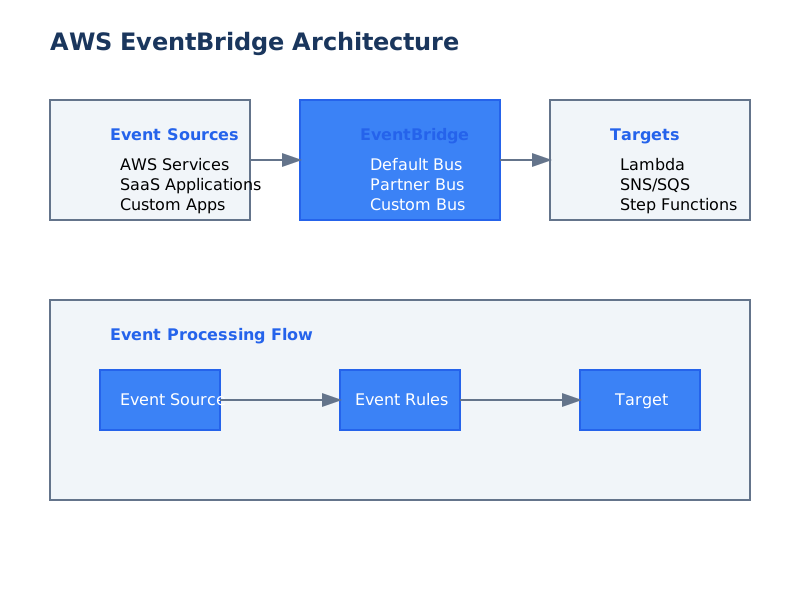
- Trigger: SNS Topics, EventBridge Rules, SQS Queues
- Benefit: Decouples services, allowing for independent scaling, development, and deployment.
Deployment Strategies and Tooling
Efficient deployment is crucial for managing serverless applications.
1. AWS Serverless Application Model (SAM)
A framework for building serverless applications, simplifying deployment and management.
Example template.yaml
AWSTemplateFormatVersion: '2010-09-09'
Transform: AWS::Serverless-2016-10-31
Description: Sample SAM template for an API Lambda function

Resources:
  MyApiFunction:
    Type: AWS::Serverless::Function
    Properties:
      FunctionName: MyApiFunction
      CodeUri: src/api/ # Path to your function code
      Handler: app.lambdaHandler
      Runtime: nodejs18.x
      MemorySize: 128
      Timeout: 30
      Events:
        HelloWorldApi:
          Type: Api
          Properties:
            Path: /hello
            Method: get

Outputs:
  MyApiFunctionArn:
    Description: "Lambda Function ARN"
    Value: !GetAtt MyApiFunction.Arn
- Workflow: ,
sam buildsam deploy - Benefit: Defines infrastructure as code, automates packaging and deployment, simplifies local testing.
2. Serverless Framework
A popular third-party framework for building and deploying serverless applications across multiple cloud providers.
Example serverless.yml
service: my-serverless-api

provider:
  name: aws
  runtime: python3.9
  region: us-east-1
  stage: dev

functions:
  hello:
    handler: handler.main
    events:
      - httpApi:
          path: /hello
          method: get

plugins:
  - serverless-offline # For local testing
- Workflow:
serverless deploy - Benefit: Offers a rich plugin ecosystem, multi-cloud support, and a declarative configuration.
3. AWS CDK (Cloud Development Kit)
Define cloud infrastructure using familiar programming languages.
Example (TypeScript):
import * as cdk from 'aws-cdk-lib';
import * as lambda from 'aws-cdk-lib/aws-lambda';
import * as apigateway from 'aws-cdk-lib/aws-apigateway';
import { Construct } from 'constructs';

export class ServerlessStack extends cdk.Stack {
  constructor(scope: Construct, id: string, props?: cdk.StackProps) {
    super(scope, id, props);

    const api = new apigateway.LambdaRestApi(this, 'MyApi', {
      handler: new lambda.Function(this, 'MyLambda', {
        runtime: lambda.Runtime.NODEJS_18_X,
        code: lambda.Code.fromAsset('lambda'), // Path to lambda code
        handler: 'index.handler',
        memorySize: 128,
        timeout: cdk.Duration.seconds(30),
      }),
      proxy: true, // Enables proxy integration
    });
  }
}
- Workflow: ,
cdk synthcdk deploy - Benefit: Leverages programming language constructs for infrastructure, enabling advanced logic and code reuse.
Performance and Cost Optimization
Minimizing latency and expenditure is critical for production-grade serverless applications.
1. Cold Start Optimization Strategies
- Keep Functions Lean: Smaller deployment packages load faster.
- Choose Appropriate Runtimes: Some runtimes initialize faster than others (e.g., Node.js and Python are generally faster than Java or .NET for cold starts).
- Initialize SDK Clients and DB Connections Outside the Handler: As shown in the "Best Practices" section, this reuses resources across invocations.
- Provisioned Concurrency: For latency-sensitive applications, pay to keep a specified number of execution environments warm.
- VPC Configuration: Minimize cold start impact from VPC configuration by using VPC ENIs pre-allocated to the function (available for certain configurations).
2. Memory Allocation and CPU
Lambda memory settings directly influence the CPU power allocated to the function. Higher memory = more CPU.
- Benchmarking: Test different memory sizes to identify the optimal balance between performance and cost. A function that is CPU-bound will benefit significantly from increased memory.
- Monitoring: Use CloudWatch metrics (e.g., ,
Duration) to guide tuning.Max Memory Used
3. Concurrency Management
- Account Concurrency Limits: Be aware of your AWS account's regional concurrency limits.
- Function Concurrency Limits: Set reserved concurrency for critical functions to prevent them from being throttled by other functions in the account.
- Downstream Bottlenecks: If your Lambda function interacts with a database or API with limited capacity, implement connection pooling (as shown in the original article) or rate limiting to avoid overwhelming downstream services.
4. Caching
- API Gateway Caching: For API Gateway-triggered Lambda functions, utilize API Gateway's built-in caching to reduce direct Lambda invocations for repeated requests.
- External Caching: Integrate with services like ElastiCache (Redis/Memcached) or DynamoDB Accelerator (DAX) for frequently accessed data.
Security Best Practices Deep Dive
Robust security is non-negotiable.
1. IAM Roles and Policies (Principle of Least Privilege)
- Granularity: Define IAM roles with the minimum necessary permissions. Avoid broad permissions like .
*:* - Resource-Specific Policies: Whenever possible, scope permissions to specific AWS resources (e.g., a particular S3 bucket, a specific DynamoDB table).
- IAM Roles for Cross-Account Access: If Lambda needs to access resources in another AWS account, use IAM roles for secure cross-account permissions.
2. Secrets Management
- AWS Secrets Manager: Ideal for storing database credentials, API keys, and other sensitive configuration values. Use with the
getSecretValue.secretName - AWS Systems Manager Parameter Store (SecureString): A viable alternative for storing secrets, especially if you're already using Parameter Store for configuration.
- Avoid Hardcoding Secrets: Never embed secrets directly in your Lambda function code or deployment artifacts.
3. Input Validation and Sanitization
- Validate Event Data: Always validate the structure and content of incoming event data, especially from external sources like API Gateway.
- Sanitize Output: Ensure that any data returned or stored is properly sanitized to prevent injection attacks.
4. Network Security (VPC)
- When to Use VPC: Lambda functions only need to be placed in a VPC if they require access to resources within a private VPC (e.g., RDS databases, internal services).
- Security Group Configuration: Apply restrictive security group rules to the Lambda function's ENIs to control inbound and outbound traffic.
- NAT Gateway/Instance: If your Lambda function needs to access the public internet from within a VPC, configure a NAT Gateway or NAT instance.
- Cost Consideration: Running Lambda functions within a VPC incurs additional costs due to Elastic Network Interface (ENI) allocation.
Monitoring, Logging, and Debugging
Effective observability is key to understanding and troubleshooting Lambda applications.
1. Structured Logging
- JSON Format: Log messages in a structured JSON format for easier parsing and analysis by CloudWatch Logs Insights or other log aggregation tools.
- Key Fields: Include essential metadata in log entries: ,
level,message,timestamp,awsRequestId,functionName, and any relevant correlation IDs.executionEnvironment - Logging Libraries: Utilize libraries like Winston or Pino in Node.js, or Python's module with a JSON formatter.
logging
2. Distributed Tracing with AWS X-Ray
- Enable X-Ray: Activate active tracing in your Lambda function's configuration.
- Instrument SDK Calls: Use the AWS X-Ray SDK to automatically trace AWS SDK calls made by your function.
- Custom Subsegments: Add custom subsegments to trace specific parts of your application logic.
- Analyze Service Maps: X-Ray provides a visual service map, helping identify performance bottlenecks and errors across distributed systems.
3. CloudWatch Alarms and Metrics
- Key Metrics: Monitor ,
Invocations,Errors,Duration,Throttles.ConcurrentExecutions - Custom Metrics: Publish custom metrics from your Lambda function to track business-specific KPIs.
- Alarms: Set up CloudWatch alarms on critical metrics (e.g., high error rates, increased duration) to proactively identify issues.
Trade-offs of Using AWS Lambda
While powerful, Lambda has inherent trade-offs that must be considered.
- Cold Starts: Latency introduced when a new execution environment needs to be initialized. This is mitigated but not entirely eliminated for infrequently used functions.
- Execution Time Limits: Functions have a maximum execution time (currently 15 minutes), making them unsuitable for long-running batch jobs.
- Statelessness: Lambda functions are inherently stateless. State must be managed externally (e.g., in databases, S3, DynamoDB).
- Vendor Lock-in: While code can be portable, deep integration with AWS services can increase dependency on the AWS ecosystem.
- Complexity in Orchestration: For complex workflows involving multiple Lambda functions, orchestration services like AWS Step Functions become necessary, adding another layer of complexity.
- Debugging Distributed Systems: Debugging issues across multiple Lambda functions and integrated services can be more challenging than debugging monolithic applications.
When Not to Use AWS Lambda
AWS Lambda is not a universal solution. Consider alternatives when:
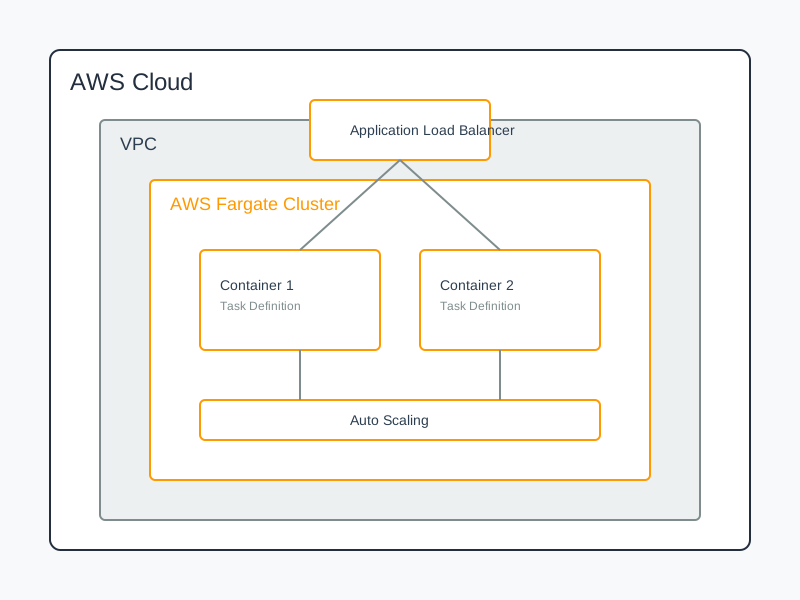
- Long-Running, CPU-Intensive Tasks: Tasks exceeding the 15-minute timeout or requiring sustained high CPU might be better suited for EC2, ECS, or Fargate.
- Predictable, Constant Workloads: For workloads with consistent, high traffic where you can optimize EC2 instance costs effectively, container orchestration (ECS/EKS) or EC2 might be more cost-effective.
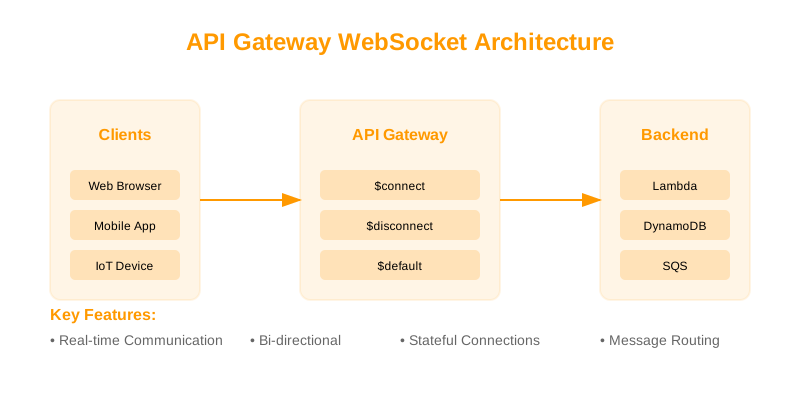
- Stateful Applications Requiring Persistent Connections: Applications that rely heavily on maintaining open, long-lived connections (e.g., WebSockets for certain real-time applications, traditional database connection pools without careful management) may not fit the Lambda model well.
- Legacy Applications with Complex Dependencies: Migrating monolithic legacy applications with intricate interdependencies may be prohibitively complex and costly in a Lambda architecture.
- Strict Latency Requirements with Frequent Cold Starts: If sub-millisecond latency is critical and cold starts are unavoidable for your usage pattern, Lambda might not be the best fit without significant investment in Provisioned Concurrency.
Decision Checklist for AWS Lambda Adoption
Use this checklist to evaluate if AWS Lambda is appropriate for your use case.
| Feature / Consideration | Yes | No | Notes | | :----------------------------------- | :-- | :-- | :------------------------------------------------------------------------------------------------- | | Event-Driven Requirements? | | | Does the workload respond to events from AWS services or custom sources? | | Need Automatic Scaling? | | | Is the workload subject to unpredictable traffic spikes? | | Stateless by Design? | | | Can the application logic be broken down into independent, stateless units? | | Execution Time within Limits? | | | Will tasks consistently complete within 15 minutes? | | Cost-Effectiveness for Spiky Loads?| | | Is the workload characterized by periods of low activity with occasional high demand? | | Developer Productivity (Serverless)? | | | Is your team comfortable with or willing to adopt serverless development paradigms? | | Microservices Architecture Fit? | | | Does the project align with a microservices approach where granular, independent services are desired?| | Tolerance for Cold Starts? | | | Can the application tolerate occasional latency spikes, or can Provisioned Concurrency be used? | | Complexity of State Management? | | | Are you prepared to manage state externally using managed services? | | No Long-Running Connections Needed?| | | Does the application primarily use request/response patterns rather than persistent connections? |
Conclusion
AWS Lambda provides a robust and scalable foundation for modern cloud-native applications. By understanding its advanced capabilities, adopting effective deployment strategies, and meticulously optimizing for performance, security, and cost, engineers can leverage Lambda to build highly efficient and resilient systems. Continuous monitoring and adherence to best practices are paramount for maintaining optimal performance and reliability in production environments.
Next Steps
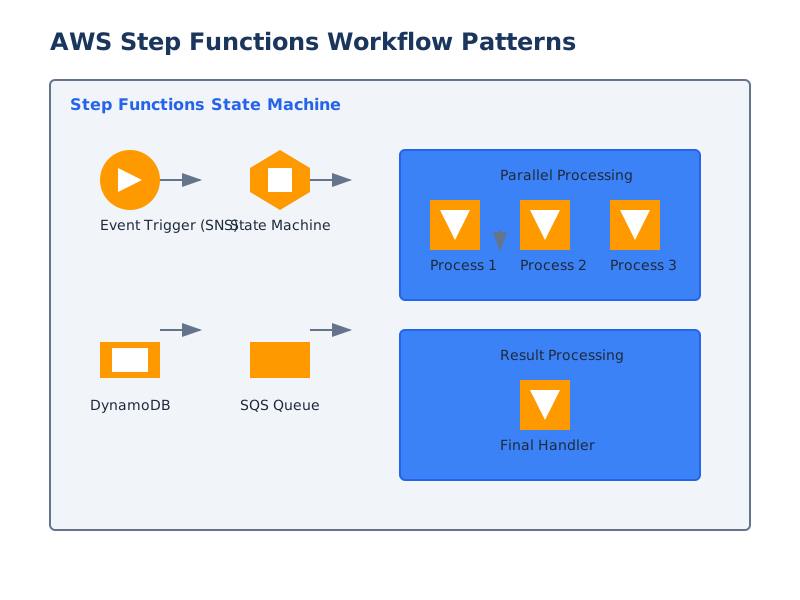
- Explore AWS Step Functions: For orchestrating complex workflows involving multiple Lambda functions and other AWS services.
- Deep Dive into EventBridge: Understand its capabilities for sophisticated event routing and filtering.
- Lambda Layers: Learn how to use Lambda Layers for managing dependencies and sharing code across functions.
- Custom Runtimes: Investigate custom runtimes for languages or specific environments not natively supported.
- Performance Testing Tools: Familiarize yourself with tools for load testing and performance analysis of serverless applications.