devops
The Role of Containers in DevOps: Docker and Beyond
Explore how containers revolutionize DevOps practices and learn best practices for container orchestration.
January 16, 2024
DeveloperHat Team
5 min read
The Role of Containers in DevOps: Docker and Beyond
Containers have revolutionized how we build, ship, and run applications. This guide explores container technologies and their role in modern DevOps practices.
Understanding Containers
Basic Concepts
Flowchart Diagram
Rendering diagram...
Container vs VM
container:
  characteristics:
    - Lightweight
    - Shares host OS kernel
    - Fast startup
    - Minimal overhead

virtual_machine:
  characteristics:
    - Complete OS
    - Hardware virtualization
    - More isolated
    - Higher overhead
Docker Fundamentals
1. Dockerfile Example
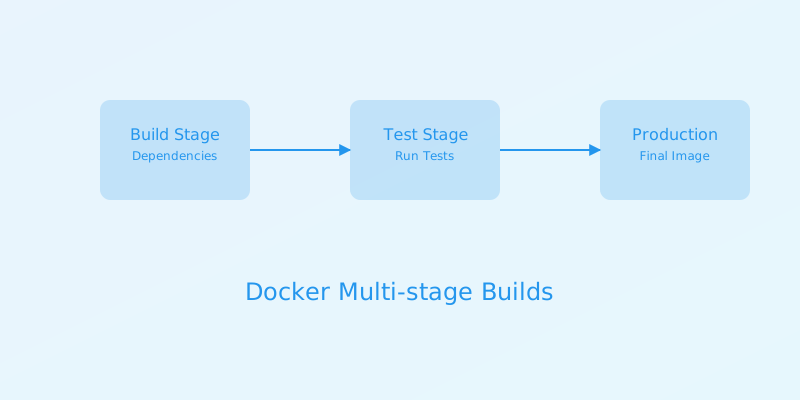
# Multi-stage build example
FROM node:18-alpine AS builder
WORKDIR /app
COPY package*.json ./
RUN npm install
COPY . .
RUN npm run build

FROM nginx:alpine
COPY --from=builder /app/dist /usr/share/nginx/html
EXPOSE 80
CMD ["nginx", "-g", "daemon off;"]
2. Docker Compose
# docker-compose.yml
version: '3.8'

services:
  web:
    build: .
    ports:
      - "3000:80"
    environment:
      NODE_ENV: production
    depends_on:
      - db

  db:
    image: postgres:13
    volumes:
      - db_data:/var/lib/postgresql/data
    environment:
      POSTGRES_PASSWORD: ${DB_PASSWORD}

volumes:
  db_data:
Container Best Practices
1. Image Optimization
# Optimized Dockerfile
FROM node:18-alpine AS deps
WORKDIR /app
COPY package*.json ./
RUN npm ci --only=production

FROM node:18-alpine AS builder
WORKDIR /app
COPY --from=deps /app/node_modules ./node_modules
COPY . .
RUN npm run build

FROM node:18-alpine
WORKDIR /app
COPY --from=builder /app/dist ./dist
COPY --from=deps /app/node_modules ./node_modules
USER node
CMD ["node", "dist/main.js"]
2. Security Guidelines
security_practices:
  image:
    - Use official base images
    - Scan for vulnerabilities
    - Keep base images updated
  runtime:
    - Run as non-root
    - Use read-only root filesystem
    - Implement resource limits
  secrets:
    - Use secret management
    - Never bake secrets into images
    - Rotate credentials regularly
Container Orchestration
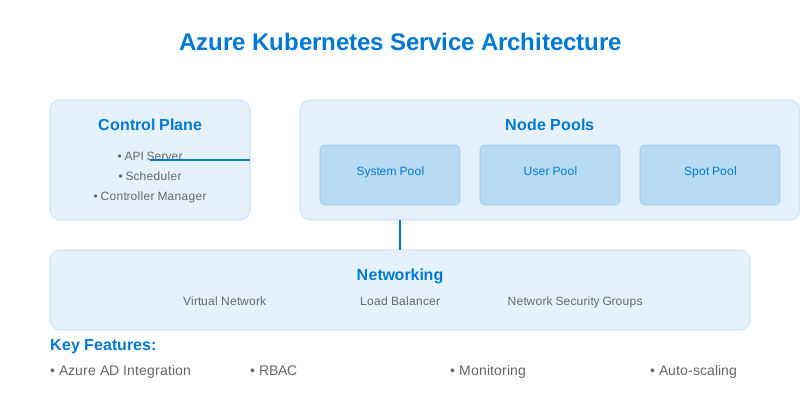
1. Kubernetes Basics
# deployment.yaml
apiVersion: apps/v1
kind: Deployment
metadata:
  name: web-app
spec:
  replicas: 3
  selector:
    matchLabels:
      app: web
  template:
    metadata:
      labels:
        app: web
    spec:
      containers:
      - name: web
        image: web-app:1.0.0
        ports:
        - containerPort: 80
        resources:
          limits:
            cpu: "1"
            memory: "512Mi"
          requests:
            cpu: "0.5"
            memory: "256Mi"
2. Service Configuration
# service.yaml
apiVersion: v1
kind: Service
metadata:
  name: web-service
spec:
  selector:
    app: web
  ports:
    - protocol: TCP
      port: 80
      targetPort: 80
  type: LoadBalancer
Container Networking
1. Network Types
networks:
  bridge:
    description: Default network driver
    use_case: Container-to-container communication

  host:
    description: Uses host network stack
    use_case: Maximum performance

  overlay:
    description: Multi-host networking
    use_case: Swarm services
2. Network Policies
# network-policy.yaml
apiVersion: networking.k8s.io/v1
kind: NetworkPolicy
metadata:
  name: api-network-policy
spec:
  podSelector:
    matchLabels:
      app: api
  policyTypes:
    - Ingress
    - Egress
  ingress:
    - from:
        - podSelector:
            matchLabels:
              app: web
      ports:
        - protocol: TCP
          port: 8080
Storage Management
1. Volume Configuration
# docker-compose with volumes
version: '3.8'
services:
  app:
    image: myapp
    volumes:
      - type: volume
        source: app_data
        target: /data
      - type: bind
        source: ./config
        target: /config
        read_only: true

volumes:
  app_data:
    driver: local
    driver_opts:
      type: none
      device: /path/to/data
      o: bind
2. Persistent Storage
# persistent-volume.yaml
apiVersion: v1
kind: PersistentVolume
metadata:
  name: app-pv
spec:
  capacity:
    storage: 10Gi
  accessModes:
    - ReadWriteOnce
  storageClassName: standard
  hostPath:
    path: /data/app-volume
Monitoring and Logging
1. Container Metrics
# prometheus-config.yaml
scrape_configs:
  - job_name: 'containers'
    static_configs:
      - targets: ['localhost:9090']
    metrics_path: /metrics
    relabel_configs:
      - source_labels: [__meta_docker_container_name]
        target_label: container_name
2. Log Collection
# fluentd-config.yaml
<source>
  @type tail
  path /var/log/containers/*.log
  pos_file /var/log/fluentd-containers.log.pos
  tag kubernetes.*
  read_from_head true
  <parse>
    @type json
    time_key time
    time_format %Y-%m-%dT%H:%M:%S.%NZ
  </parse>
</source>
CI/CD Integration
1. Container Build Pipeline
# GitHub Actions workflow
name: Container Build

on:
  push:
    branches: [ main ]

jobs:
  build:
    runs-on: ubuntu-latest
    steps:
      - uses: actions/checkout@v2

      - name: Build image
        uses: docker/build-push-action@v2
        with:
          context: .
          push: true
          tags: |
            myregistry.azurecr.io/myapp:${{ github.sha }}
            myregistry.azurecr.io/myapp:latest
2. Deployment Pipeline
# deployment-pipeline.yml
stages:
  - build
  - test
  - deploy

build_container:
  stage: build
  script:
    - docker build -t $CI_REGISTRY_IMAGE:$CI_COMMIT_SHA .
    - docker push $CI_REGISTRY_IMAGE:$CI_COMMIT_SHA

deploy_container:
  stage: deploy
  script:
    - kubectl set image deployment/myapp container=$CI_REGISTRY_IMAGE:$CI_COMMIT_SHA
Scaling and High Availability
1. Horizontal Pod Autoscaling
# hpa.yaml
apiVersion: autoscaling/v2
kind: HorizontalPodAutoscaler
metadata:
  name: web-app-hpa
spec:
  scaleTargetRef:
    apiVersion: apps/v1
    kind: Deployment
    name: web-app
  minReplicas: 2
  maxReplicas: 10
  metrics:
    - type: Resource
      resource:
        name: cpu
        target:
          type: Utilization
          averageUtilization: 80
2. Load Balancing
# ingress.yaml
apiVersion: networking.k8s.io/v1
kind: Ingress
metadata:
  name: web-ingress
  annotations:
    nginx.ingress.kubernetes.io/rewrite-target: /
spec:
  rules:
    - host: myapp.example.com
      http:
        paths:
          - path: /
            pathType: Prefix
            backend:
              service:
                name: web-service
                port:
                  number: 80
Best Practices
1. Development Workflow
development_workflow:
  local:
    - Use docker-compose for local development
    - Mount source code as volumes
    - Enable hot reload
  testing:
    - Run tests in containers
    - Use same environment as production
    - Implement integration tests
  deployment:
    - Use CI/CD pipelines
    - Implement blue-green deployments
    - Monitor container health
2. Production Guidelines
production_guidelines:
  security:
    - Regular security scans
    - Implement least privilege
    - Use container runtime security
  performance:
    - Resource optimization
    - Cache management
    - Performance monitoring
  maintenance:
    - Regular updates
    - Backup strategies
    - Disaster recovery plans
Conclusion
Effective container usage in DevOps requires:
- Understanding container fundamentals
- Implementing security best practices
- Proper orchestration and scaling
- Robust monitoring and logging
- Efficient CI/CD integration
Remember to:
- Keep containers lightweight
- Follow security guidelines
- Implement proper monitoring
- Use container orchestration
- Maintain scalability
Docker
Containers
Kubernetes
Microservices