AWS DynamoDB Patterns: Building Scalable NoSQL Applications
Learn essential patterns and best practices for designing and implementing scalable applications using Amazon DynamoDB, including data modeling, access patterns, and optimization strategies
Mastering Amazon DynamoDB: Patterns for High-Performance Applications
TL;DR: This guide provides a pragmatic overview of building efficient applications with Amazon DynamoDB, focusing on core data modeling principles, optimized data operations, and leveraging advanced features. It emphasizes designing for known access patterns, the benefits and trade-offs of single-table design, effective query strategies, and performance tuning techniques like DAX and auto-scaling.
Introduction to DynamoDB
Amazon DynamoDB is a fully managed, serverless, key-value and document NoSQL database service that delivers single-digit millisecond performance at any scale. Its inherent scalability and predictable performance make it a compelling choice for a wide range of applications, from web and mobile backends to IoT and gaming. This guide dives into practical patterns and best practices for engineers to unlock DynamoDB's full potential.
Data Modeling: The Cornerstone of DynamoDB Efficiency
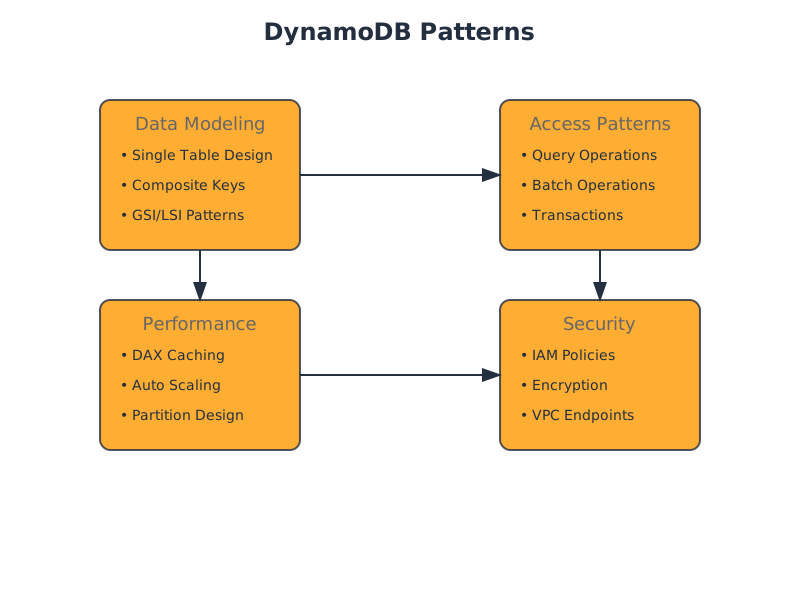
DynamoDB's NoSQL nature demands a different approach to data modeling compared to relational databases. The primary principle is to design for your access patterns. Understanding how you will retrieve data is paramount before defining your tables, keys, and attributes.
1. Single Table Design Pattern
Instead of creating many tables, the single-table design pattern consolidates different entity types and relationships into a single DynamoDB table. This is achieved by using generic primary key names (
PKSKKey Concepts:
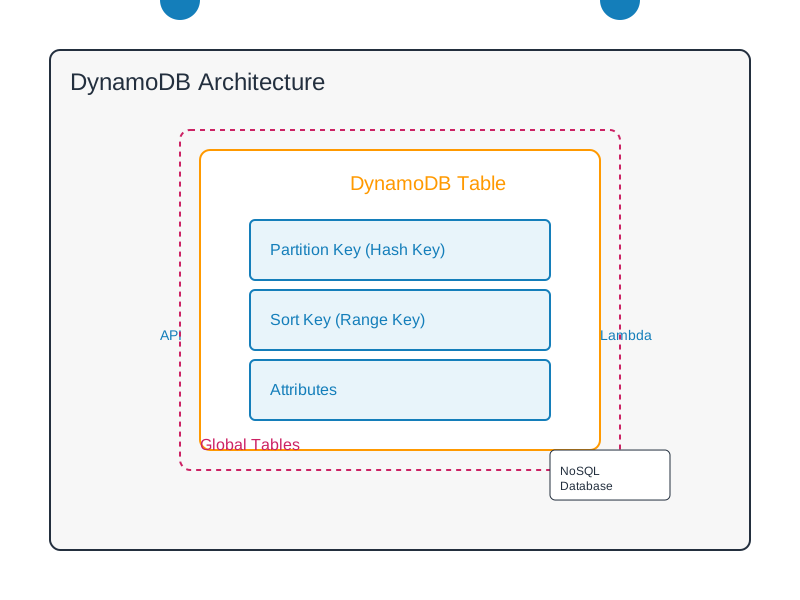
- Partition Key (): Distributes data across partitions, essential for scalability and performance. Often represents the "business entity" (e.g.,
PK,CUSTOMER#<customerId>).ORDER#<orderId> - Sort Key (): Allows for efficient querying within a partition. Can be used to order items, create hierarchies, or represent relationships (e.g.,
SK,METADATA#<timestamp>).ORDER_ITEM#<itemId> - Generic Keys: Using and
PKallows flexibility to store different entities within the same table.SK - Secondary Indexes (GSIs/LSIs): Crucial for supporting access patterns not covered by the primary key. GSIs can have different partition and sort keys than the base table, enabling cross-partition queries. LSIs share the same partition key but have a different sort key.
Example: User and Order Data in a Single Table
Consider an e-commerce scenario. Instead of separate tables for
UsersOrdersOrderItemsAppTable// Attributes for a User entity interface User { PK: string; // USER#<userId> SK: string; // PROFILE userId: string; name: string; email: string; createdAt: string; } // Attributes for an Order entity interface Order { PK: string; // ORDER#<orderId> SK: string; // METADATA#<timestamp> orderId: string; customerId: string; status: string; totalAmount: number; createdAt: string; // GSI1PK could be CUSTOMER#<customerId> to query all orders for a customer // GSI1SK could be ORDER#<status>#<timestamp> for filtering/sorting orders } // Attributes for an Order Item interface OrderItem { PK: string; // ORDER#<orderId> SK: string; // ITEM#<itemId> orderId: string; itemId: string; productName: string; quantity: number; price: number; } // Example of GSI setup to query all orders for a customer // GSI1PK: CUSTOMER#<customerId> // GSI1SK: ORDER#<orderId> (or ORDER#<status>#<timestamp>)
Trade-offs of Single Table Design:
- Pros: Reduces provisioned throughput needs (fewer tables mean shared capacity), simplifies application logic by avoiding cross-table joins, potentially lower costs.
- Cons: Can become complex if not carefully planned, requires a deep understanding of access patterns upfront, query complexity can increase.
2. Designing for Access Patterns
Before writing any code, map out all anticipated read and write operations. Each access pattern should ideally map to a specific query or scan operation.
- Fetch a single item: operation using the full primary key.
GetItem - Fetch items by partition key: operation on the partition key.
Query - Fetch items within a partition, sorted: operation on the partition key and a condition on the sort key.
Query - Fetch items across partitions based on an attribute: Requires a Global Secondary Index (GSI) where the GSI's partition key is the desired attribute.
Efficient Data Operations
1. Querying DynamoDB
DynamoDB's
QueryExample: Retrieving all orders for a specific customer
Assuming a GSI named
GSI1GSI1PKCUSTOMER#<customerId>GSI1SKORDER#<orderId>const AWS = require('aws-sdk'); const dynamodb = new AWS.DynamoDB.DocumentClient(); async function getCustomerOrders(customerId, orderStatusFilter = null) { const params = { TableName: 'AppTable', // Assuming a single table design IndexName: 'GSI1', // The Global Secondary Index KeyConditionExpression: 'GSI1PK = :pk', ExpressionAttributeValues: { ':pk': `CUSTOMER#${customerId}` } }; if (orderStatusFilter) { // Example: Filter for only 'SHIPPED' orders params.FilterExpression = 'begins_with(GSI1SK, :sk_prefix)'; // Assuming GSI1SK format is ORDER#<status>#<timestamp> params.ExpressionAttributeValues[':sk_prefix'] = `ORDER#${orderStatusFilter}`; } try { const data = await dynamodb.query(params).promise(); return data.Items; } catch (error) { console.error("Error querying customer orders:", error); throw error; } } // Usage: // getCustomerOrders('cust-123'); // Get all orders for cust-123 // getCustomerOrders('cust-123', 'SHIPPED'); // Get only shipped orders for cust-123
Key Considerations for Querying:
- : Must always include the partition key of the table or index being queried. You can add conditions on the sort key (e.g.,
KeyConditionExpression,BETWEEN,begins_with,=,<,>,<=).>= - : Applied after data is retrieved from the index but before it's returned to the client. This does not reduce the number of read capacity units consumed. Use
FilterExpressionfor efficiency.KeyConditionExpression - Pagination: DynamoDB queries return a maximum of 1MB of data per request. Use from the response to paginate subsequent requests.
LastEvaluatedKey
2. Write Operations
- Batch Operations: Use to write up to 25 items in a single request. This is more efficient than individual
BatchWriteItemorPutItemcalls. Note thatDeleteItemoperations are eventually consistent and do not support transactions.BatchWriteItem - Transactions: For atomic operations across multiple items or tables, use . This ensures all operations succeed or fail together. It incurs higher latency and cost than non-transactional writes.
TransactWriteItems
3. DynamoDB Streams
DynamoDB Streams capture a time-ordered sequence of item-level modifications in a DynamoDB table (insertions, updates, and deletions). This data can be processed by other services (e.g., AWS Lambda) to trigger actions, synchronize data, or build materialized views.
Performance and Scalability
1. DynamoDB Accelerator (DAX)
DAX is a fully managed, highly available, in-memory cache for DynamoDB. It sits in front of your DynamoDB table and intercepts read requests. For cache hits, it returns data in single-digit milliseconds without touching DynamoDB. For cache misses, it reads from DynamoDB and caches the result.
When to Use DAX:
- Applications with high read throughput and predictable read patterns.
- When sub-millisecond latency is critical.
- When you can tolerate eventual consistency for cached data (writes are written through to DynamoDB but may not be immediately reflected in DAX).
Trade-offs:
- Pros: Significant latency reduction for reads, reduced read capacity consumption on DynamoDB.
- Cons: Additional cost, complexity of managing a separate DAX cluster, primarily benefits read operations.
2. Capacity Management
- Provisioned Capacity: You specify read and write capacity units (RCUs/WCUs) per second. Cost-effective for predictable workloads.
- On-Demand Capacity: DynamoDB automatically scales read and write capacity up and down based on traffic. Ideal for spiky, unpredictable workloads, but can be more expensive for sustained high traffic.
- Auto Scaling: For provisioned capacity, Auto Scaling adjusts the provisioned throughput based on actual consumption, helping to avoid throttling and optimize costs.
3. TTL (Time To Live)
DynamoDB's TTL feature automatically deletes items that have expired, based on a timestamp attribute. This is invaluable for automatically cleaning up old data, reducing storage costs, and maintaining a relevant dataset.
Example:
Add a
ttl{ "PK": "LOG#2023-10-27T10:00:00Z", "SK": "REQUEST#abc", "message": "User login successful", "timestamp": "2023-10-27T10:00:00Z", "ttl": 1698386400 // Example: Expires after 1 hour from creation }
Security and Management
1. IAM and Access Control
Utilize AWS Identity and Access Management (IAM) to grant granular permissions to users, roles, and services accessing your DynamoDB tables. Employ least privilege principles.
2. Encryption
- Encryption at Rest: DynamoDB encrypts all data stored on disk using AWS Key Management Service (KMS) keys. You can choose between AWS-owned keys, AWS-managed keys, or customer-managed keys.
- Encryption in Transit: Always use TLS/SSL for data transfer between your application and DynamoDB endpoints.
3. VPC Endpoints
Use VPC endpoints for DynamoDB to allow resources within your Virtual Private Cloud (VPC) to access DynamoDB without traversing the public internet, enhancing security and network performance.
When Not to Use DynamoDB
While powerful, DynamoDB is not a panacea. Consider alternatives when:
- Complex Ad-hoc Queries: If your application requires frequent, complex queries across many different attributes without well-defined access patterns, a relational database or a document database with flexible querying capabilities might be more suitable.
- Strong Relational Integrity: For applications where strict ACID compliance and complex referential integrity constraints are paramount, traditional relational databases often provide more robust solutions.
- Large Documents with Frequent, Granular Updates: While DynamoDB can store large items, frequent, small updates to specific parts of very large documents might be more efficiently handled by document databases optimized for this.
- Cost Sensitivity for Small, Infrequent Workloads: For very small, low-traffic applications, the baseline cost of managing DynamoDB (even with on-demand) might be higher than simpler, self-managed solutions.
Decision Checklist
| Feature/Consideration | Yes | No | Notes | | :--------------------------- | :-: | :-: | :----------------------------------------------------------------------------------------------------- | | Data Modeling Approach | | | | | Do you know your primary access patterns? | | | Crucial for designing PK/SK and GSIs. | | Can data be consolidated into a single table? | | | Single Table Design reduces overhead and cost. | | Performance Requirements | | | | | Are sub-millisecond read latencies required? | | | Consider DAX. | | Is read traffic significantly higher than write traffic? | | | DAX or read replicas might be beneficial. | | Are your workloads predictable or spiky? | | | Influences choice between Provisioned and On-Demand capacity. | | Data Operations | | | | | Do you need ACID transactions across items? | | | Use TransactWriteItems. | | Is background processing of item changes needed? | | | DynamoDB Streams + Lambda. | | Scalability | | | | | Do you anticipate rapid, unpredictable scaling needs? | | | On-Demand capacity or robust Auto Scaling configuration. | | Security | | | | | Do you need to restrict access to specific IP ranges? | | | VPC Endpoints. | | Is data encryption at rest a strict requirement? | | | DynamoDB provides this by default; configure KMS key. | | Cost Management | | | | | Is automatic cleanup of old data required? | | | TTL. | | Are you actively monitoring and optimizing capacity? | | | Essential for cost efficiency. |